Chapter 10: 3D Graphing 163
10_3D.DOC TI-89/TI-92 Plus: 3D Graphing (English) Susan Gullord Revised: 02/23/01 11:00 AM Printed: 02/23/01 4:22 PM Page 163 of 22
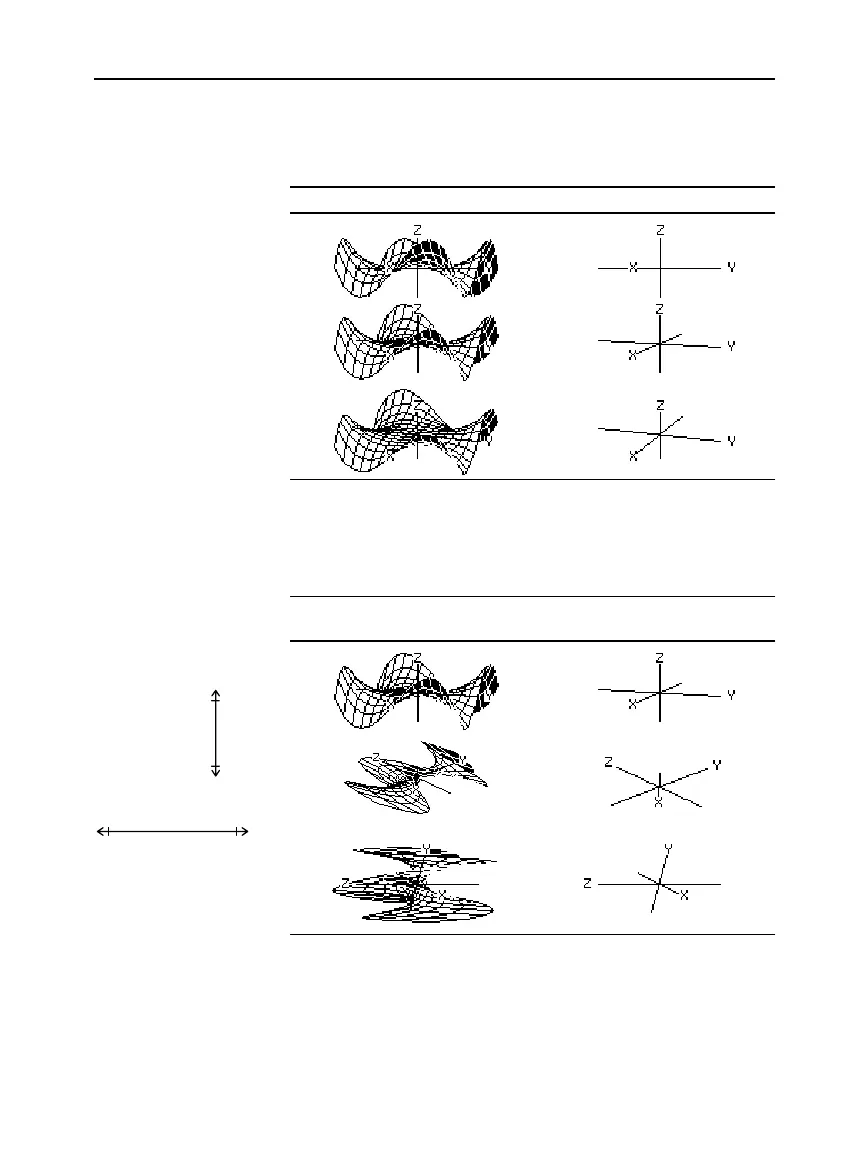
By changing eye
f
, you can elevate your viewing angle above the xy
plane. If
90 < eye
f
< 270
, the viewing angle is below the xy plane.
z1(x,y) = (x
3
y
-
y
3
x) / 390 In this example, eye
q
= 20
The view on the Graph screen is always oriented along the viewing
angles set by
eye
q
and
eye
f
. You can change
eye
ψ
to rotate the graph
around that line of sight.
z1(x,y)=(x
3
yì y
3
x) / 390
In this example,
eye
q
=20 and eye
f
=70
The
eye
values are stored in the system variables
eye
q
,
eye
f
, and
eye
ψ
. You can access or store to these variables as necessary.
TI
-
89
:
To type
f
or
ψ
,
press
¥cj
[F]
or
¥c
Ú
, respectively.
You can also press
2¿
and use the Greek menu.
TI
-
92 Plus
:
To type
f
or
ψ
,
press
2
G F
or
2
G Y
respectively.
You can also press
2¿
and use the Greek menu.
Effect of Changing
eye
f
Note: This example starts
on the xy plane (
eye
f
=
90
)
and decrements
eye
f
by
20
to elevate the viewing angle.
Effect of Changing
eye
ψ
Note: During rotation, the
axes expand or contract to
fit the screen’s width and
height. This causes some
distortion as shown in the
example.
When
eye
ψ
=0
,
the z axis runs
the height of the
screen.
When
eye
ψ
=90
, the z axis
runs the width of the screen.
As the z axis rotates 90
¡
, its
range (
ë
10 to 10 in this
example) expands to almost
twice its original length.
Likewise, the x and y axes
expand or contract.
From the Home
Screen or a Program
eye
ψ
=0
eye
ψ
=45
eye
ψ
=90
eye
f
= 90
eye
f
= 70
eye
f
= 50
z=10
z=
ë
10
z=10 z=
ë
10


 To Next Page
 Loading...














