48 Chapter 2: Operating the Calculator
-
-
p
-
-
92 Plus (English) Susan Gullord Revised: 02/23/01 1:06 PM Printed: 02/23/01 2:11 PM Page 48 of 44
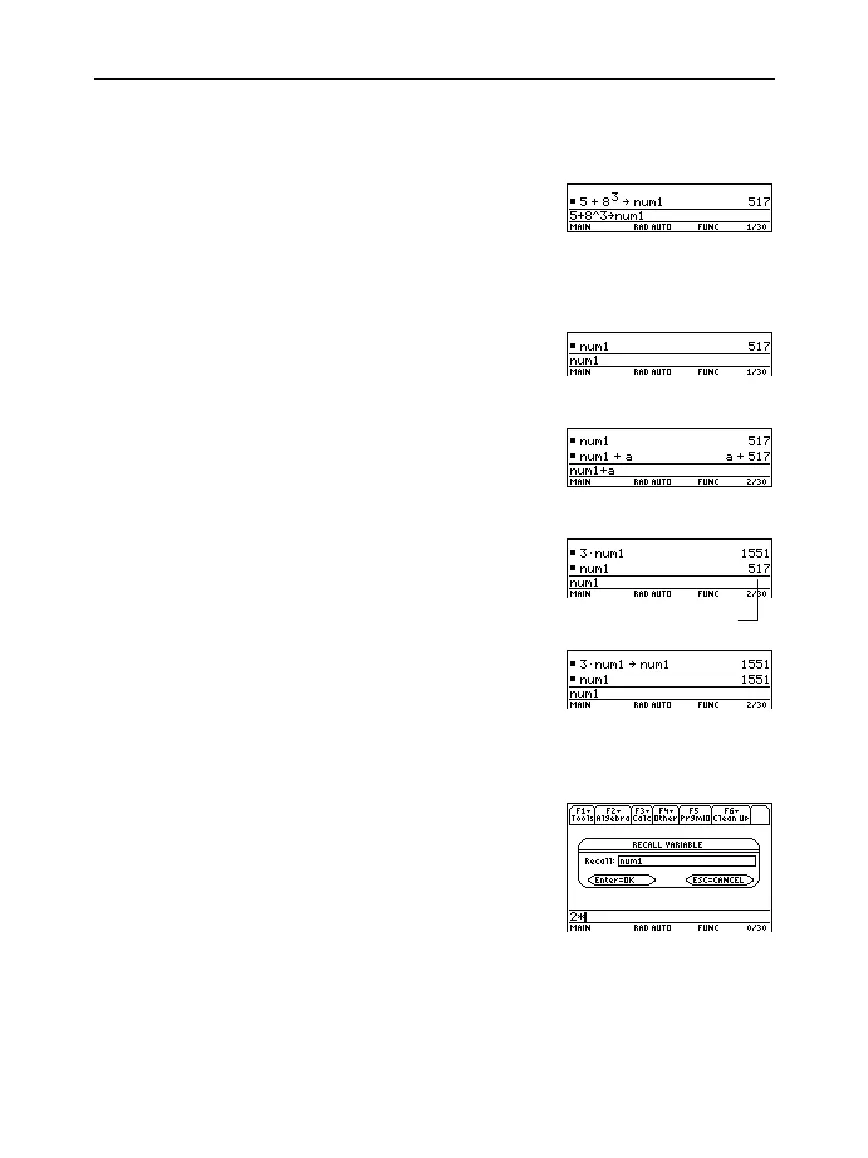
1. Enter the value you want to store, which can be an expression.
2. Press
§
. The store symbol (
!
) is displayed.
3. Type the variable name.
4. Press
¸
.
To store to a variable temporarily, you can use the “with” operator.
Refer to “Substituting Values and Setting Constraints” in Chapter 3.
1. Type the variable name.
2. Press
¸
.
If the variable is undefined, the variable name is shown in the result.
In this example, the variable
a
is
undefined. Therefore, it is used as a
symbolic variable.
1. Type the variable name into the
expression.
2. Press
¸
to evaluate the
expression.
If you want the result to replace the
ariable’s previous value, you must
store the result.
In some cases, you may want to use a variable’s actual value in an
expression instead of the variable name.
1. Press
2£
to display a dialog
box.
2. Type the variable name.
3. Press
¸
twice.
In this example, the value stored in
num1
will be inserted at the
cursor position in the entry line.
Storing a Value in a
Variable
Note:
TI
-
89
users should
use
j
as necessary
when typing variable names.
Displaying a
Variable
Note: Refer to Chapter 3 for
information about symbolic
manipulation.
Using a Variable in
an Expression
Tip: To view a list of existin
variable names, use
2°
as described in
Chapter 21.
Recalling a
Variable’s Value
The variable’s value
did not change.



 To Next Page
 Loading...













