Section 3 – SR-2 Software Description
OPERATOR FEATURES
Alarms
The Alarms menu allows the operator to view any
existing alarms. Operator level Help screens are
available for each alarm code. The operator can
also clear most alarms from this menu.
The Thermo King SR2 control system features many
special operator functions. These functions are
available from the Standard Display. A brief
explanation of each menu is included here. For
complete details see Section 4 of this manual.
Datalogger
The Datalogger menu allows a CargoWatch start of
trip marker to be set and the current CargoWatch
trip report to be printed.
Standard Display
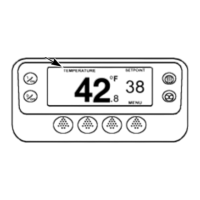
The Standard Display is the default display that
appears if no other display function is selected. The
Standard Display shows the box temperature and
setpoint. Standard Display soft keys provide direct
operator access to change the setpoint and select
the Gauge Menu, Sensor Menu or Main Menu.
Hourmeters
The Hourmeters menu allows the operator to check
the readings of all unit hourmeters that have been
enabled for viewing.
TemperatureWatch
®
Mode
This menu allows the operator to select various
modes of operation, such as Cycle Sentry or
Continuous. These modes should be selected as
specified by the customer.
The TemperatureWatch Display appears 2½
minutes after the last key is pressed and will remain
until any key is pressed. The TemperatureWatch
Display shows the box temperature and setpoint
using large numbers that allow unit conditions to be
checked from a distance. To return to the Standard
Display press any soft key.
Pretrip
A Pretrip Test verifies unit operation. This menu
allows a Pretrip Test to be initiated by the operator.
If the test is started with the engine off a full test
including amp checks is performed. If the test is
started with the engine or motor running the amp
checks are omitted. Test results are reported as
PASS, CHECK or FAIL.
The TemperatureWatch display will not appear if
there are any Check, Prevent or Shutdown alarms
present. This offers a quick check for units that may
have an alarm set.
Setpoint Change
Diesel Mode (Model 50 units only)
The setpoint menu can be directly accessed from
the Standard Display.
If enabled, this menu allows the operator to
manually switch from electric mode to diesel mode if
the standby power fails or is disconnected. If
automatic electric to diesel switchover is enabled,
this switchover will occur automatically.
Gauges
The unit gauges menu can be directly accessed
using a soft key from the Standard Display.
Electric Standby (Model 50 units only)
Sensors
If enabled, this menu allows the operator to switch
from diesel mode to electric mode if standby power
is connected. If automatic diesel to electric
switchover is enabled, this switchover will occur
automatically
The unit sensors menu can be directly accessed
using a soft key from the Standard Display.
Main Menu Features
The Main menu allows the operator to check other
unit conditions, change operating modes and
perform other operator functions. The following
menus are available.
Adjust Brightness
This menu allows the operator to change the
brightness of the display as required by ambient light
conditions.
Language
If more than one language is enabled, the Language
menu allows the operator to select a desired
language from those available.
Time
The Time menu allows the operator to view the unit
time and date.
3-8
31 January 2005


 To Next Page