42
4.2.4.3. Positioning
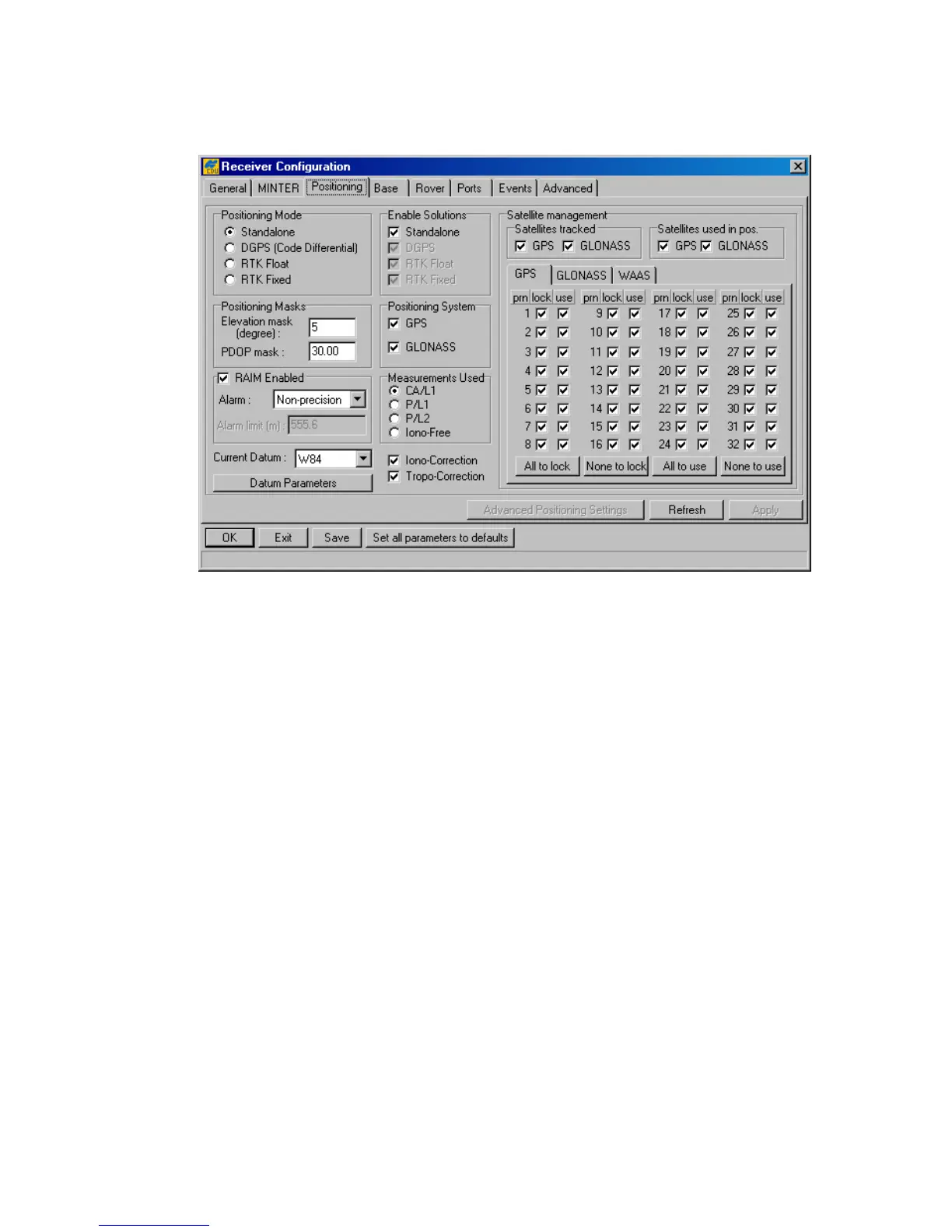
Figure 28. shows the Positioning tab.
Figure 28. “Positioning” tab
Positioning Mode
• These four radio buttons are included in the Positioning tab only for user conven-
ience. They “mirror” the same named buttons from the Rover tab. For more informa-
tion about this radio button group, see 4.2.4.5. The receiver parameter associated with
these radio buttons is /par/pos/mode/cur.
Enable Solutions
• These four checkboxes are included in the Positioning tab only for user convenience.
They “mirror” the same named checkboxes from the Rover tab. If the Standalone
checkbox has been checked and the rover receiver is being run in differential mode, the
receiver will report its current standalone position instead of the DGPS (or RTK) posi-
tion if the latter is unavailable in the current epoch. The corresponding receiver pa-
rameter is /par/pos/mode/sp.
• Note that the checkboxes DGPS, RTK Float and RTK Fixed are always grayed
out in this version of PC-CDU.
Positioning Masks
• In the Elevation mask edit box you specify the elevation mask angle for the satel-
lites used in position computation. The corresponding receiver parameter is
/par/pos/elm.



 To Next Page