67
4.2.7. RFM96 Configuration window
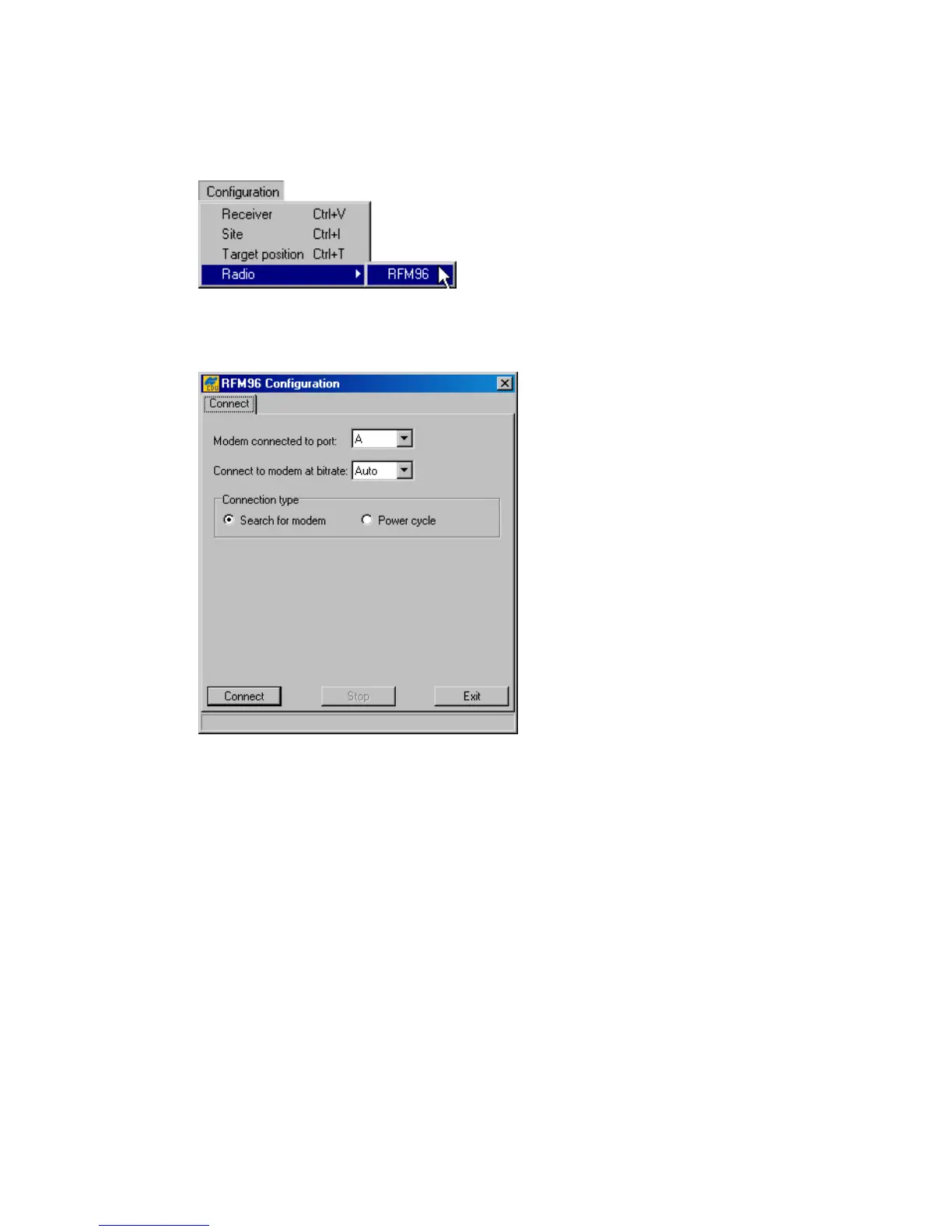
To open the RFM96 Configuration window, select the Radio item from the
Configuration menu, then click RFM96, as shown in Figure 46.
Figure 46. RFM96 item
Figure 47 shows the tab that will appear after you click the RFM96 item.
Figure 47. “Connect” tab
This tab allows the user to establish communication with the radio modem.
Use the Modem connected to port list box to select the receiver port that the radio modem
is connected to. Normally, this is port C for the Legacy, Legacy-E, Legacy-H, Regency, HiPer, Odys-
sey-E and port B for the Odyssey.
To set the baud rate of the modem communicating with the receiver, use the Connect to
modem at bitrate list box. It is normally 38400 bps. If one wants the receiver automatically to
detect the baud rate, select Auto.
Next, select the method of modem connection. For most RFM96 models, you can use Search for
modem.
If the radio is not found, change Connection type to Power cycle and press Connect.
The program will prompt the user to turn the modem OFF and then back ON (Figure 48). The pro-
gram will poll the radio during its power up cycle and establish a connection. If you have an older



 To Next Page