E6582062
7-17 7. Operating using external signals
3
4
7
9
7. 3. 2 Inputting the frequency commands by
potentiometer/voltage (0 - 10 Vdc)
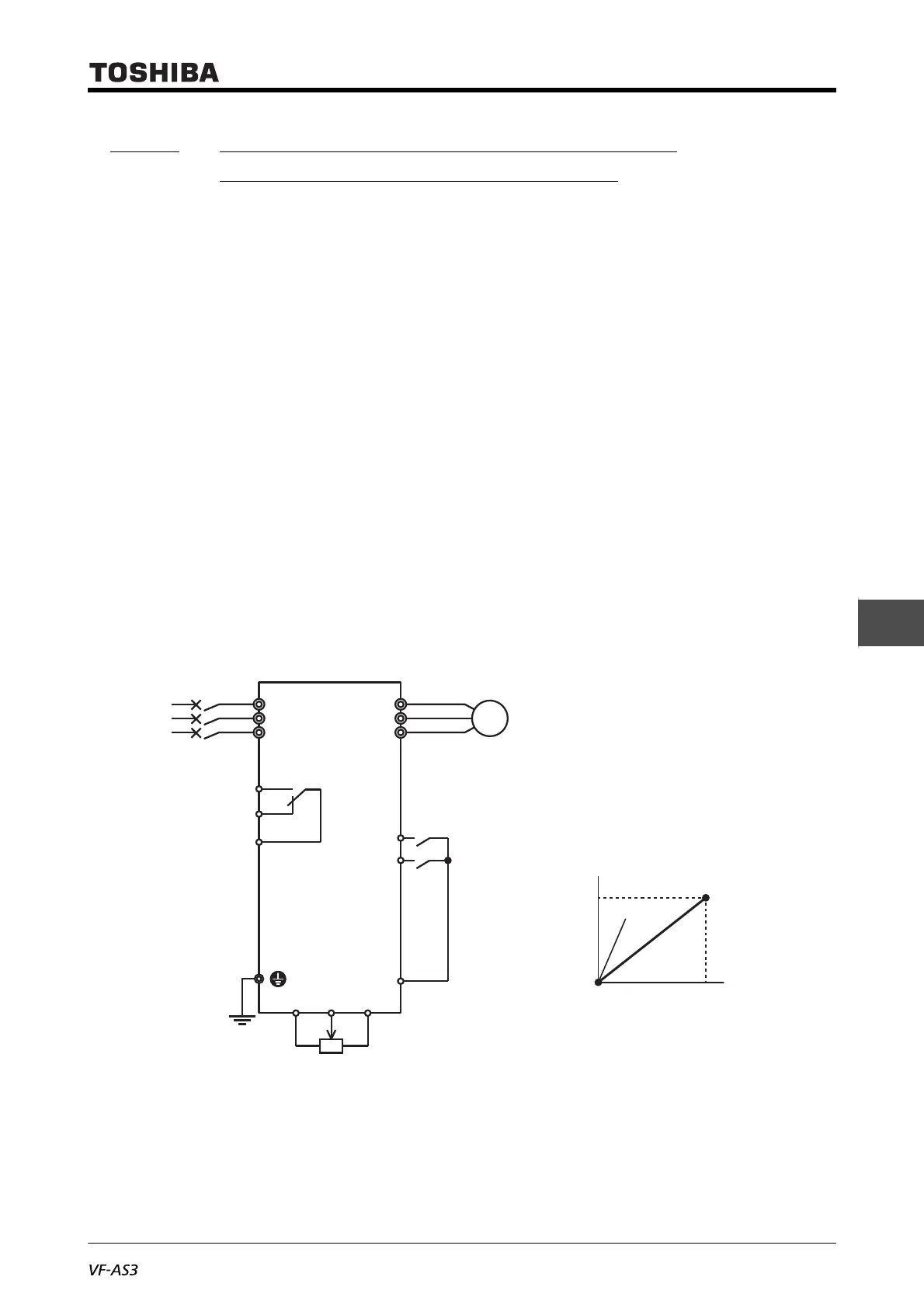
Connect a potentiometer (1 k - 10 kΩ) between the terminals [PP]-[RR]-[CC] to input frequency
commands.
Divide the reference voltage (10 Vdc) of the terminal [PP] using a potentiometer to input the voltage of
0 - 10 Vdc between the terminals [RR]-[CC].
You can also directly input a voltage signal of 0 - 10 Vdc between the terminals [RR]-[CC] without using
a potentiometer.
■ Setting example
The following shows an example of how to externally input the run commands to the digital input
terminals, and how to input the frequency commands using a potentiometer.
The frequency shall be 0 Hz at the minimum setting of a potentiometer, and 60 Hz at the maximum
setting of a potentiometer.
• <CMOd: Run command select> = "0: Terminal"
• <FMOd: Frequency command select 1> = "1: Terminal RR"
• <F201: RR point 1 input value> = "0" (%) (default setting)
• <F202: RR point 1 frequency> = "0" (Hz) (default setting)
• <F203: RR point 2 input value> = "100" (%) (default setting)
• <F204: RR point 2 frequency> = "60" (Hz) (default setting)
For the characteristics of input voltages and output frequencies, set at two points of <F201> and
<F202>, and <F203> and <F204>. The reference for 100% of the input value is 10 V.
R/L1
S/L2
T/L3
FLA
FLB
FLC
U/T1
V/T2
W/T3
F
Fwd run
Potentiometer (1k to 10 kΩ)
Rev run
R
CC
PPRRCC
MCCB
or
ELCB
Inverter
Motor
M
Power
supply
Output frequency (Hz)
Point 2
Point 1
Voltage signal (%)
100%
(10V)
0%
(0V)
(In case of sink logic)
<F204>
<F202>
<F201> <F203>



 To Next Page
 Loading...











