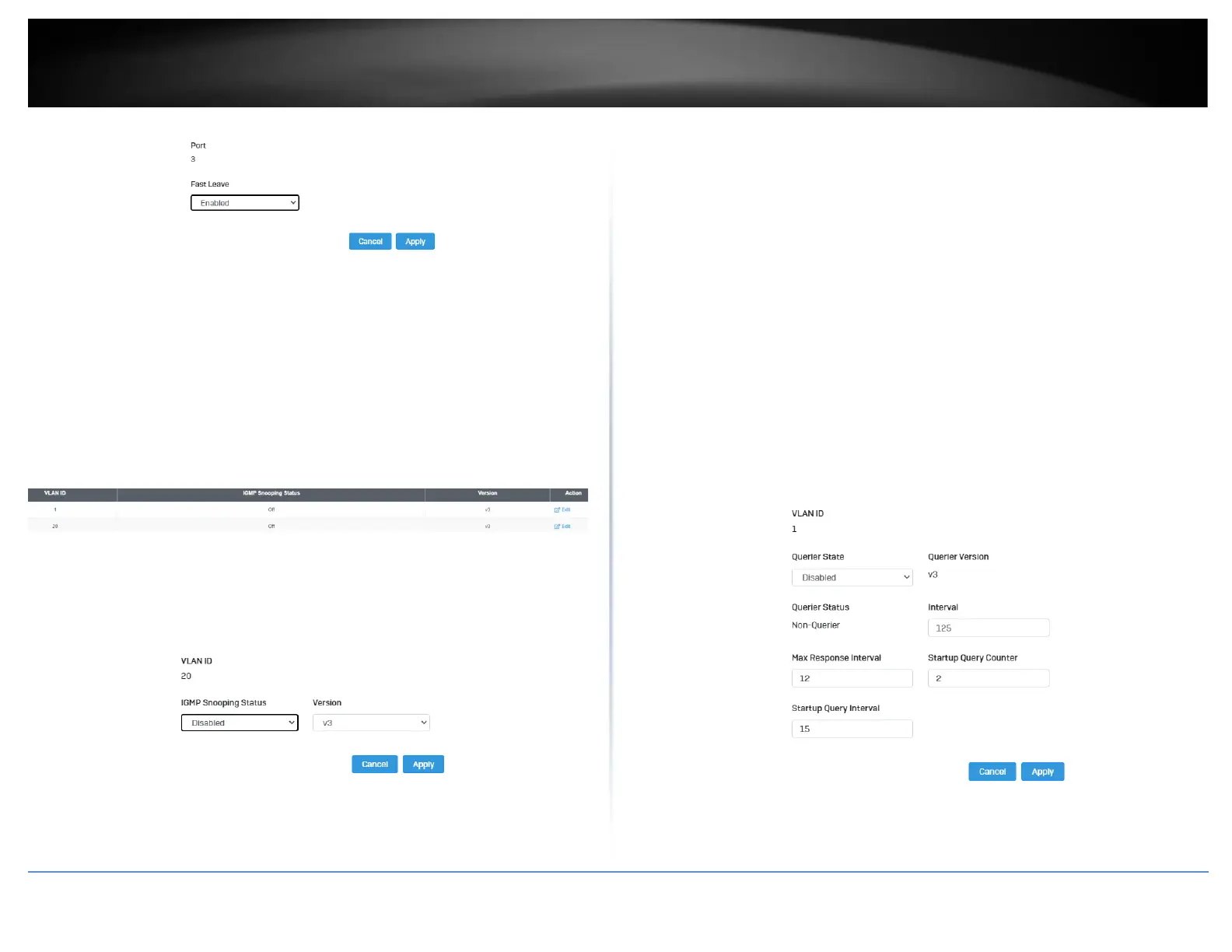
VLAN Settings
Network > IGMP Snooping > VLAN Settings
1. Log into your switch management page (see “Access your switch management page”
on page 5).
2. Click on Network, click on IGMP Snooping, and click on VLAN Settings.
3. Select the VLAN ID to configure
4. Review the settings. Click Apply to save the settings.
• IGMP Snooping Status – Click the drop-down list and select Enabled to enable
the IGMP snooping or Disabled to disable the feature
• Version – Click the drop-down list and select IGMP version
Querier Settings
Network > IGMP Snooping > Querier Settings
1. Log into your switch management page (see “Access your switch management page”
on page 5).
2. Click on Network, click on IGMP Snooping, and click on Querier Settings.
3. Select the VLAN ID to configure
4. Review the settings. Click Apply to save the settings.
• Querier State – Click the drop-down list and select Enabled to enable the
Querier Status or Disabled to disable this feature.
• Interval – Enter the amount of time you want your switch to send IGMP
queries.
• Max Response Interval- Specifies the maximum time before sending a
response report.
• Startup Query Counter – Enter the amount to start the query counter
• Startup Query Interval – Enter the amount of time to start the query counter













 To Next Page