EasyManua.ls Logo

Valleylab Force FX-C - Page 129

Valleylab Force FX-C
214 pages
Print Icon
To Next Page IconTo Next Page
To Previous Page IconTo Previous Page
Loading...
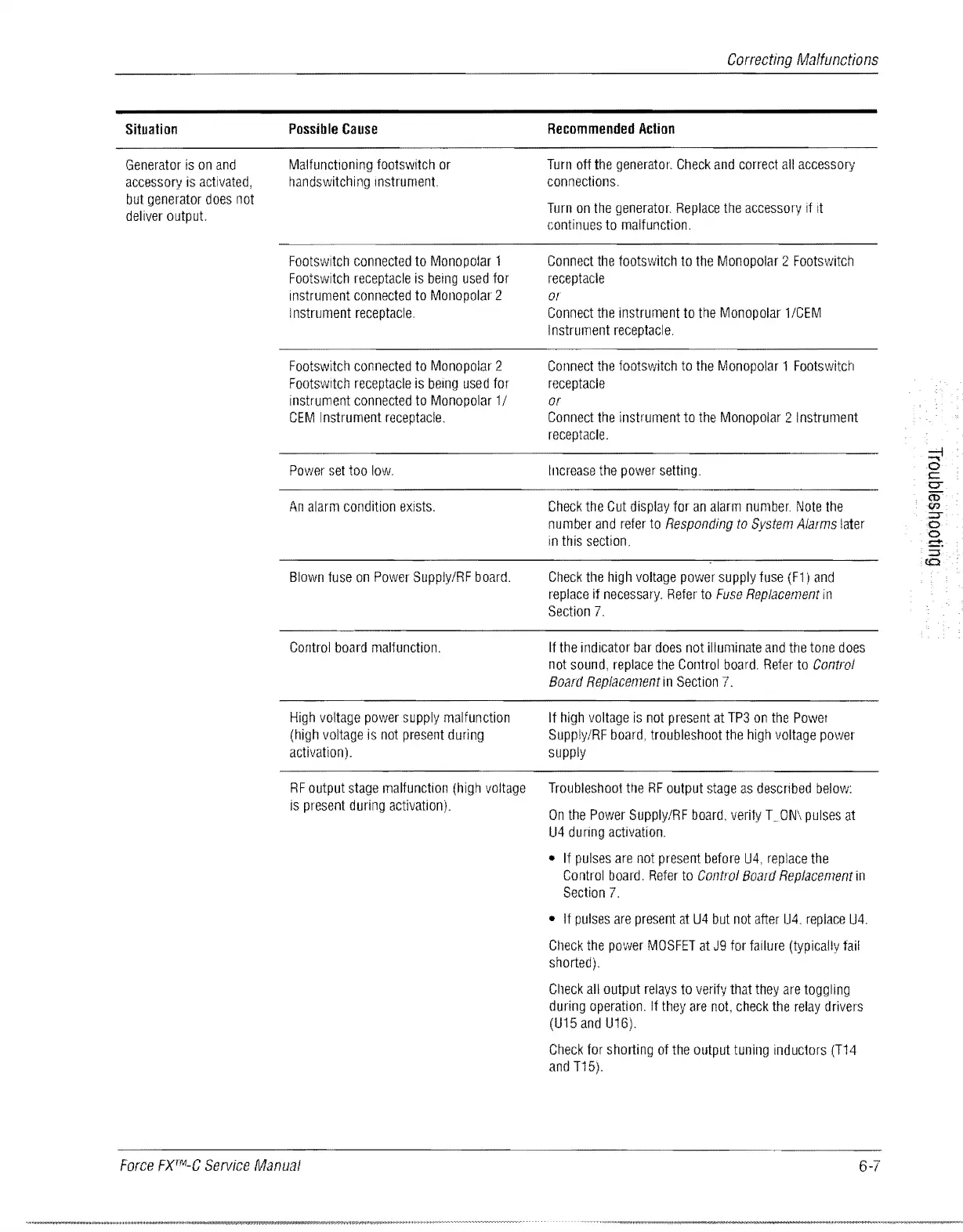
Situation
Generator
is
on
and
accessory
is
activated,
but
generator
does
not
deliver
output.
Possible
Cause
Malfunctioning
footswitch
or
handswitching
Instrument.
Footswitch
connected
to
Monopolar
1
Footswitch
receptacle
is
being
used
for
instrument
connected
to
Monopolar
2
I
nstru
ment
receptacle.
Footswitch
connected
to
Monopolar
2
Footswltch
receptacle
is
being
used
for
instrument
connected
to
Monopolar
1 I
CEM
Instrument
receptacle.
Power
set
too
low.
An
alarm
condition
exists.
Blown
fuse
on
Power
Supply/RF
board.
Control
board
malfunction.
High
voltage
power
supply
malfunction
(high
voltage
is
not
present
during
activation).
RF
output
stage
malfunction
(high
voltage
is
present
during
activation).
Force
FXTlILC
Service
Manual
Correcting
Malfunctions
Recommended
Action
Turn
off
the
generator.
Check
and
correct
all
accessory
connections.
Turn
on
the
generator.
Replace
the
accessory
if
It
continues
to
malfunction.
Connect
the
footswitch
to
the
Monopolar
2
Footswitch
receptacle
or
Connect
the
instrument
to
the
Monopolar
1/CEM
Instrument
receptacle.
Connect
the
footswitch
to
the
Monopolar
1
Footswitch
receptacle
or
Connect
the
instrument
to
the
Monopolar
2
Instrument
receptacle.
Increase
the
power
setting.
Check
the
Cut
display
for
an
alarm
number.
Note
the
number
and
refer
to
Responding
to
System
Alarms
later
in
this
section.
Check
the
high
voltage
power
supply
fuse
(F1)
and
replace
if
necessary.
Refer
to
Fuse
Replacement
in
Section
7.
If
the
indicator
bar
does
not
illuminate
and
the
tone
does
not
sound,
replace
the
Control
board.
Refer
to
Control
Board
Replacement
in
Section
7.
If
high
voltage
is
not
present
at
TP3
on
the
Powel
Supply/RF
board,
troubleshoot
the
high
voltage
power
supply
Troubleshoot
HIe
RF
output
stage
as
descnbed
below:
On
the
Power
Supply/RF
board,
verily
T_ON\
pulses
at
U4
during
activation.
If
pulses
are
not
present
before
U4,
replace
the
Control
board.
Refer
to
Control
Board
Replacement
in
Section
7.
If
pulses
are
present
at
U4
but
not
after
U4.
replace
U4.
Ctleck
the
power
MOSFET
at
J9
for
failure
(typically
fail
shorted).
Clleck
all
output
relays
to
verify
that
they
are
toggling
during
operation.
If
they
are
not
check
the
relay
drivers
(U15
and
U16).
Check
for
shorting
of
the
output
tuning
inductors
(T14
and
T15).
6-7

Table of Contents

Related product manuals