EasyManua.ls Logo

Valleylab Force FX-C - Page 130

Valleylab Force FX-C
214 pages
Print Icon
To Next Page IconTo Next Page
To Previous Page IconTo Previous Page
Loading...
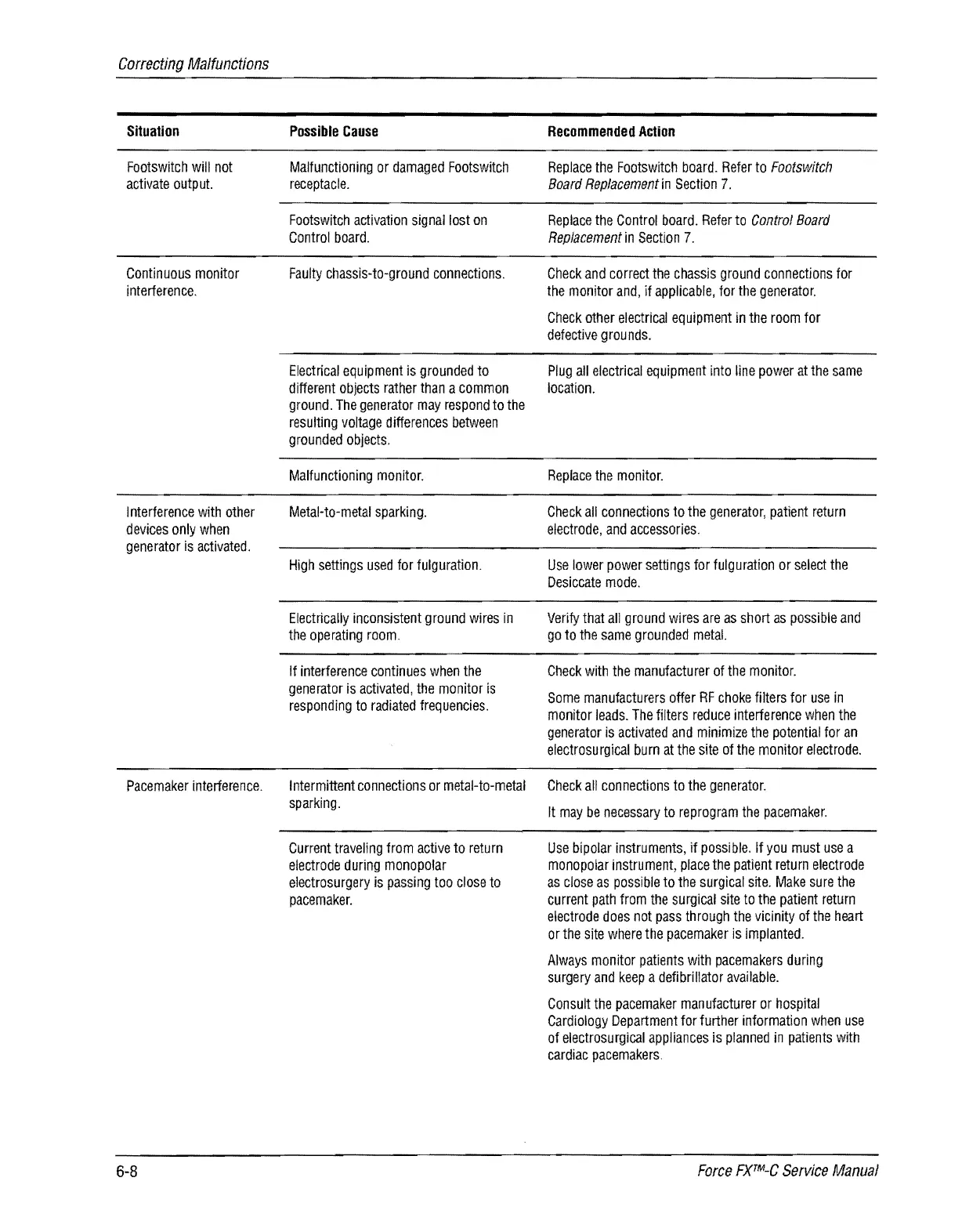
Correcting
Malfunctions
Situation
Footswitch
will
not
activate
outp
ut.
Continuous
monitor
interference.
I
nterference
with
other
devices
only
when
generator
is
activated.
Pacemaker
interference.
6-8
Possible
Cause
Malfunctioning
or
damaged
Footswitch
receptacle.
Footswitch
activation
signal
lost
on
Control
board.
Faulty
chassis-to-ground
connections.
Electrical
equipment
is
grounded
to
different
objects
rather
than
a
common
ground.
The
generator
may
respond
to
the
resulting
voltage
differences
between
grounded
objects.
Malfunctioning
monitor.
Metal-to-metal
sparking.
High
settings
used
for
fulguration.
Electrically
inconsistent
ground
wires
in
the
operating
room.
If
interference
continues
when
the
generator
is
activated,
the
monitor
is
responding
to
radiated
frequencies.
Intermittent
connections
or
metal-to-metal
sparking.
Current
traveling
from
active
to
return
electrode
during
monopolar
electrosurgery
is
passing
too
close
to
pacemaker.
Recommended
Action
Replace
the
Footswitch
board.
Refer
to
Footswitch
Board
Replacement
in
Section
7.
Replace
the
Control
board.
Refer
to
Control
Board
Replacement
in
Section
7.
Check
and
correct
the
chassis
ground
connections
for
the
monitor
and,
if
applicable,
for
the
generator.
Check
other
electrical
equipment
in
the
room
for
defective
grounds.
Plug
all
electrical
equipment
into
line
power
at
the
same
location.
Replace
the
monitor.
Check
all
connections
to
the
generator,
patient
return
electrode,
and
accessories.
Use
lower
power
settings
for
fulguration
or
select
the
Desiccate
mode.
Verify
that
all
ground
wires
are
as
short
as
possible
and
go
to
the
same
grounded
metal.
Check
with
the
manufacturer
of
the
monitor.
Some
manufacturers
offer
RF
choke
filters
for
use
in
monitor
leads.
The
filters
reduce
interference
when
the
generator
is
activated
and
minimize
the
potential
for
an
electrosurgical
burn
at
the
site
of
the
monitor
electrode.
Check
all
connections
to
the
generator.
It
may
be
necessary
to
reprogram
the
pacemaker.
Use
bipolar
instruments,
if
possible.
If
you
must
use
a
monopolar
instrument,
place
the
patient
return
electrode
as
close
as
possible
to
the
surgical
site.
Make
sure
the
current
path
from
the
surgical
site
to
the
patient
return
electrode
does
not
pass
through
the
vicinity
of
the
heart
or
the
Site
where
the
pacemaker
is
implanted.
Always
monitor
patients
with
pacemakers
during
surgery
and
keep
a
defibrillator
available.
Consult
the
pacemaker
manufacturer
or
hospital
Cardiology
Department
for
further
information
when
use
of
electrosurgical
appliances
is
planned
in
patients
with
cardiac
pacemakers.
Force
FXTM-C
Service
Manual

Table of Contents

Related product manuals