6.3 Mounting discs in the w orking
chamber
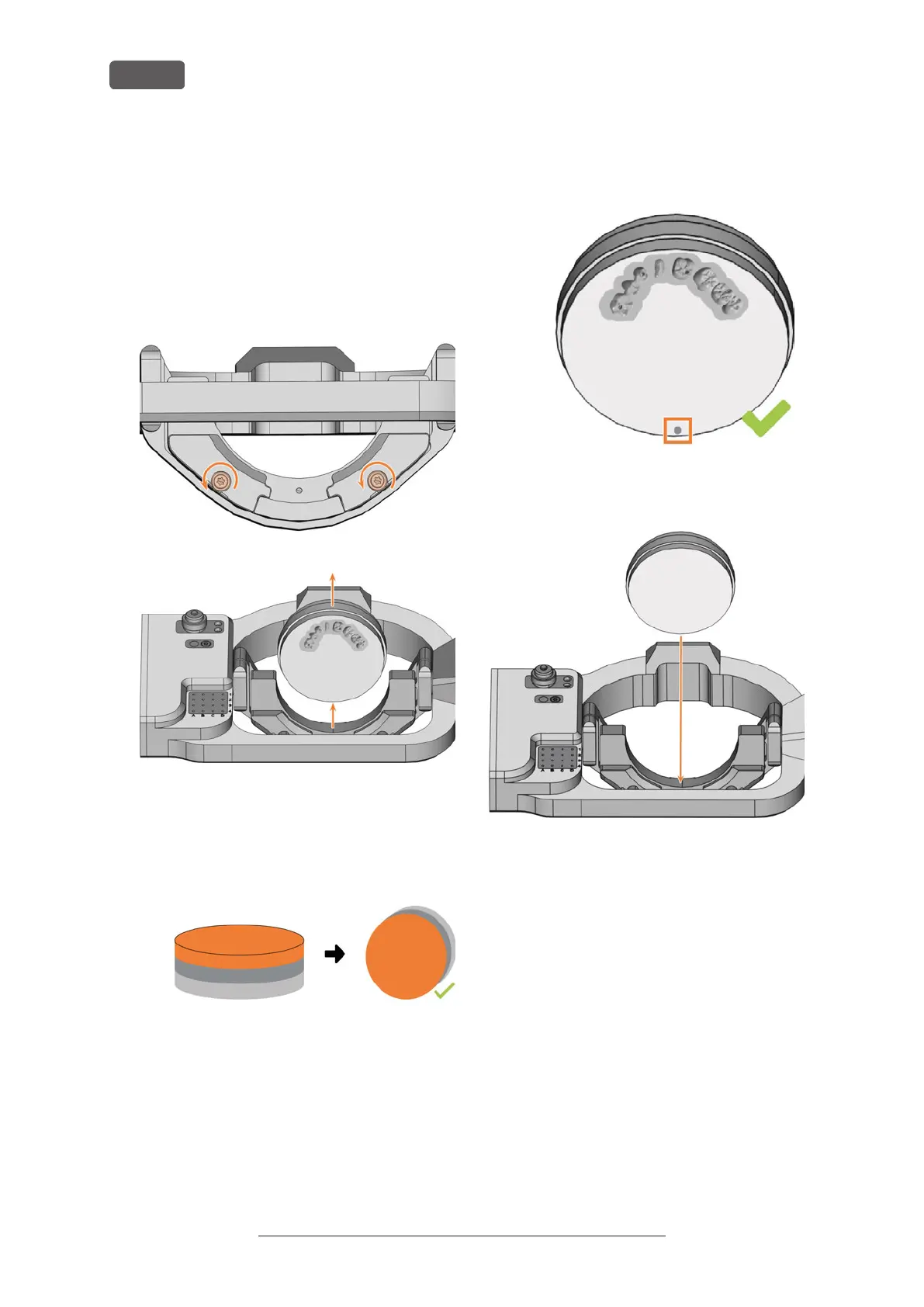
1. ⚠ CAUTION! Wear gloves.
2. Open the working chamber door.
3. Loosen the 2 fixing screws on the blank holder
without unscrewing them.
4. Remove the blank from the blank holder if present.
FIG. 36
FIG. 37
5. Use the disc as follows:
a. If the disc is multilayered, align the blank so
that the top layer of color points to you.
FIG. 38 MULTILAYER BLANK
b. If the disc was already machined, ensure that:
n
The original front faces towards the
front.
n
If the disc has been marked for safer
remounting via DENTALCNC, ensure
that the marking is in the position
shown below.
FIG. 39 MARKING FOR SAFE REMOUNTING MARKED ORANGE
c. Insert the disc from above into the holder.
FIG. 40
6. Carefully rotate blanks that have already been
machined so that the marking on the blank is
exactly above the marking on the blank holder.
Original Operating Instructions:E5
Version: 4/27/2023
Operating the machine
EN 28



 To Next Page