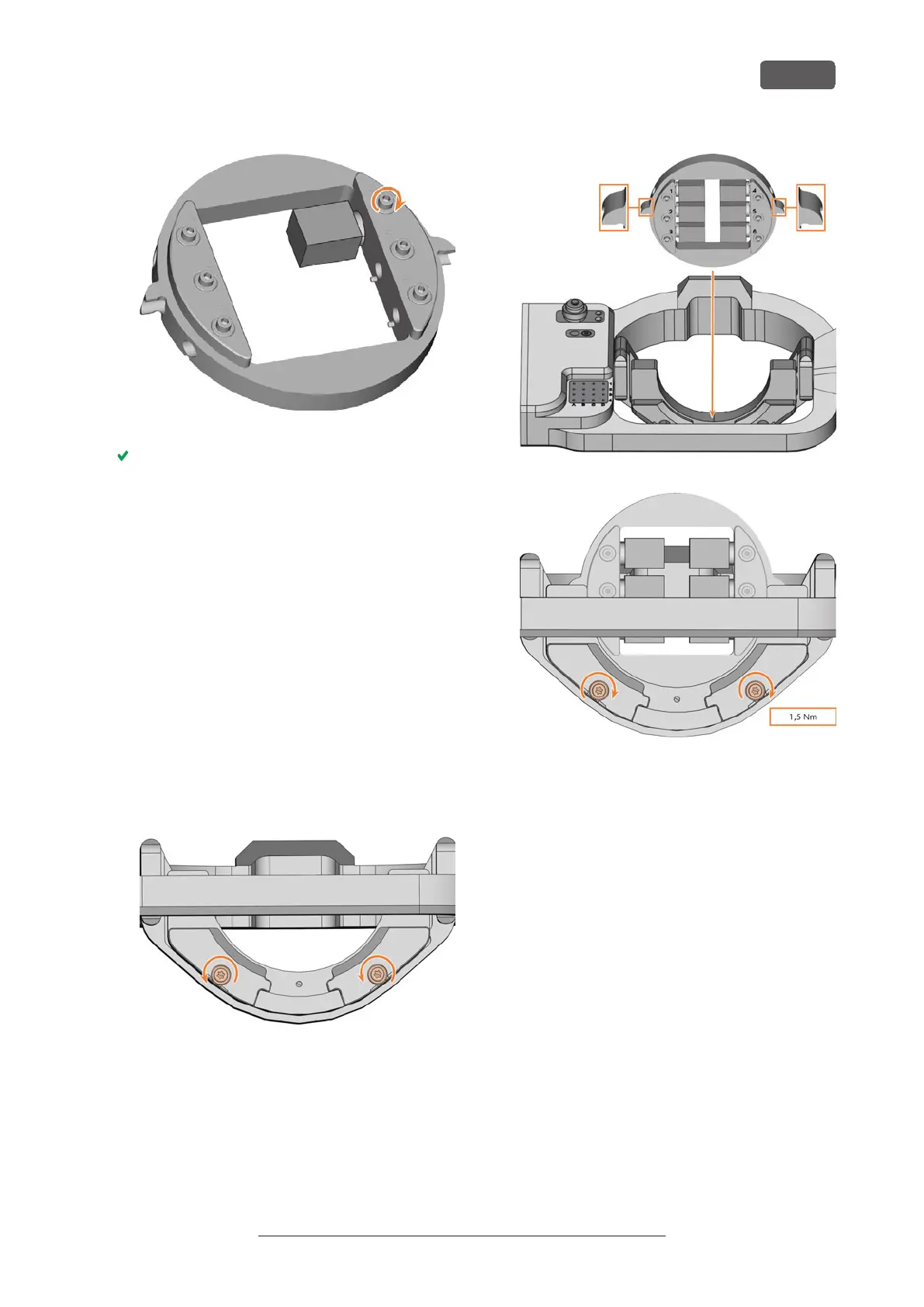
FIG. 49
You can now mount the block holder.
6.4.2 Mounting the block holder in the w ork-
ing chamber
1. ⚠ CAUTION! Wear gloves.
2. Open the working chamber door.
3. Loosen the 2 fixing screws on the blank holder
without unscrewing them.
4. Remove the blank from the blank holder if present.
5. Align the block holder so that the position numbers
point in your direction.
The flat sides of the positioning aids point down-
wards.
6. Insert the block holder from the top into the blank
holder.
7. Tighten the fixing screws with the supplied torque
screwdriver (1.5Nm).
FIG. 50
FIG. 51
FIG. 52
6.4.3 Removing the block holder from the
w orking chamber
1. ⚠ CAUTION! Wear gloves.
2. Open the working chamber door.
3. Loosen the 2 fixing screws on the blank holder
without unscrewing them.
4. Remove the block holder from the blank holder.
Operating the machine
EN 31
Original Operating Instructions: E5
Version: 4/27/2023



 To Next Page