n
You must configure this manual tool change for
individual tool positions in DENTALCNC.
n
This is described in the DENTALCNCmanual.
6.5.2 Inserting tools into the tool magazine
You can equip the tool magazine of your machine in
two ways:
n
By manual insertion into the tool magazine
‒ This is the fastest way. It is described below.
n
About the spindle ‒ You insert a tool into the
collet chuck and the spindle places the tool in the
tool magazine. This option takes more time, but
might be more convenient for some. It is
described in the documentation for the man-
ufacturing software.
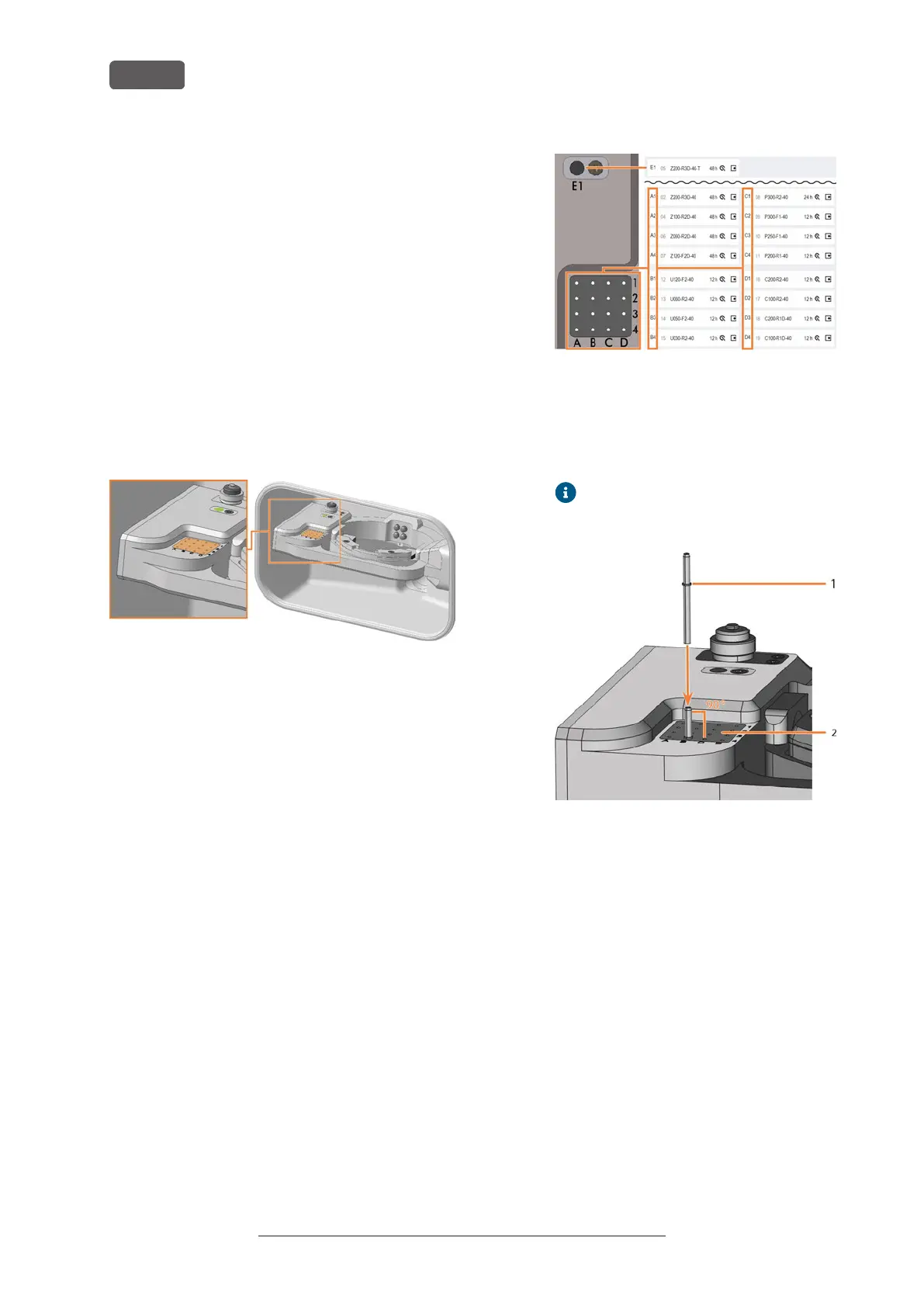
FIG. 58 (MARKED ORANGE) TOOL MAGAZINE AND INSERT FOR THE AIRTOOL
(MARKED GREEN)
You insert tools manually as follows:
1. ⚠ CAUTION! Wear gloves.
2. Open the working chamber door.
3. NOTICE! Remove worn or damaged tools from the
tool magazine if any. DENTALCNC shows tool life in
the tool management view.
NOTICE! Tool breakage and defective
machining results due to incorrect tool
assignment
n
Ensure that the positions of the tools in the
tool magazine match the tool positions in
DENTALCNC.
FIG. 59
n
Insert the tools straight into the tool posi-
tions with the cutting edge pointing down-
wards. Push them in until the ring engages
the tool magazine insert.
The vhftool packaging helps you to
insert the tools.
FIG. 60
1. Ring
2. Tool magazine insert
NOTICE! Defective machining results
when not using the AirTool
n
Insert the required AirTool into position E1.
Slide it in until the propeller engages the
tool magazine insert.
DENTALCNC shows the tool match code
with the suffix -T in position E1.
Original Operating Instructions:E5
Version: 4/27/2023
Operating the machine
EN 34



 To Next Page