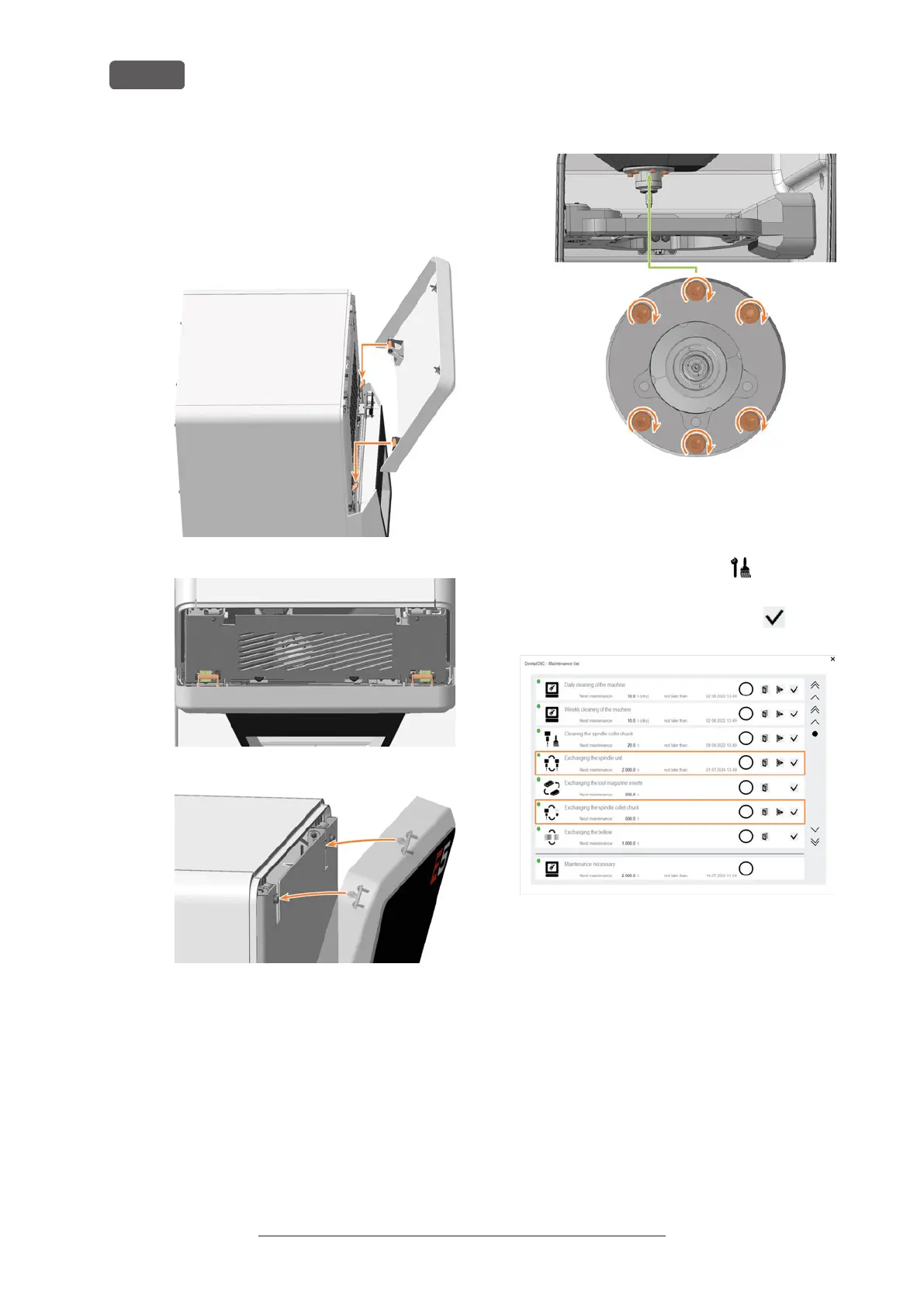
a. Insert the bolts on the service cover (marked
in orange) into the tabs on the safety cover
(marked in green).
b. Tilt the top of the service cover toward the
machine until it snaps into place.
FIG. 182
FIG. 183
FIG. 184
25. Switch on the machine at the main power switch.
26. If you have loosened the screws securing the
mounting washer to the bellow, do the following:
a. Open the working chamber door.
b. Tighten the screws.
c. Close the working chamber door.
27. Start DENTALCNC.
1. Open the Maintenance section window with the fol-
lowing icon in the main iconbar:
28. Select the following icon of the entries Exchange
spindle and Exchange spindle collet chuck:
29. Mill a test specimen and calibrate the machine as
necessary.
Calibrating the axes – on page95
30. Contact customer service and have the spindle
operating hours reset.
This can be important for deciding warranty claims.
Original Operating Instructions:E5
Version: 4/27/2023
Maintenance
EN 72



 To Next Page