48
Preparing for use
Adjusting the pick-
up equipment
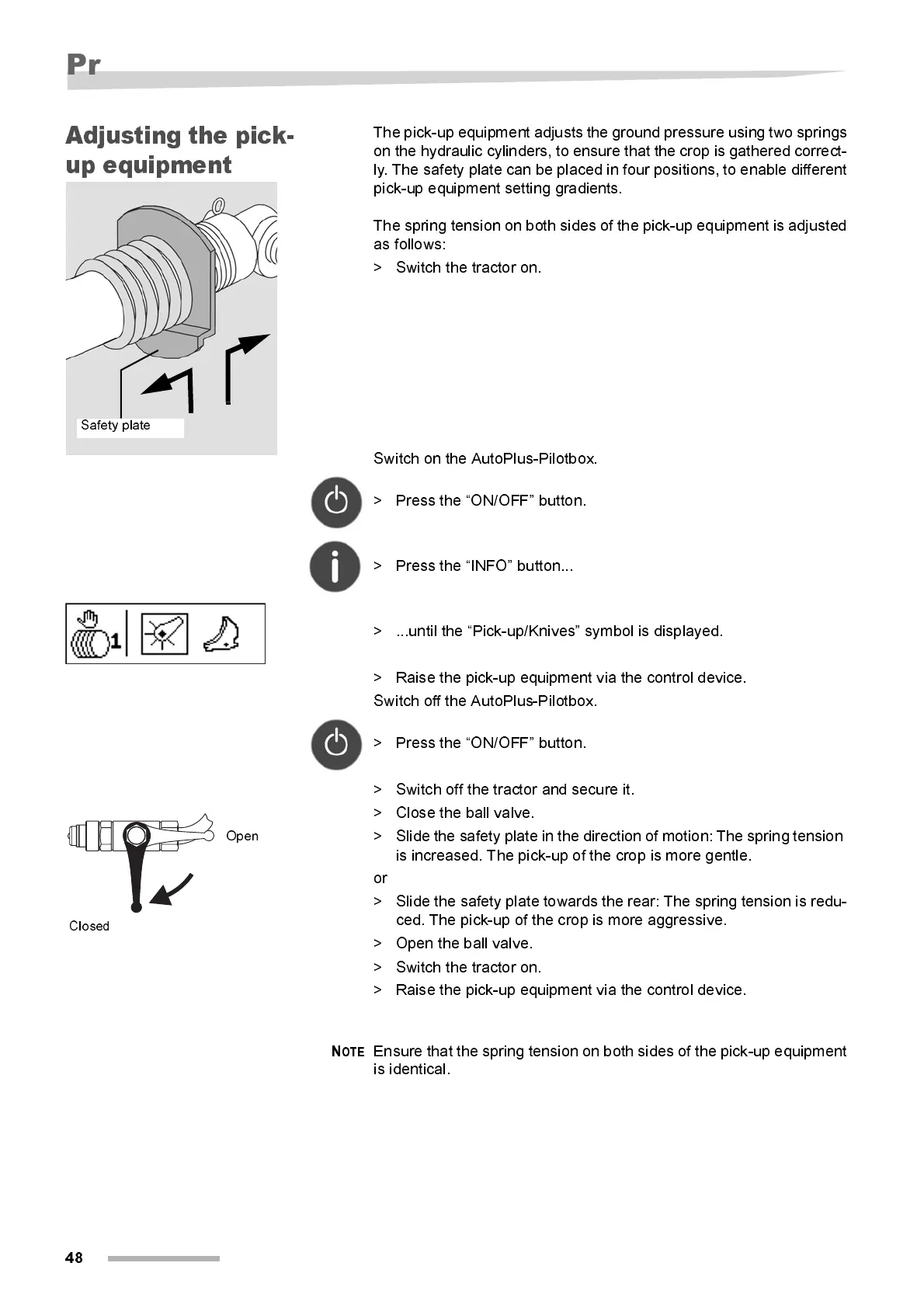
The pick-up equipmen t adjusts the ground pressure using two springs
on the hydraulic cylinders, to ensure that the crop is gathered correc t-
ly. The safety plate can be placed in four positions, to enable different
pi ck-up equipment setting gradi ents.
The spring tension on both sides of the pick-up equipment is adjusted
as follows:
> Switch the tractor on.
Switch on the AutoPlus-Pilotbox.
> Press the “ON/OFF” button.
> Press the “INFO” button...
> ...until the “Pick-up/Knives” symbol is displayed.
> Raise the pick-up equipment via the control device.
Switch off the AutoPlus-Pilotbox.
> Press the “ON/OFF” button.
> Switch off the tractor and secure it.
> Close the ball valve.
> Slide the safety plate in the direction of motion: The spring tension
is increased. The pick-up of the crop is more gentle.
or
> Slide the safety plate towards the rear: The spring tension is redu-
ced. The pick-up of the crop is more aggressive.
> Open the ball valve.
> Switch the tractor on.
> Raise the pick-up equipment via the control device.
N
OTE
Ensure that the spring tension on both sides of the pick-up equipment
i s identical .
Safety plate
Open
Closed



 To Next Page