Preparing for use
53
OptiCut 23
HydroProtected
Rem ov in g the kn i ves
The knife driving shaft can be accessed via the bale chamber. Please
observe the relevant safety instructions »Working in the bale cham-
ber«, page 49.
Switch on the AutoPlus-Pilotbox.
> Press the “ON/OFF” button.
> Press the “INFO” button...
> ...until the “Pick-up/Knives” symbol is displayed.
> Press the “GO” button...
> unti l the “Pi ck-up/Kni ves” symbol is selected on the displ ay.
> Swivel the knives in via the control device.
> Open and secure the rear flap.
→
»Opening the rear flap«, page 46.
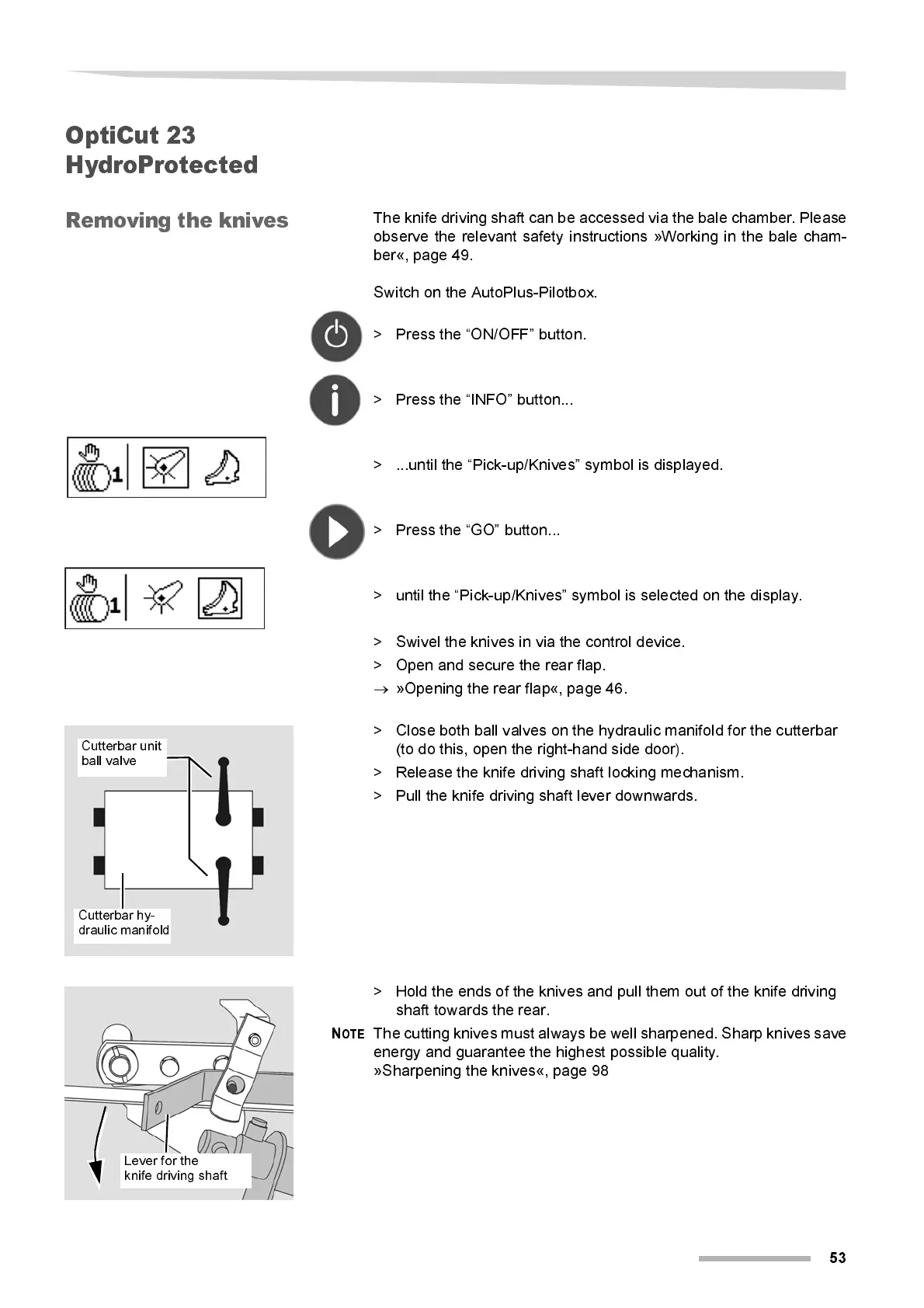
> Close both ball valves on the hydraulic manifold for the cutterbar
(to do this, open the right- hand side door).
> Release the knife dri ving shaft l ocking mechani sm.
> Pull the knife driving shaft lever downwards.
> Hold the ends of the knives and pull them out of the knife driving
shaft towards the rear.
N
OTE
The cutting knives mus t always be well sharpened. Sharp knives sav e
energy and guarantee the highest possi bl e quality.
»Sharpening the knives«, page 98
Cutterbar unit
ball valve
Cutterbar hy-
draulic manifold
Lever for the
knife driving shaft



 To Next Page