Maintenance
99
Bleeding the
hydrau li c sy stem
The hydraulic system for switching the knife groups of the OptiCut 23
HydroProtected is bled when:
•
the cyl i nders are replaced or
•
the OptiCut cutterbar is modified.
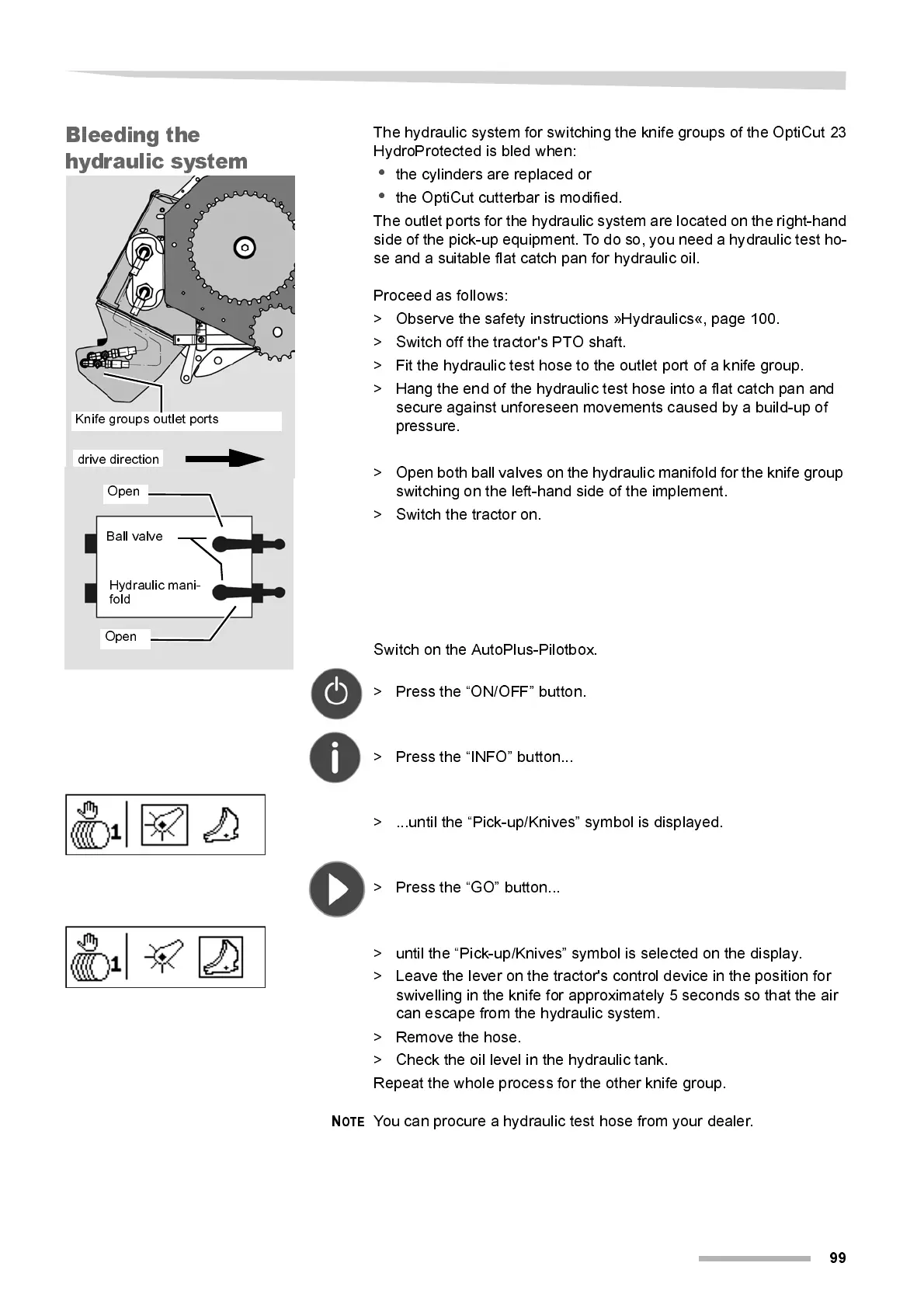
The outlet ports for the hydraulic system are located on the right-han d
side of the pick-up equipment. To do so, you need a hydraulic test ho-
se and a suitabl e fl at catch pan for hydraul i c oi l .
Proceed as foll ow s:
> Observe the safety i nstruct i ons »Hydrauli cs«, page 100.
> Switch off the tractor's PTO shaft.
> Fit the hydraulic test hose to the outlet port of a knife group.
> Hang the end of the hydraulic test hose into a fl at catch pan and
secure against unforeseen movements caused by a buil d-up of
pressure.
> Open both ball valves on the hydraulic manifold for the knife group
switching on the left-hand side of the implement.
> Switch the tractor on.
Switch on the AutoPlus-Pilotbox.
> Press the “ON/OFF” button.
> Press the “INFO” button...
> ...until the “Pick-up/Knives” symbol is displayed.
> Press the “GO” button...
> unti l the “Pi ck-up/Kni ves” symbol is selected on the displ ay.
> Leave the lever on the tractor's control device in the position for
swivelling in the knife for approximately 5 seconds so that the air
can escape from the hydraulic system.
> Remove the hose.
> Check the oi l l evel in the hydraul ic tank.
Repeat the whol e process for the other kni fe group.
N
OTE
You can procure a hydraulic test hose from your dealer.
Knife groups outlet ports
drive direction
Open
Open
Hydraulic mani-
fold
Ball valve



 To Next Page