VIVOTEK - A Leading Provider of Multimedia Communication Solutions
User's Manual - 101
Camera Conguration
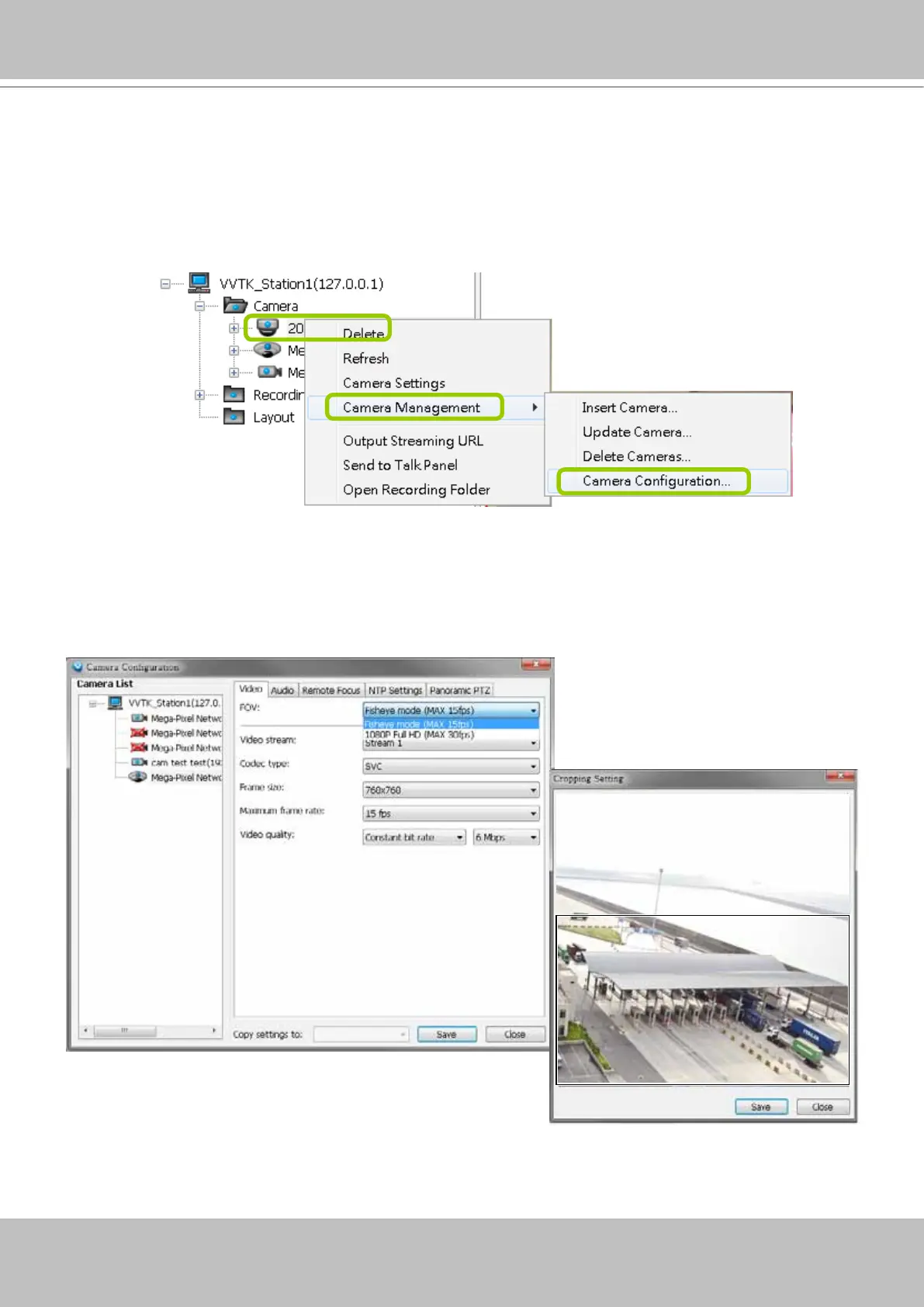
The Camera Conguration function group provides immediate access to the video streaming
and other settings without the need to open a web console. The function group is accessed by
selecting a camera on the device tree, and right-click to select Camera Management > Camera
Configuration. If you have new VIVOTEK cameras and the VAST server can not recognize
their features, see page 69 for how to update camera information using the Device Pack update.
FOV (Field of View)
The FOV configuration is available for 5 megapixel cameras (such as IP8372 and IP8172P),
which allows you to crop a portion of the image captured by the sensor. The FOV setting ap-
plies in the scenario where you do not need all of the video a camera can capture. For example,
when shooting a parking lot where the upper half of the image is the sky. Cropping a field of
view can help save bandwidth and reduce the requirements for storage space.
Video mode
For cameras having resource limitations such as hav-
ing a lower frame rate when supporting dual streams, or
lower frame rate when using the Rotation mode, its vid-
eo mode is automatically displayed in the Video window.



 To Next Page