VIVOTEK - A Leading Provider of Multimedia Communication Solutions
User's Manual - 75
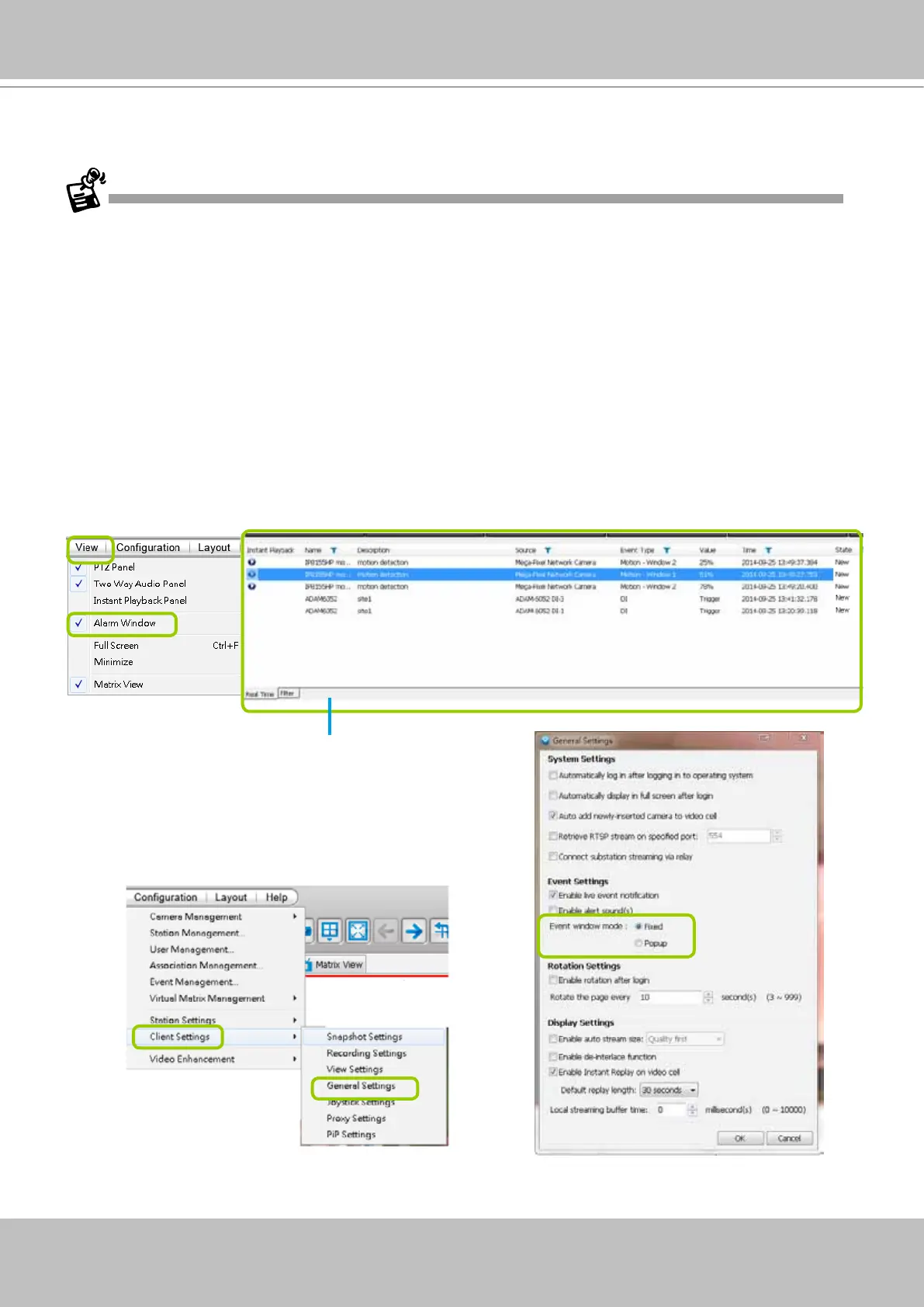
Click View > Alarm Window to open a window showing the real-time information for event
triggers. If you want to hide this window, deselect this option on the menu bar.
The default Alarm window is set to be fixed on the
bottom of the LiveClient. If you want to change
the Alarm window as a popup page, please open
the Configuration > Client Settings > General
Settings window to switch the display modes.
Event Window
Alarm Window
• Only the alarm-related messages will be displayed in this window. An Alarm is a conguration
consisting of triggers and reactions set to activate during a specific period of time. The
Alarm-related settings is congured in Conguration > Alarm management. See page 139
for more information.
• For the event messages of the overall system operation, please refer to the Playback > Log
viewer.
• If a VAST server is reset, the Alarms will disappear from the Alarm window. You can go to the
Playback utility and use the Alarm search function to retrieve the past events.



 To Next Page