VIVOTEK - A Leading Provider of Multimedia Communication Solutions
User's Manual - 239
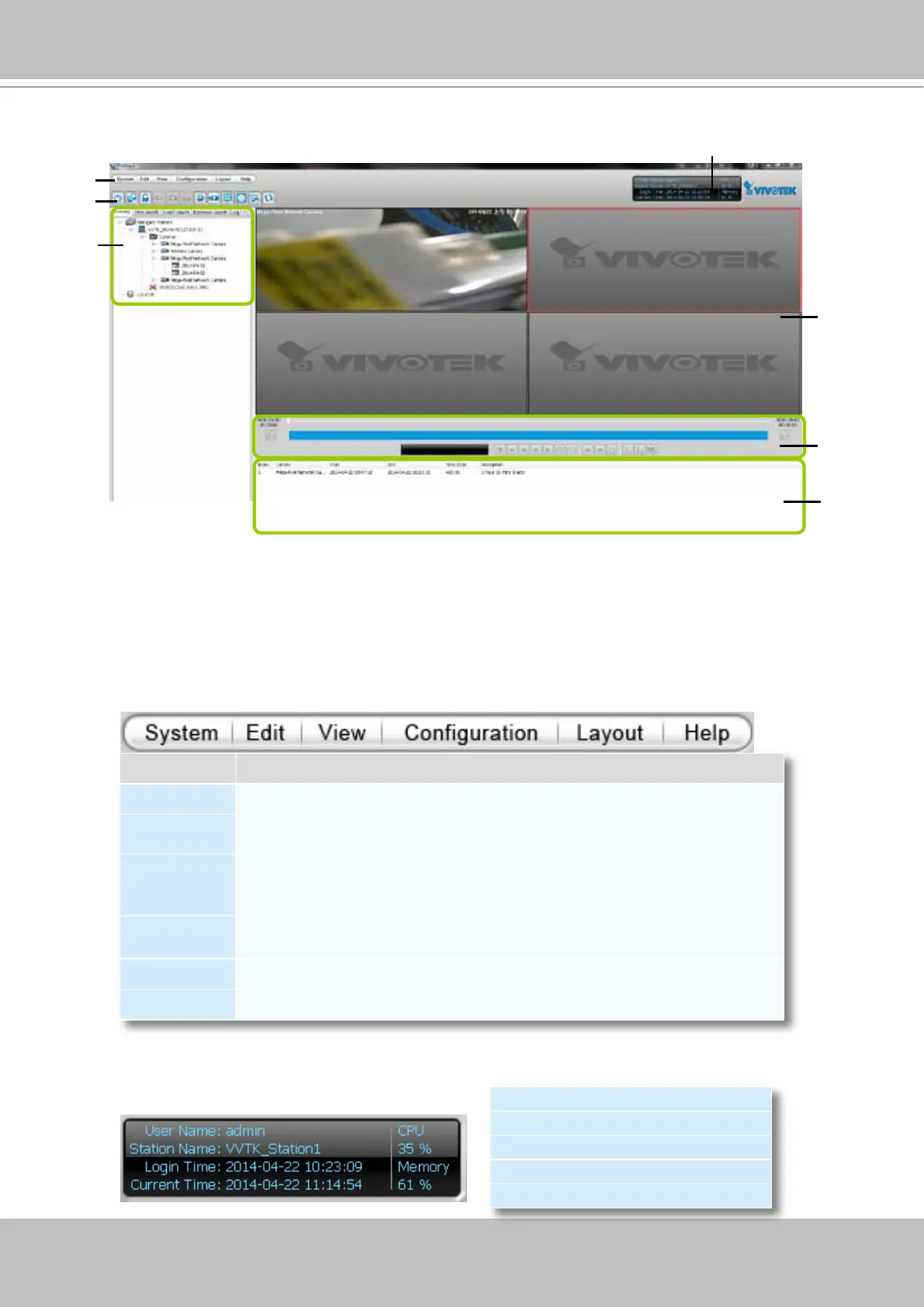
VAST Playback User Interface
A. Menu bar B. Quick access bar C. Query panel (Browsing / Time search / Bookmark search /
Event search / Alarm search / Log viewer) D. Status panel E. Recorded video playback window
F. Playback control panel
G. Video clips list
Menu Bar
Status Panel
Menu Item Drop-down Options
System Lock / Language / Launch LiveClient / Logout / Exit
Edit
Snapshot / Print / Snapshot zoomed image / Print zoomed image / Find
View
Logical Tree View / Device Tree View / Backup Status /Exporting Status /
Browsing / Time Search / Event Search / Bookmark search / Alarm search /
Log Viewer / Full Screen / Minimize / Query Panel / Video Clips List
Conguration
Client Settings (Snapshot Settings / Export Settings / View Settings / Proxy
Settings / General Settings / PiP Settings)
Layout Change Layout
Help About
User Name
Station Name (IP Address)
Login Time (yyyy-mm-dd hh:mm:ss)
Current Time (yyyy-mm-dd hh:mm:ss)
CPU and memory usage in percentage
G
D
A
E
B
C
F



 To Next Page