VIVOTEK - A Leading Provider of Multimedia Communication Solutions
14 - User's Manual
Physical Description
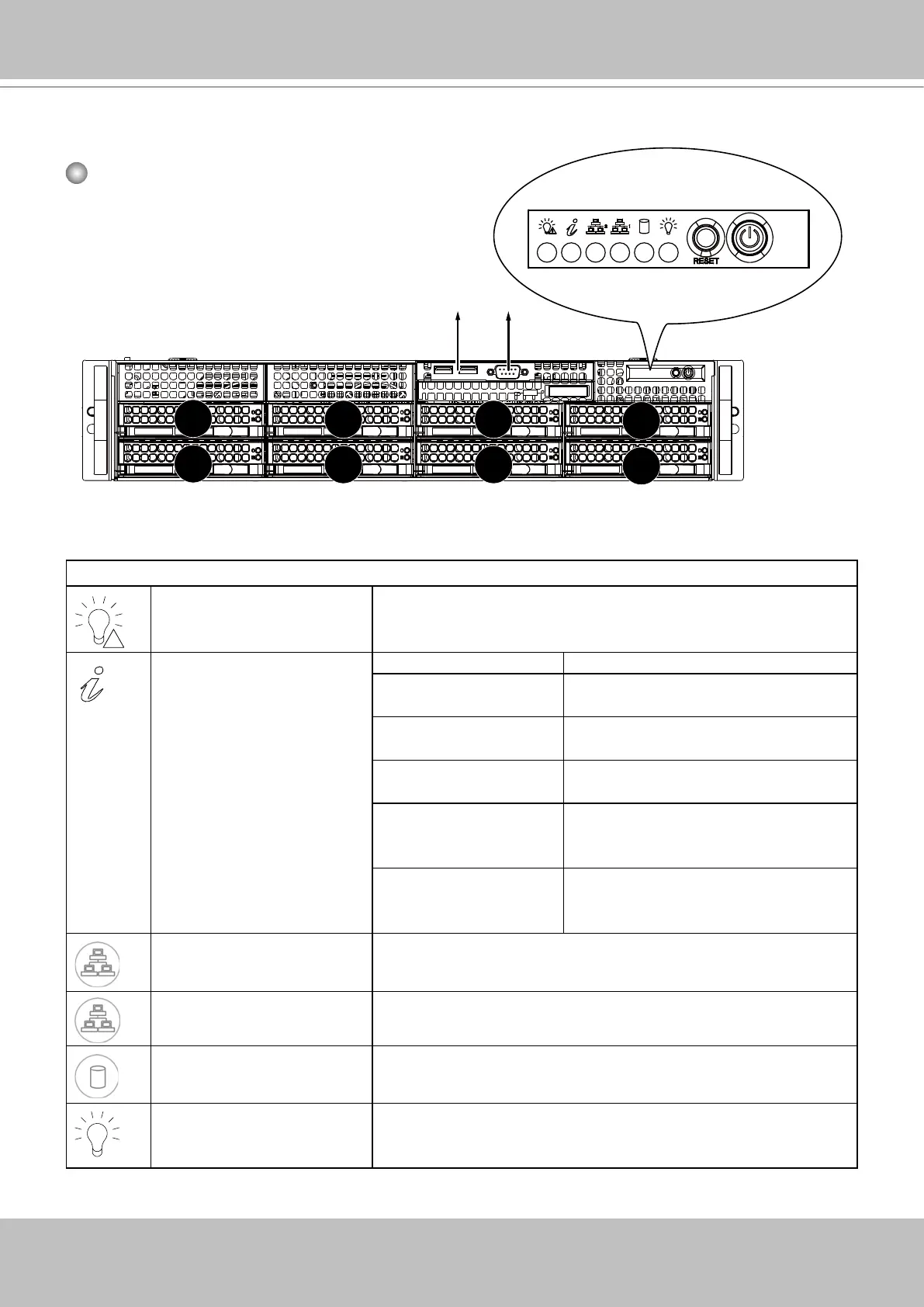
Front View
5
4
6
7
Drive bay numbering
sequence
Control Panel buttons and LEDs
!
Power failure LED Flashes to indicate a power failure.
Status LED Status Description
Constant on and red An overheat condition. (e.g., by cable
congestion)
Blinking red (1 Hz) Fan failure: check for an inoperable
fan.
Blinking red (0.25 Hz) Power failure: check for an inoperative
power supply.
Solide blue Local UID has been activated. Use
this button to locate the server in a
rack environment.
Blinking blue (300 msec) Remote UID has been activated. Use
this button to locate the server from a
remote site.
2
NIC2 Indicates network activity on GLAN2 when ashing.
1
NIC1 Indicates network activity on GLAN1 when ashing.
HDD Indicates activity on the SAS/SATA drives when ashing.
Power Indicates power is being supplied to the system power supply
units. This LED should normally be lit when the system is
operating.
Control Panel
RS-232 (for debug only)
USB 2.0



 To Next Page