VIVOTEK - A Leading Provider of Multimedia Communication Solutions
User's Manual - 121
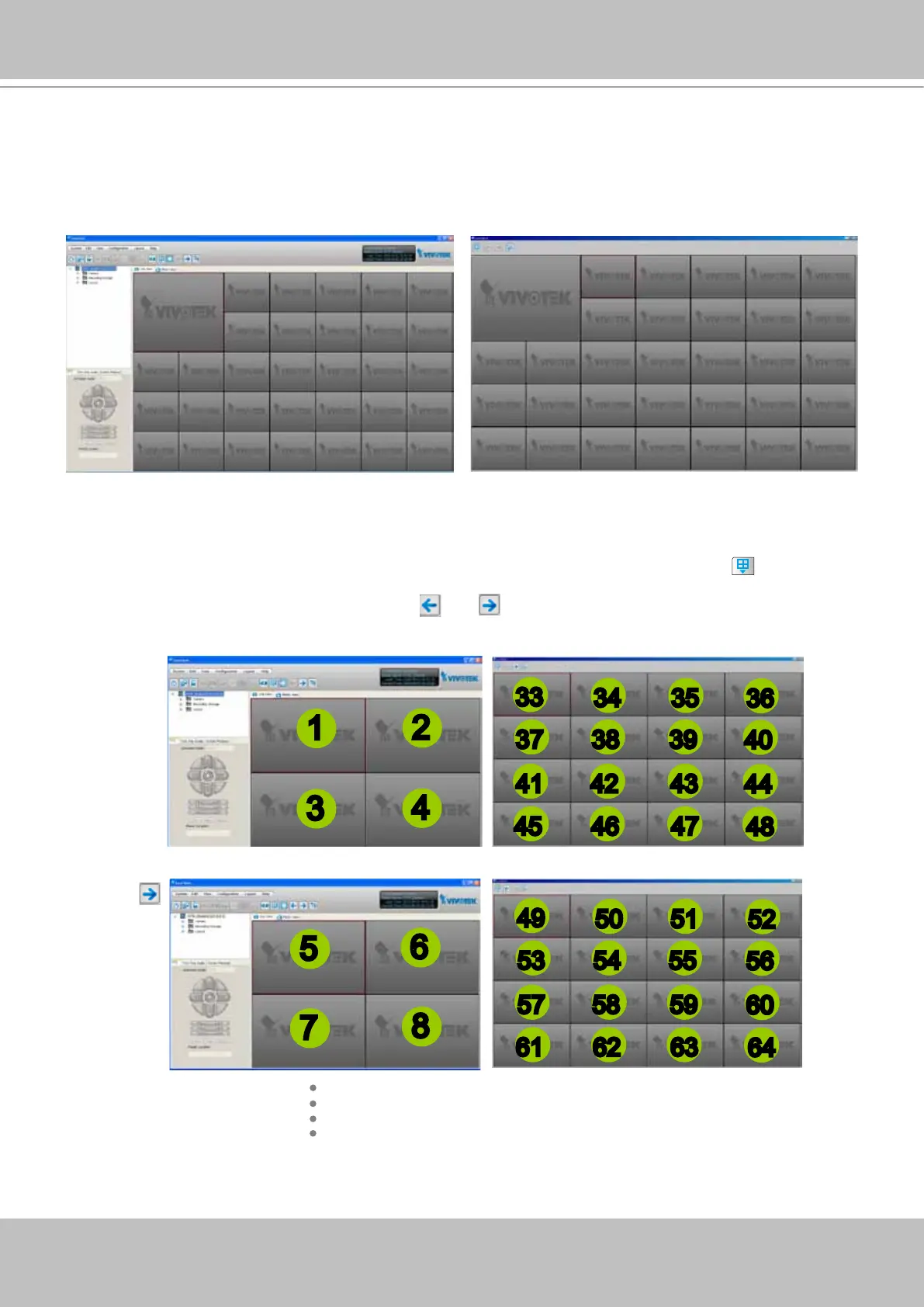
Simultaneously Viewing up to 64 Channels
If you select 1+31 layout on dual screens, you can view a maximum of 64 channels live video
simultaneously. In this case, each layout contains 32 channels on 1 video page.
Using different layouts on each monitor
You can also select different layout for two monitors, simply click the Layout button on the quick
access bar. Below is an example of the 2x2 layout with 8 video pages on monitor 1 and the 4x4 layout
with 2 video pages on monitor 2. You can click
and to switch among the video pages.
Monitor 2 - page 1
Monitor 1 - page 1
Monitor 1 - page 2
Click
1
2
3
4
5
6
7
8
34 35
36
37 38 39
40
41 42 43
44
45 46 47
48
33
Monitor 1 - page 8
50 51
52
53 54 55
56
57 58 59
60
61 62 63
64
49
Monitor 1 - 32 channel
Monitor 2 - 32 channel
Monitor 2 - page 2



 To Next Page