VIVOTEK - A Leading Provider of Multimedia Communication Solutions
74 - User's Manual
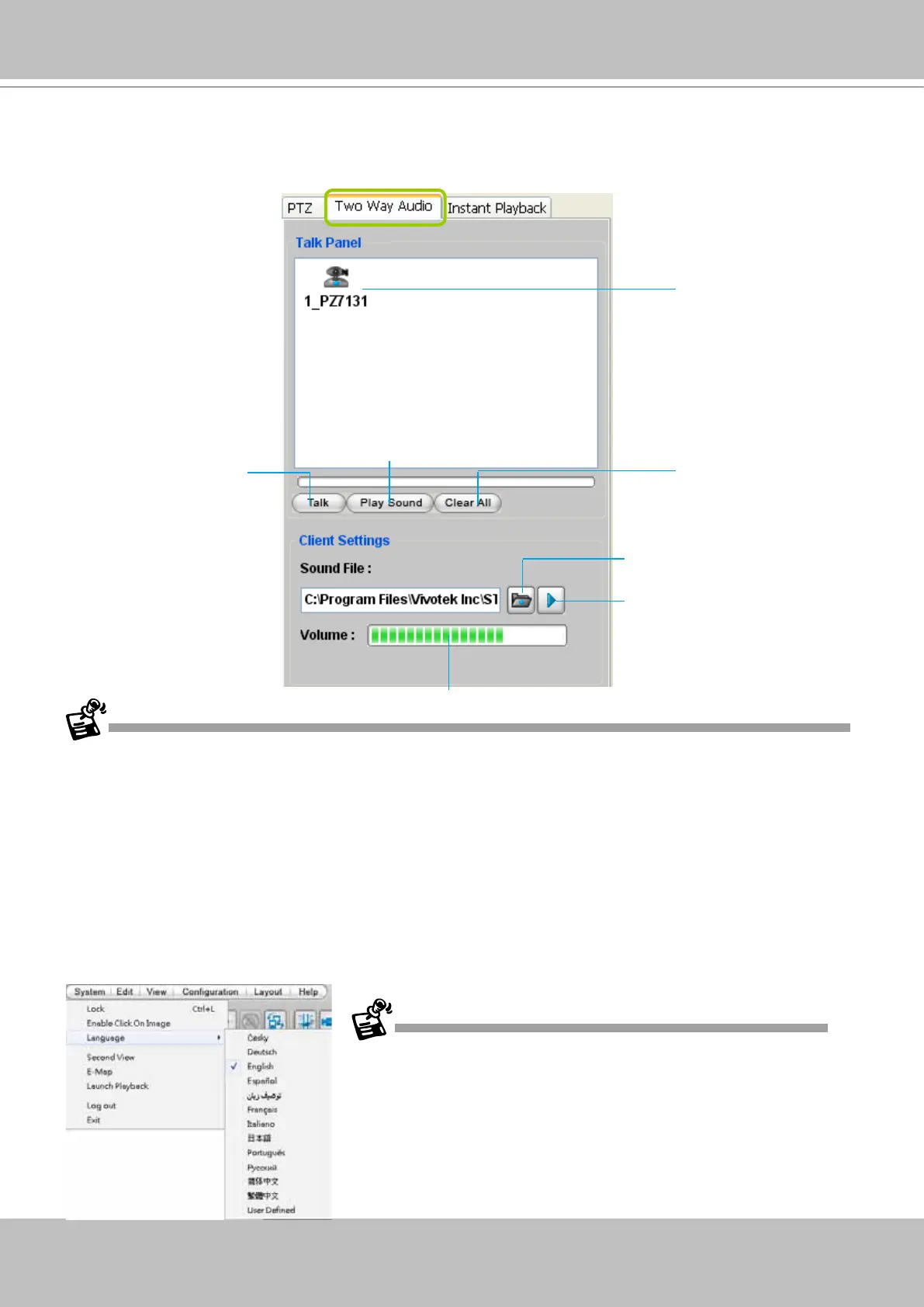
Two Way Audio Control Panel
The two way audio function allows the user to remotely communicate with people nearby the
network camera.
For detailed information about How to Use the Talk Panel, please refer to page 186.
Only cameras that come with the two way audio function can be added to the Talk Panel.
Language Selection
VAST currently supports multi-lingual user interfaces including:
English, Česky, Deutsch, Espa-
ñol, Farsi, Français, Italiano,
日本語
, Português, Русский,
簡体中文
,
繁體中文
. If you want to select
another language for the interface, please click System > Language on the menu bar to select
the desired language. Please note that if you want to change the language option, a message
will prompt to remind you to restart the system.
Remove all cameras
from the Talk Panel
Click to play sound from the camera
Click to talk
Click to adjust volume
Selected device that
can use the two way
audio function
Click to play the selected
sound on the client's side
If you want to use "User Dened" language, please prepare images and
language strings, and upload the les to the following folders:
...\VAST\Client\LiveClient\language\zz_UD (language string)
...\VAST\Client\LiveClient\image (images)
Select sound from the
le list



 To Next Page