VIVOTEK - A Leading Provider of Multimedia Communication Solutions
User's Manual - 209
General Settings
This section allows you to congure the System Settings and Rotation Settings.
System Settings
Auto login after logging in to operating system: If you check this option, VAST LiveClient will
automatically login after you login to Windows without filling in the user name and password. This
function is disabled as default.
Automatically display in full screen after login: If you check this option, the video cells will be displayed
in full screen without showing the menu bar or the control panels.
Auto add newly-inserted camera to video cell: If you check this option, VAST LiveClient will
automatically add the newly-inserted device to a video cell. This function is enabled as default.
Retrieve RTSP streaming on specific port: The default port for RTSP streaming is 4543. If you want to
change this port, please check this item and fill in a desired port number.
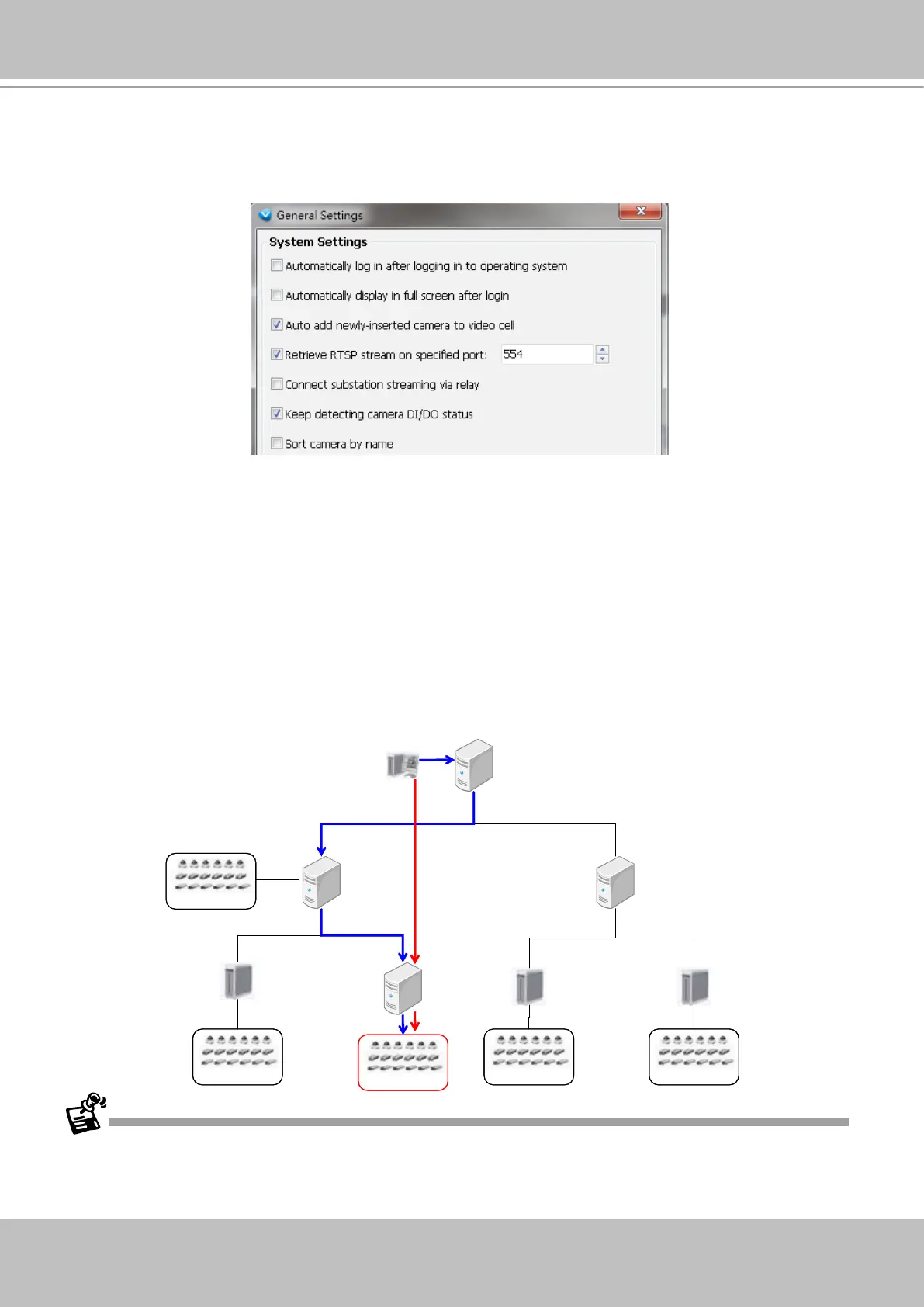
Setup substation streaming via relay: This option is not checked by default. As the following diagram
shows, VAST Client might directly connect to the streaming under VAST Server 3-2 without requesting
the connection via VAST Server 1 and Server 2-1. If you want to get streaming through relaying,
please check this option.
If the VAST Server 3-2 is set up behind a firewall, the VAST Client will not be able to access the VAST Server 3-2
directly. You have to get the connetion by relaying.
VIVOTEK IP CameraVIVOTEK IP Camera
ST7501
Server 3-1
VAST
Server 1
VAST
Client
VAST
Server 2-1
VIVOTEK IP CameraVIVOTEK IP Camera
VAST
Server 3-2
VIVOTEK IP CameraVIVOTEK IP Camera
VIVOTEK IP CameraVIVOTEK IP Camera
ST7501
Server 3-3
VAST
Server 2-2
VIVOTEK IP CameraVIVOTEK IP Camera
ST7501
Server 3-4
manages 2 sub-stations



 To Next Page