VIVOTEK - A Leading Provider of Multimedia Communication Solutions
User's Manual - 87
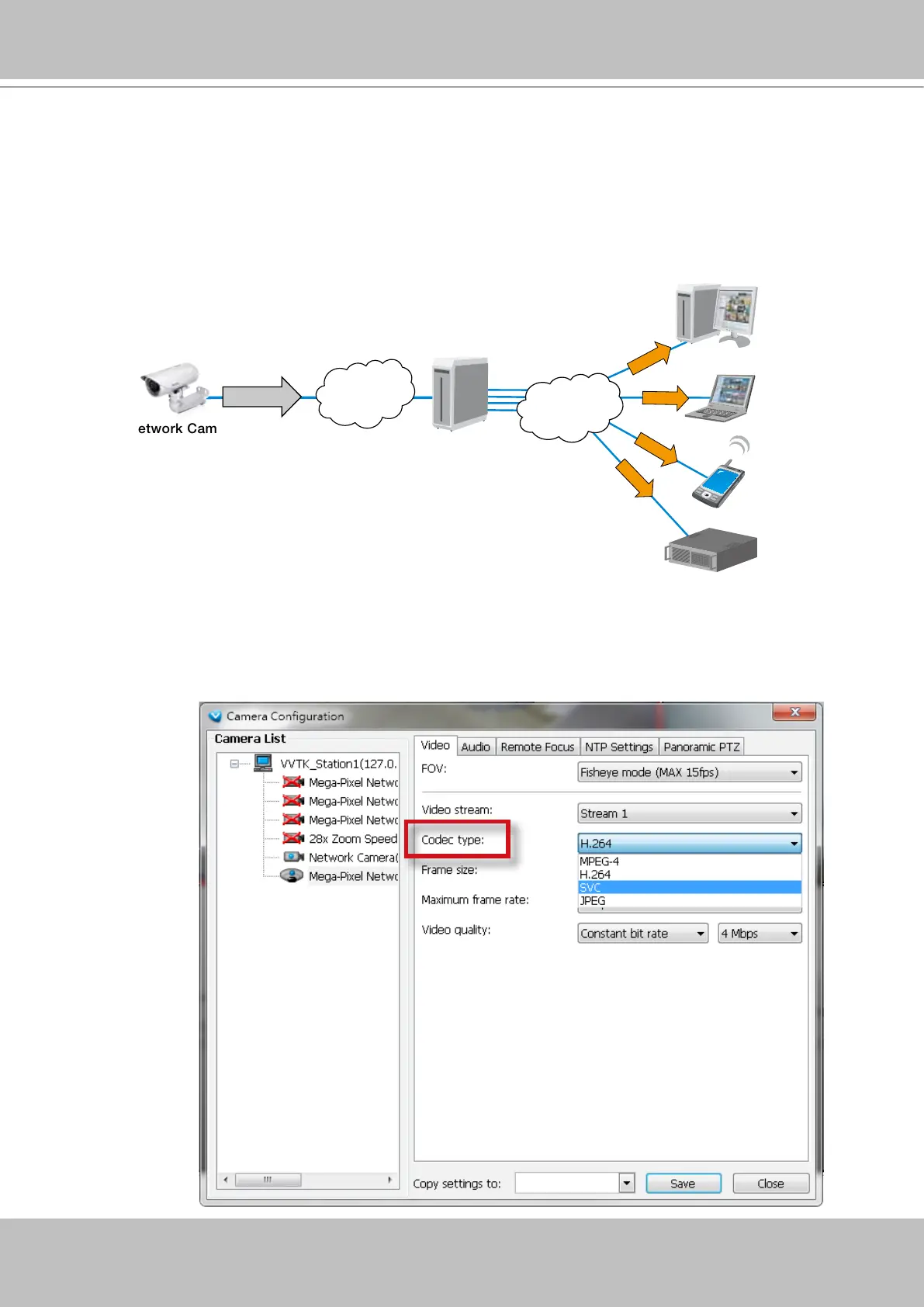
Enable SVC
If the camera to-be-added supports the latest SVC (Scalable Video Coding) feature, select the
SVC checkbox to enable the related control. The SVC feature enables streaming of videos for
multiple clients from one single set of layered IP packets. Designed for saving bandwidth and
CPU load on client stations, the frame rate of a video stream appearing through a view cell
can be individually adjusted. This feature applies when an administrator experiences unstable
video streaming due to the lack of network bandwidth, less-than-ideal hardware, or during an
occurence of network problems.
The VAST server (rev. 1.6.1 and later) automatically negotiates with a camera and determines
whether a network camera comes with the SVC feature.
To congure the SVC-related feature:
1. When inserting a new camera into your conguration, select the streaming option, usually the
stream #1.
VAST Server
Notebook
3G Cell Phone
Client PC
5fps
25fps
30fps
LAN
NVR Storage
60fps
LAN/WAN
SVC Packet
Stream
on Demand
Stream
on Demand
Stream
on Demand
Stream
on Demand
Network Camera



 To Next Page