VIVOTEK - A Leading Provider of Multimedia Communication Solutions
282 - User's Manual
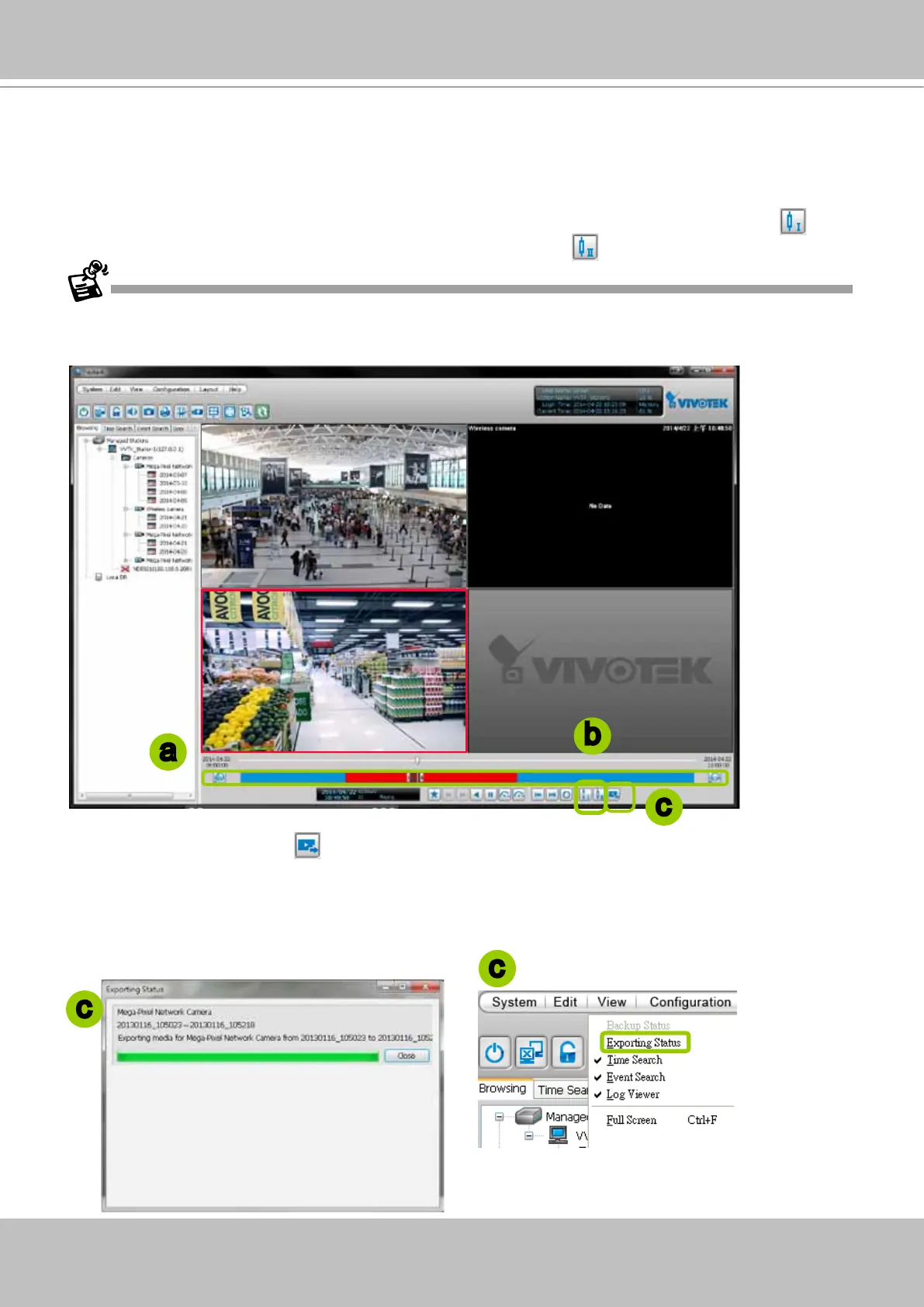
Export an EXE/3GP/AVI File
Please follow the steps below to convert part of an EXE/3GP/AVI le of recorded video:
a. Playback a video clip from which you want to export a media le.
b. Set a period of time. Move the timeline slider bar to the desired start time and click Marker I
. Move
the timeline slider bar to the desired end time and click Marker II
.
c. Click Export EXE/3GP/AVI
, the server will start to export the data and popup a window showing
the exporting status. If you close the status window, you can also open it again by clicking View >
Exporting Status.
d. When the export is complete, you will see an information dialog. The exported data will be restored in
the preset storage folder on your local computer (C:\ProgramData\Documents\VIVOTEK Inc\VAST\
Client\PlayBack\Export).
a
b
c
c
c
Currently exporting video les from the NVR series is not supported.



 To Next Page