EVENT TAGS FLEET MANAGER UTILITY
100
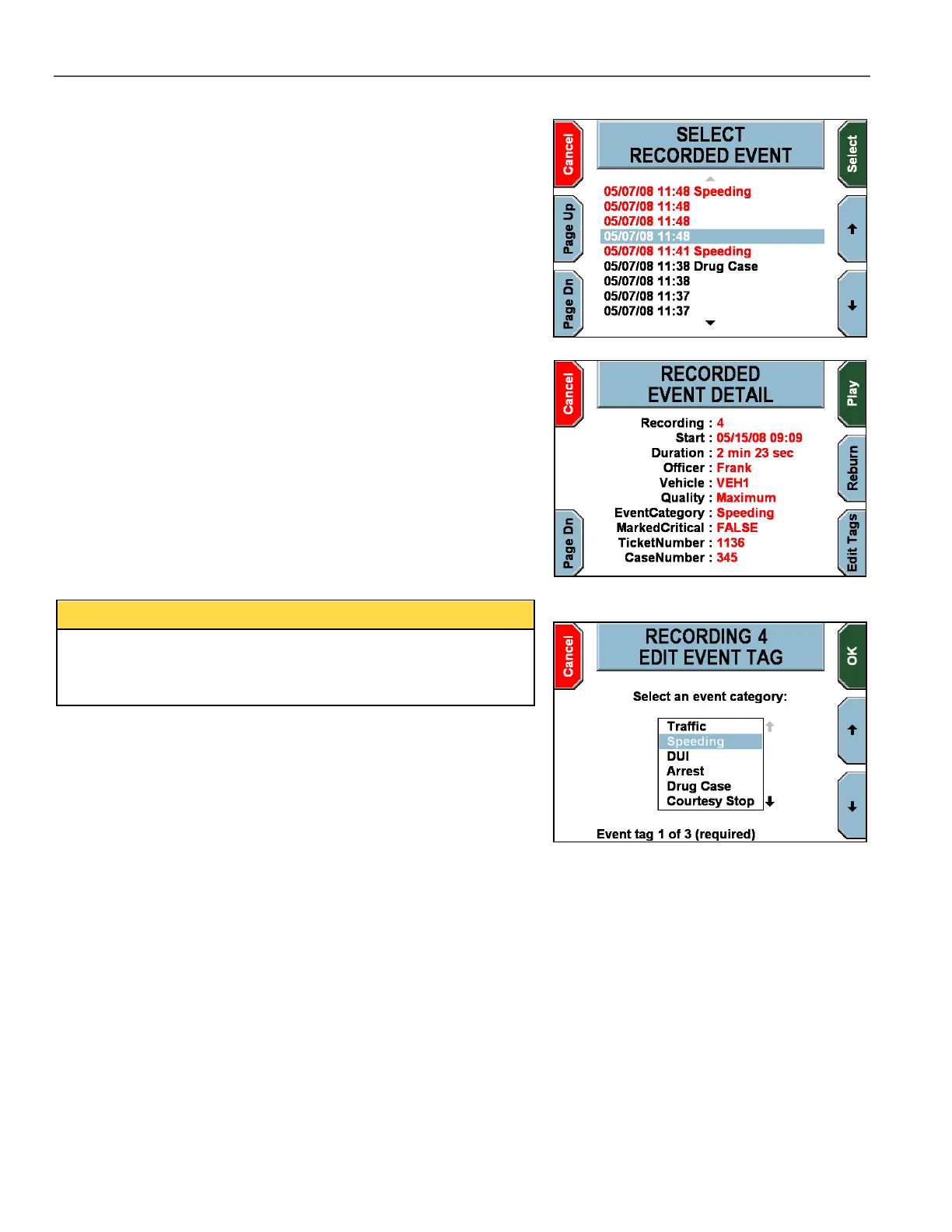
The SELECT RECORDED EVENT screen is displayed.
Press the and
keys to highlight the recorded event to review.
Press Page Dn & Page Up to scroll to the next 10 recorded
events. Red items are editable and black items are not.
Press Select to review the recorded event’s details and/or playback
the recorded event.
Press Cancel to return to the video review screen.
The RECORDED EVENT DETAIL screen is displayed, which shows
details about the highlighted recorded event.
Press Page Dn to display additional details about the recorded
event. Press Play to play the recorded event. Press Reburn to burn
the event to a DVD.
Press Edit Tags to edit the event tags for the recorded event
displayed. This key is only available for recorded events that have
event tags associated.
Actual event tag prompts will vary, but the basic navigation through
the screens is the same. The following example has 3 event tag
screens. The first two answers are required, and the last one is
optional.
The first EDIT EVENT TAG screen is displayed.
On this example screen, the officer must press the and
keys to
highlight a new event category.
Press OK to advance to the next screen, or Cancel to exit without
making any modifications.



 To Next Page