CHAPTER 6 - DETAILED PARAMETER DESCRIPTION
112
Range
[Factory Setting]
Parameter Unit Description / Notes
The Keypad can not be operated while it is executing the read or
write procedures.
NOTES!
1) IftheKeypad(HMI)hassavedparametersofa“dierent
version” than that installed in Soft-Starter SSW-06 to which it
is trying to copy the parameters, the operation will not be exe-
cuted and Soft-Starter SSW-06 will display error E10 (Error:
CopyFunctionnotpermitted).“DierentVersion”arethose
thataredierentin“x”or“y”,supposingthatthenumbering
of Software Versions is described as Vx.yz.
2) This function changes all SSW-06 parameters to the new
values.
ItallowstheadjustmentoftheLCDDisplaycontrast,asafunction
of the viewing angle. Increase/decrease the parameter content until
the best contrast is obtained.
P218 0 to 150
LCDDisplay [127]
ContrastAdjustment -
DenesthecommandsourcethatwillselectbetweentheLOCAL/
REMOTE operation.
P220
(1)
0 to 10
LOCAL/REMOTE [2]
Source Selection -
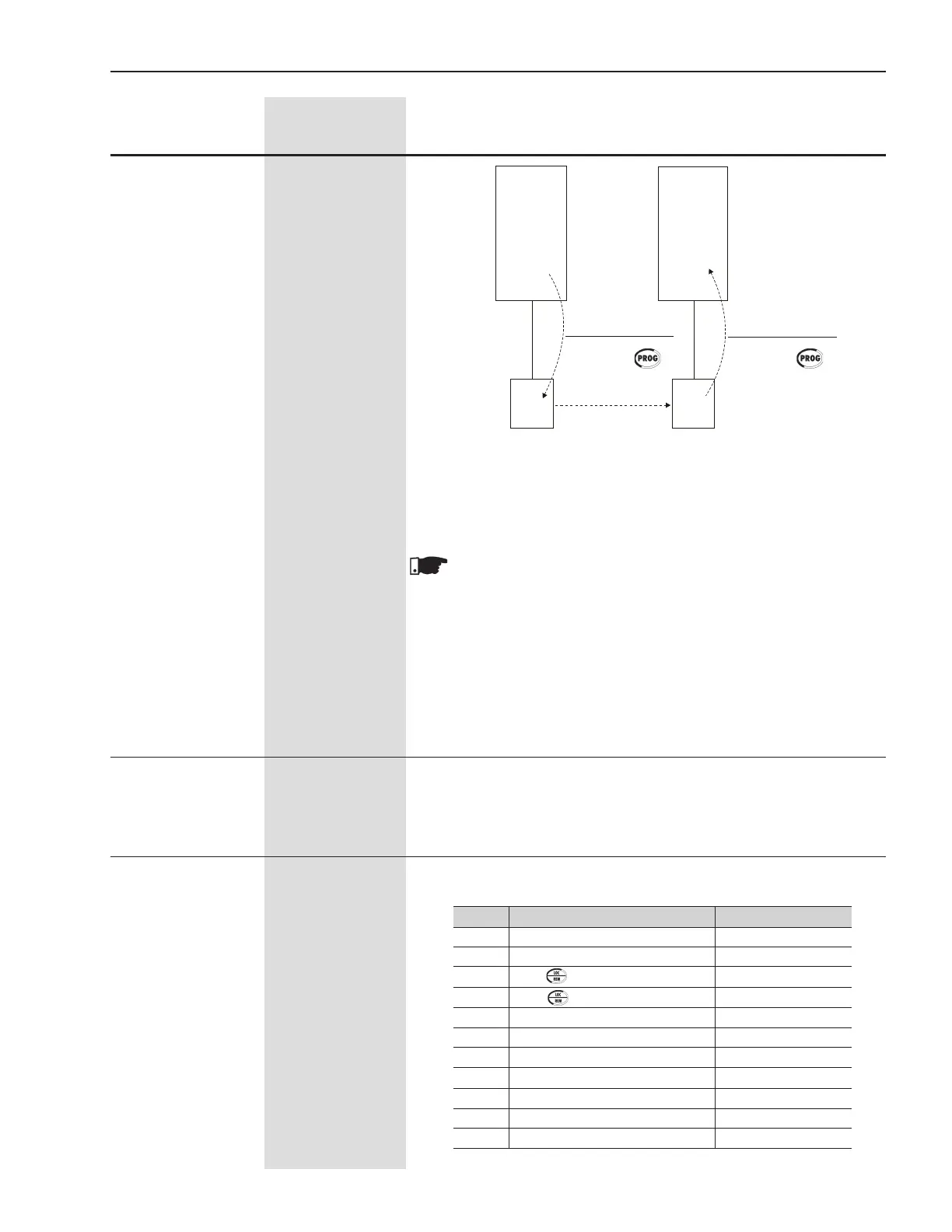
Soft-Starter
A
Parameters
Soft-Starter
B
Parameters
SSW → HMI (copy) HMI → SSW(copy)
Figure 6.12 - Parameter Copying from “Soft-Starter A” to “Soft-Starter B”
EEPROM EEPROM
HMI HMI
P215=1
Press.
P215=2
Press.
P220 Local/RemoteSelection DefaultCondition
0 AlwaysLocalCondition Local
1 Always Remote Condition Remote
2 KeyoftheKeypad Local
3 Key of the Keypad Remote
4 Digital Inputs DI4 ... DI6 (P266 ... P268)
5 SerialCommunication Local
6 Serial Communication Remote
7 FieldbusCommunication Local
8 Fieldbus Communication Remote
9 SoftPLC Local
10 SoftPLC Remote
Table 6.25 - LOCAL/REMOTE Selection


 To Next Page