CHAPTER 6 - DETAILED PARAMETER DESCRIPTION
113
Range
[Factory Setting]
Parameter Unit Description / Notes
Default condition = when Soft-Starter SSW-06 is powered-up (start-
-up).
In the factory default setting, the key of the Keypad will select
LocalorRemoteMode.Whenpoweredup,theSoft-StarterSSW-06
startsinLocalmode.
Defines the origin of the Soft-Starter SSW-06 enable/disable
commands.
P229
(1)
0 to 4
LocalStatus [0=HMI]
Command Selection -
P230
(1)
0 to 4
Remote Status [ 1=Digital Inputs ]
Command Selection -
P229/P230
0
1
2
3
4
Origin of the Commands
Keypad (HMI)
Digital Inputs DIx
Serial Communication
FieldbusCommunication(DeviceNetorProbusDP)
SoftPLC
Table 6.26 - Command Selection
Table 6.27 - FWD/REV selection
P231
0
1
2
Action
Inactive
By Contactor
JOG Only
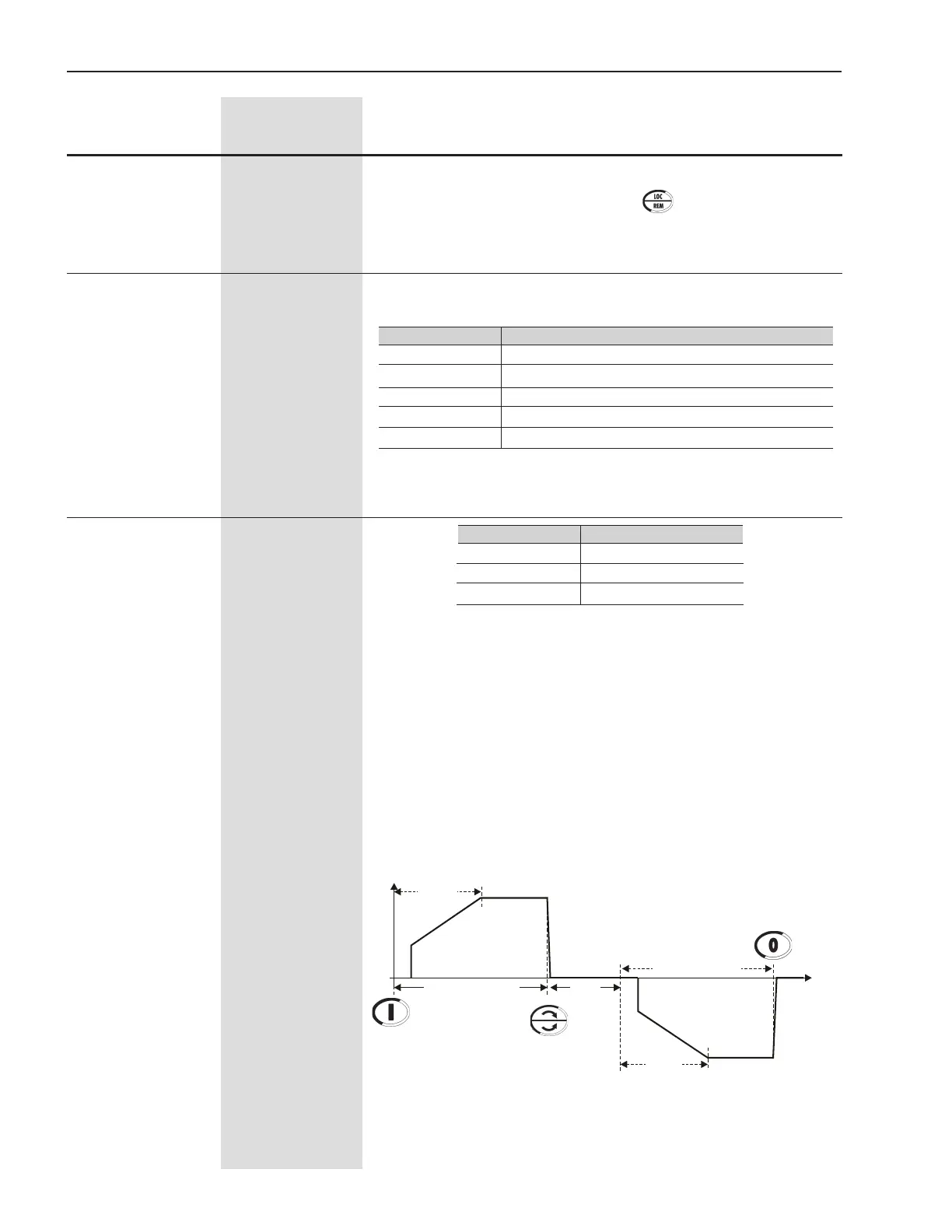
“By Contactor”
This option enables the possibility of changing the direction of ro-
tation via contactors connected at the input power supply.
The new method implemented in the Soft-Starter SSW-06 allows the
use of only two contactors to change the motor direction of rotation
and isolate the power supply at the same time.
Possibility of changing the direction of rotation with inside delta
motor connection.
When the motor is stopped the contactors are opened. When the
motorisenabledthedirectionspeciccontactorisenabled.
P231
(1)
FWD/REV Selection
0 to 2
[ 0=Inactive ]
-
Figure 6.13 - Change of rotation via contactor
Enable
U(V)
100%Un
t(s)
0
100%Un
Start
Disable
P630
FWD/REV - K1 Closed
FWD/REV - K2 Closed
Start


 To Next Page