42 2599440000/00/04.2019
Installation
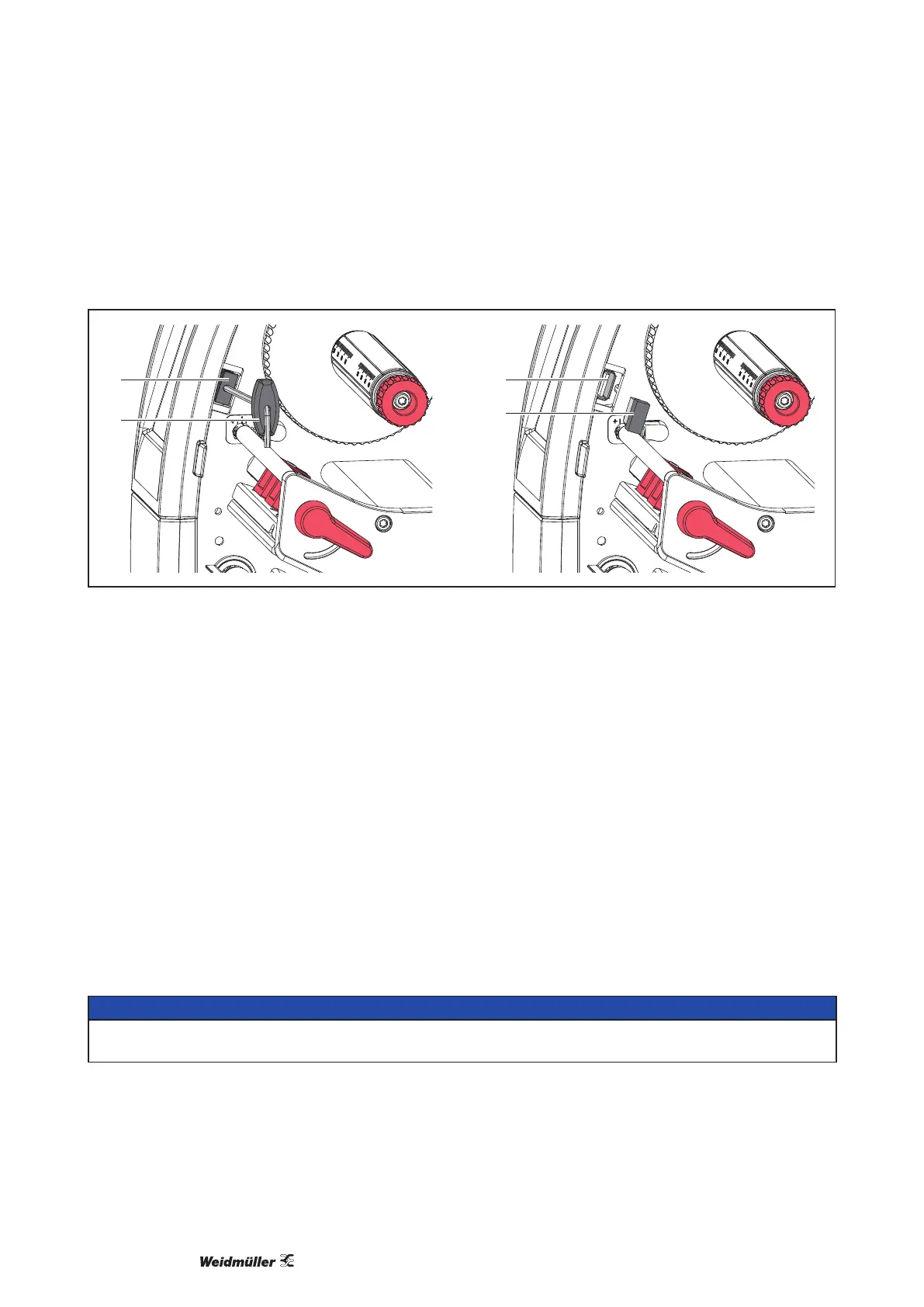
2.3 Installing the Wi-Fi stick
1
2
3
4
Figure 4 Installing the Wi-FI stick
f Remove the cover (1) with the Allen key (2).
f Connect the Wi-Fi stick (4) to the USB interface (3) in the control panel.
2.4 Connecting the Device
The standard available interfaces and connectors are shown in „Figure 3 Connections“.
2.4.1 Connecting to the Power Supply
The printer is equipped with a wide area power unit. The device can be operated with a supply voltage of 230
V~/50 Hz or 115 V~/60 Hz without adjustment.
f Checkthatthedeviceisswitchedo.
f Plugthepowercableintothepowerconnectionsocket(gure3Connections).
f Plug the power cable into a grounded socket.
2.4.2 Connecting to a Computer or Computer Network
ATTENTION!
Inadequate or no grounding can cause malfunctions during operations.
Ensure that all cables connected to the label printer are grounded.
• Connect the label printer to a computer or network by a suitable cable.
Fordetailsofthecongurationoftheindividualinterfaces→CongurationManual.



 To Next Page
 Loading...






