July 2019
4-28
Xerox® B210 Service Manual
REP 4.10
Initial Release
Repairs - Adjustments
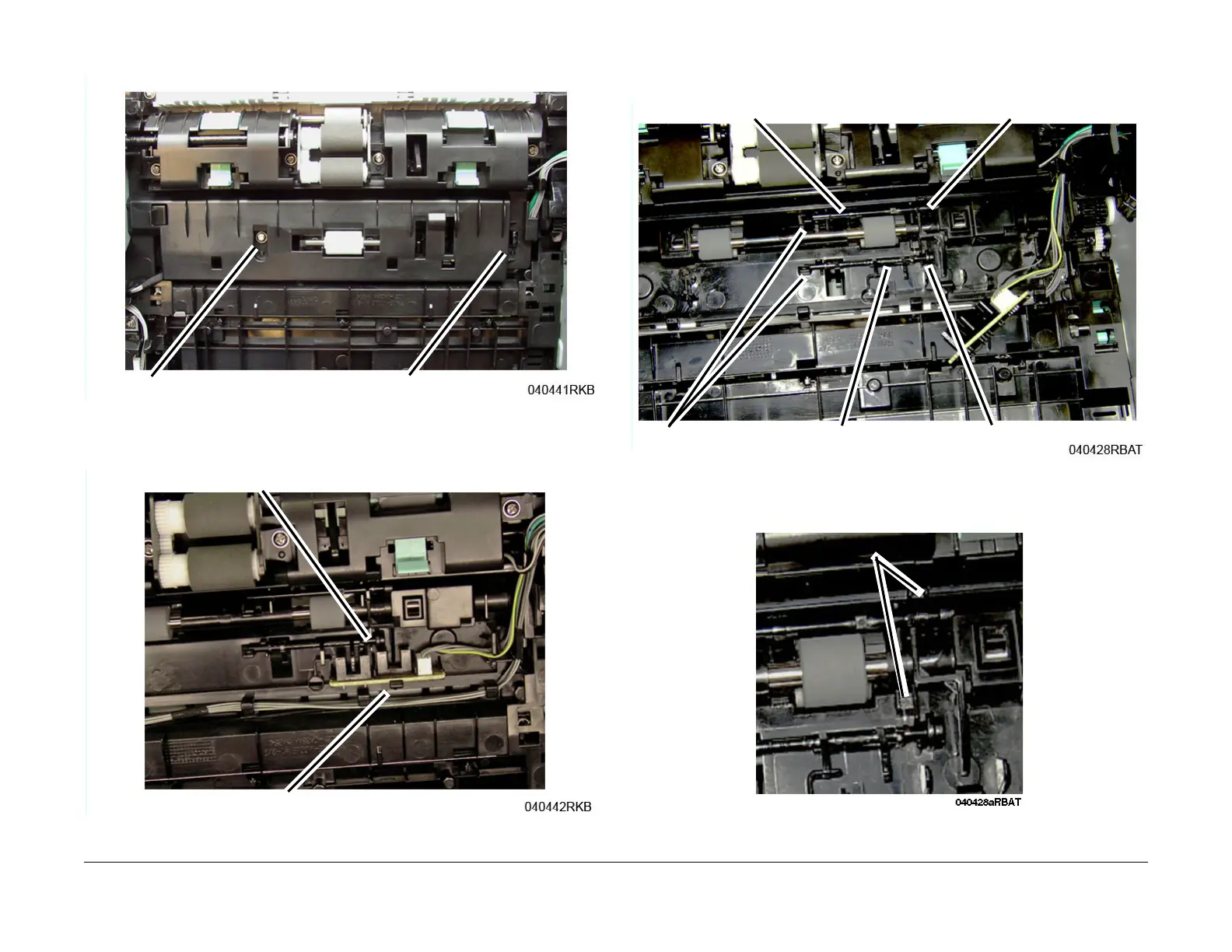
5. Remove the screw, then remove the Feed and Registration Sensor PWB Cover, Figure 2.
Figure 2 Feed and Reg Sensors PWB Cover (Bottom View)
6. Release the latch, then remove the Feed and Registration Sensor PWB, F
igure 3.
Figure 3 Feed and Registration Sensors PWB (Bottom View)
7. Release the actuator from the latch, then remove the Feed and Registration Sensor Actu-
ators, F
igure 4:
Figure 4 Feed and Registration Sensors Actuators (Bottom View)
Note the location of the Spring in the frame cutout for reinstallation, F
igure 5.
Figure 5 Actuator Spring Cutouts (Bottom View)
Feed Sensor Actuator
Latch
Spring
Reg Sensor Actuator
Spring


 To Next Page
 Loading...