Troubleshooting
Paper Jams
This section includes:
• Locating Paper Jams .......................................................................................................................................................... 197
• Minimizing Paper Jams ..................................................................................................................................................... 198
• Clearing Paper Jams ........................................................................................................................................................... 199
• Troubleshooting Paper Jams .......................................................................................................................................... 210
• Print-Quality Problems ...................................................................................................................................................... 212
• Copy and Scan Problems.................................................................................................................................................. 218
• Fax Problems ......................................................................................................................................................................... 219
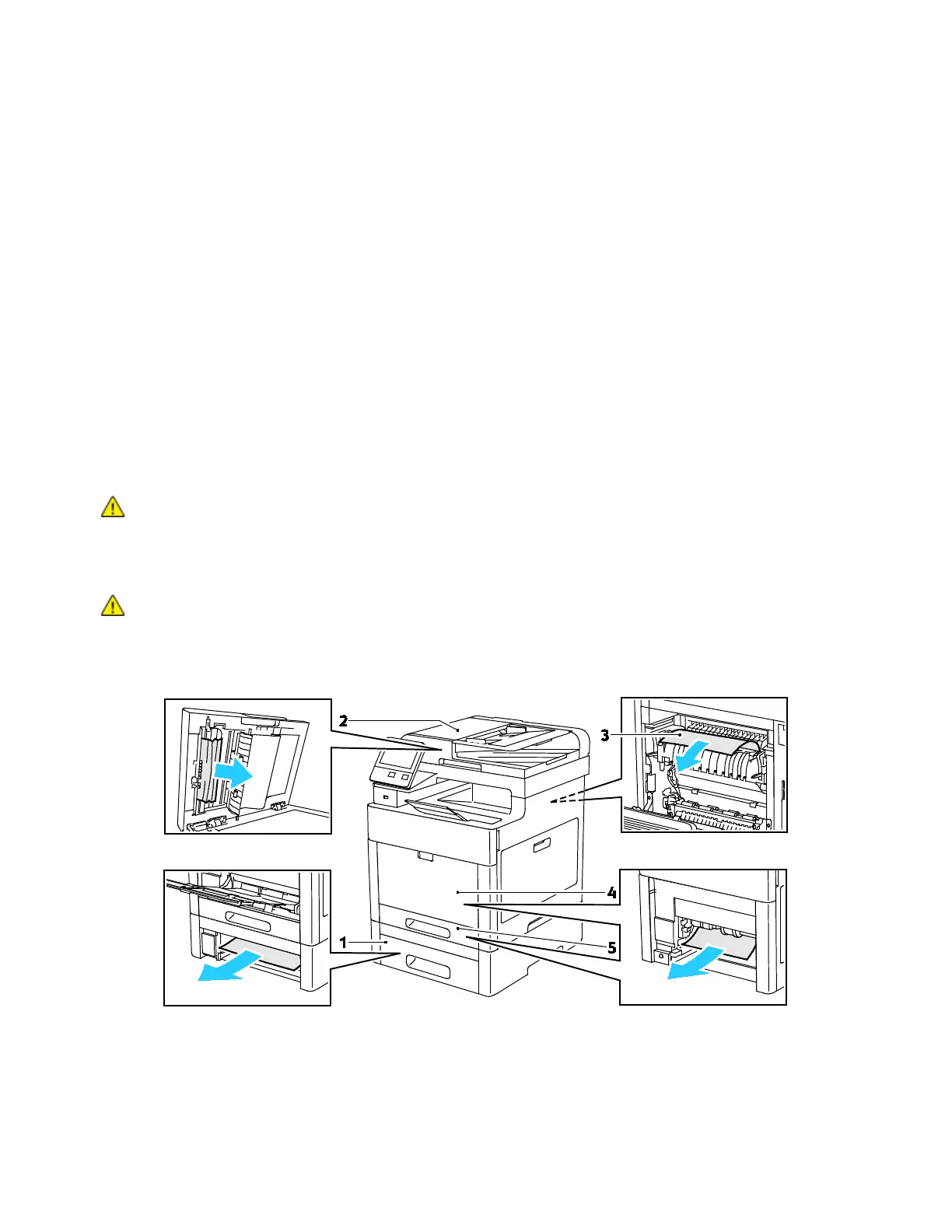
Locating Paper Jams
WARNING: Never touch a labeled area on or near the heat roller in the fuser. You can get burned.
If a sheet of paper is wrapped around the heat roller, do not try to remove it immediately. Switch
off the printer immediately and wait 40 minutes for the fuser to cool. Try to remove the jam after
the printer has cooled. If the error persists, contact your Xerox representative.
CAUTION:
Do not attempt to clear any paper jams using tools or instruments, which can damage
the printer permanently.
The following illustration shows where paper jams can occur along the paper path:
Xerox
®
WorkCentre
®
6515 Color Multifunction Printer 197
User Guide



 To Next Page
 Loading...