XT2640OperatingManual 13July2016 Page117of187
23 USINGAUSBDRIVE
TheFrontPanelUSBPortcanbeusedwithaUSBDriveformanypurposes,amongwhichare–
Exportingtheconfigurationasanimportablebinaryfile.
Exportingthecustomscreendefinitionasanimportablebinaryfile.
ExportingtheVoltsandAmpsHarmonicsLimitsasanimportablebinaryfile.
Exportingallmeasurements(includingharmonicslistings)toafileintabularASCII(CSV)format.
ExportingVolts,AmpsandWattsharmonicslistingstoafileintabularASCII(CSV)format.
ExportingVolts,AmpsandWattsspectrumlistingstoafileintabularASCII(CSV)format.
ExportingVoltsandAmpssinglecyclewaveformstoafileintabularASCII(CSV)format.
ExportingVoltsandAmpswaveformscapturedbySCOPEVIEWtoafileintabularASCII(CSV)format.
ExportinghistoricallyloggedselectedmeasurementstoafileintabularASCII(CSV)format.
ExportingabinaryimagefileinBMPformatofmostscreens.
DataLoggingselectedmeasurements(includingharmonicslistings)toafileintabularASCII(CSV)orabinaryformat.
Importingapreviouslysavedbinaryconfiguration.
ImportingapreviouslysavedbinaryorusergeneratedASCII(CSV)customscreendefinitionfile.
ImportingpreviouslysavedbinaryorusergeneratedASCII(CSV)Voltsand/orAmpsHarmonicLimitsfile.
Importingfactoryupdates.
23.1 DRIVECOMPATIBILITY
AwidevarietyofdrivesarecompatiblewiththeXT2640.Thesemustmeetallofthefollowingrequirements‐
ThedrivemustbedirectlyconnectedtotheFrontPanelUSBPort,ahubmustnotbeusedandanextensioncableisnot
recommended.
MeettherequirementsoftheUSBMassStorageClassspecificationandbeasinglephysicaldrive(somemulti‐driveconvertors
cannotbeused).
MeetUSB2.0orhigherusingfull‐speed(notethatifmarkedasHighSpeedthenitalsomeetstheFullSpeedrequirement).
Requirelessthan500mAofpowerfromtheUSBport(someUSB3.0drivesdonotmeetthisrequirement).
Thedrivemustuse512bytespersector(thisisarequirementoftheUSBMassStorageClassbutthereareafewdriveswhich
donotusethissectorsize).
Thedrivemaybepartitioned,butonlythefirstFAT32(asdefinedbyMicrosoft)partitionwillbeusedanditmustbe<4Tbin
size.Inmostcasesyoucanreformatthedrivetomeetthisrequirement.Generally,drivesorpartitions<1Gbytecannotbe
formattedwithFAT32however.
23.2 CHECKING DRIVECOMPATIBILITY
IfadriveiscompatiblewithacomputerthatdoesnotnecessarilymeanthatitwillbecompatiblewiththeXT2640andviceversa.
TheXT2640requiresthedrivetomeetasmallsub‐setofthestandards,soevendrivesthatdonotfullymeetthestandardsareoften
compatible.
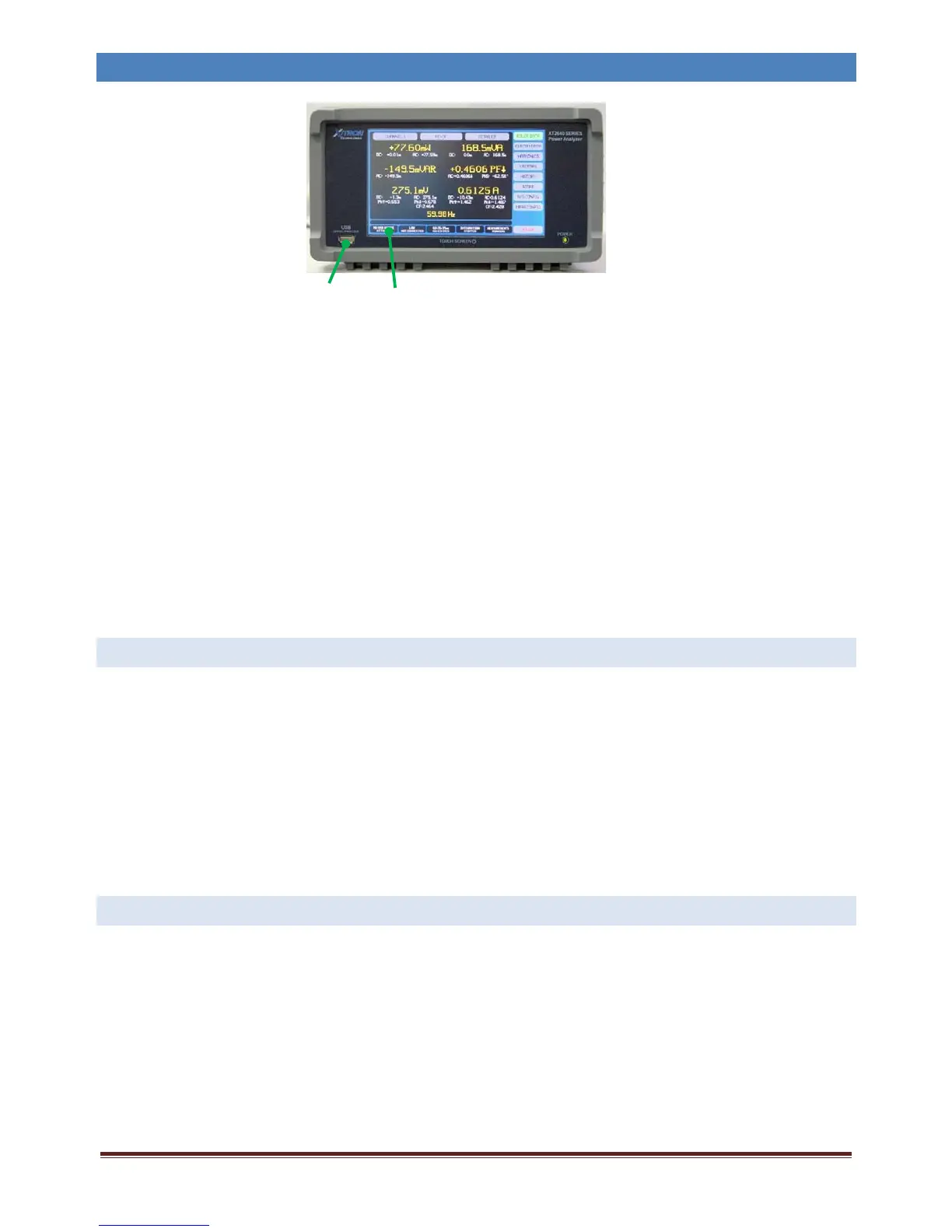
ThebestmethodtocheckifadriveiscompatiblewiththeXT2640istoinsertitintothefrontpanelUSBdriveport.TheUSBDrive
InfoareaonanymainscreenoftheXT2640showstheconnectionstatus.
Theindicationsareasfollows(assumingnodataloggingisactive)–
NOUSBDEVICEATTACHED. TheXT2640hasnotdetectedthatanydeviceisattached,typicallytheXT2640willdetectadeviceis
attachedwithinabout1second,ifthedriveisattachedbuttheXT2640remainsshowingthisforan
extendedperiodoftimethenthedriveisnotcompatiblewithUSB2.0full‐speedoperationand
shouldberemoved.
USBDEVICEATTACHING. ThisindicatesthattheXT2640hasdetectedthedeviceasbeingattachedandisperformingtheinitial
USBenumerationofthedevice.Thistypicallytakesabout1second,butonsomedrivesmaytakea
littlelonger.
USBDrivePort
USBDriveInfoArea



 To Next Page