XT2640OperatingManual 13July2016 Page128of187
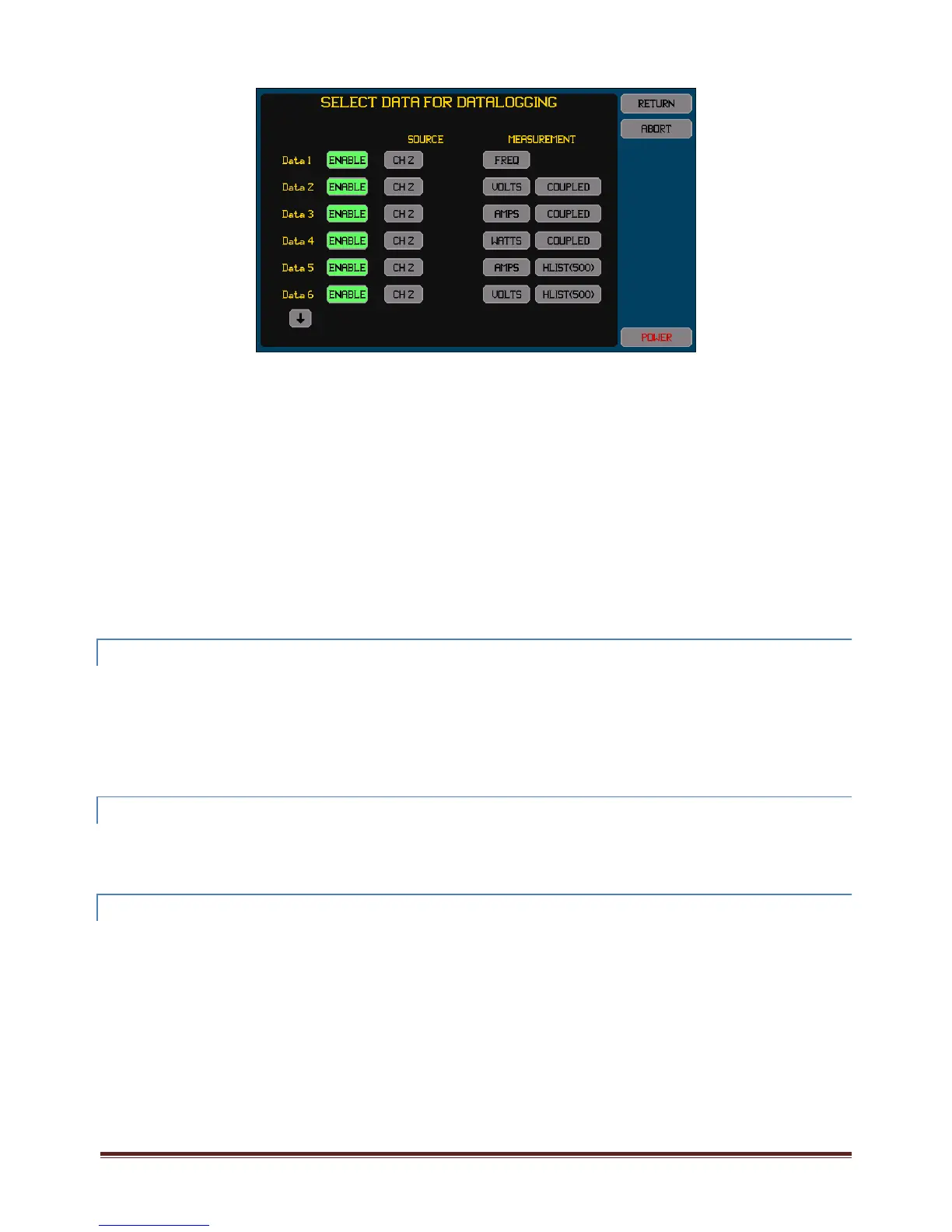
PressingtheSELECTDATAbuttonstartsascreenwhichallowsyoutoenableordisableeachofthe16dataselectionsand,
ifenabled,toselectwhatdatatologforeachdataselection.Thescreenshownbelowisanexampleofthisscreen.
Onlymeasurementswhicharepresentlyconfiguredtobemeasuredcanbeselectedwhileinthisscreen.
EachENABLEbuttonishighlighted(green)ifthedataisenabled;otherwisetheENABLEbuttonisnothighlightedandis
coloredgrey.
IftheSOURCEisselectedtobefromaVPAthenthereisasecondSOURCEbuttonwhichselectswhetherthetotalforthe
VPAorthatfromaspecificphaseoftheVPAistobeused.
IfaharmoniclistisselectedastheMEASUREMENTthenyoumustalsoenterthenumberofharmonicstobelisted.The
listingalwaysincludesthefundamentaluptoandincludingthisenteredharmonic.Ifaharmonicisnotbeingmeasuredat
thedatalogtimethentherespectivedatarecordediszero.
Typicallyeachenabledentryisonefieldinthedatalog;howeverifaharmoniclistingisselectedtheentrywillcreatethe
samenumberoffieldsasthenumberofharmonicssettobelisted.
Youdonotneedtoenableconsecutiveentries;thefilewillonlycontainfieldsforenabledentriesintheorderdefinedand
skipoverentrieswhicharenotenabled.Ifanentryisnotenabled,anypriorselectionofthesourceandmeasurementdata
isstillsaved.Inthismanneryoumayhaveseveraldifferentdataloggingdatasetsandchangebetweenthembychanging
whichentriesareenabled.
PressingtheRETURNbuttonreturnstotheDataLoggingConfigureScreenandsavestheconfigureddataentries,whereas
pressingtheCANCELbuttonreturnstotheDataLoggingConfigureScreenwithoutsavinganychanges.
23.7.4 STARTINGANDSTOPPINGDATA LOGGING
ThisisperformedbyusingtheSTART/STOPbuttonontherightsideofthisscreen.
Note:
Ifadataloghaspreviouslybeenperformedbutnodrivewasinsertedtosavethatdataandthenafurtherdatalogis
started,thedatacapturedbythepriordatalogwillbelost.
Stoppingdataloggingonlystopsthecollectionofdata,thedatasavedinthebufferisstillwrittenouttothedriveorto
internalmemory.YoucanalsostopthisbypressingtheABORTbuttonwhilenotactivelydataloggingbutstillwritingthe
internalbuffer,butdoingsomayproduceapartialfinalrecordintheresultingfile.
23.7.5 CLEARINGTHEDATAFROMACOMPLETEDUNSAVED DATALOG
IfadatalogisperformedtoanexternalUSBdrivebutiscompletedwithoutadrivebeinginsertedtosavethatdatathenthis
preventsanyotherUSBDriveactivity(suchasimportingorexportingafile)frombeingperformeduntilthisdataiseithersavedtoa
driveoritiscleared.ThedatamaybeclearedbypressingtheCLEARbuttonontherightsideofthisscreen.TheCLEARbuttonis
onlyshownwhenadataloghasbeencompletedbutnodatafromithasbeensavedtoadrive.
23.7.6 VIEWINGDATALOGGINGSTATUS
Youcanremainonthisscreen,orcanreturntothisscreen,toshowthestatusofaprogressingdataloggingactivity.
Thestatusinformationshowninthelowerareaofthisscreenis–
Ifloggingtointernalmemory:Theamountofthatmemoryusedandthetotalavailable.
Ifloggingtoanexternaldrive(ortotheinternalbuffer):Thefilenameofthedatalogfileandthepresentsizeofit.
Adescriptionofanyerrorswhichhaveoccurred.
Abarwhichshowstheamountoftheinternalmemorybufferwhichispresentlyused(agreenbargrowingfromtheleftas
morebufferisused),andthemaximumamountused(averticallinewithinthebararea).Ifthisindicatesthatasignificant
amountofthebufferhasbeenused(>75%)thenyoushouldconsidereitherusingafasterdrive,logginglessdata,orusing
alongerdatalogginginterval.
CAUTION:removingadrivewhiledataloggingmaydamagethefilesystemonthedriveandmayrenderthedriveandthedataonit
unusable.Onceinsertedandsavingdatalogdataitmustnotberemoveduntiltheentirefilehasbeenwritten.



 To Next Page