XT2640OperatingManual 13July2016 Page35of187
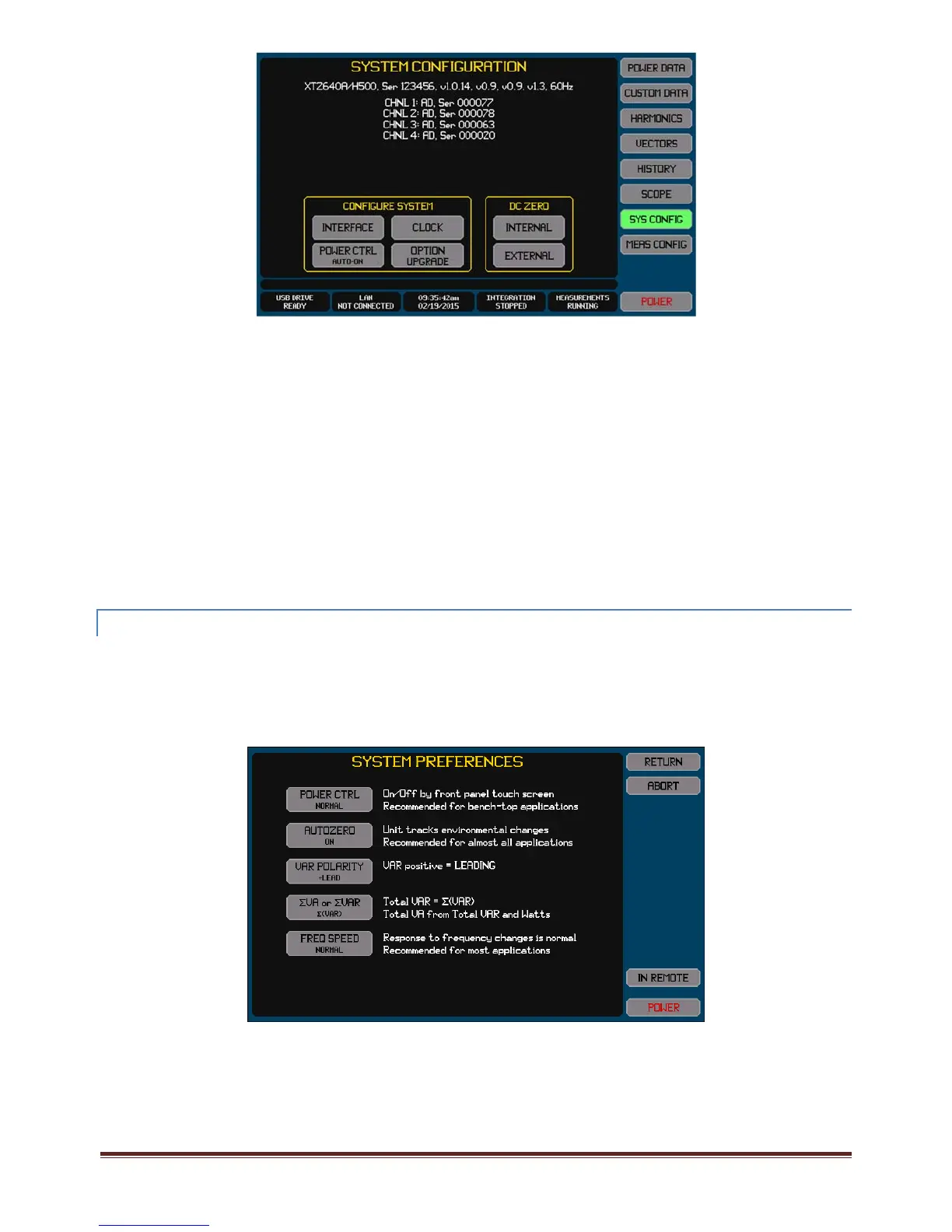
Theuppermostinformationlineshows–
Modelnumberandoptioncontent
Thesecondinformationlineshows(inorderfromlefttoright)–
Unitserialnumber
MainFirmwareversion
FPGAVersion
BootFirmwareversion
PowerManagementMCUFirmwareversion
ThepresentmainssupplyfrequencytotheXT2640(thisisnotanexactmeasurement).
Underthesecondinformationlinethescreenliststhetypeandcurrentoptioninstalledandthechannelserialnumberforeach
channel.
ThebuttonsintheCONFIGURESYSTEMareaallowsyoutosetsystemconfigurationsettingsanduserpreferences(seebelowfor
details).
ThebuttonsintheDCZEROareaallowsyoutoensurethatthecircuitryDCzeroesaresetproperly(INTERNAL)orthatanyexternal
CThasitsDCzerosetcorrectly.Seesection13fordetails.
12.3.1 SETTINGPOWER ANDMEASUREMENTUSERPREFERENCES
PressingthePREFERENCESbuttonontheSYSCONFIGscreeninitiatesthePREFERENCESscreen,anexampleofwhichisshown
below.
Usingthisscreenyoucansetyourpreferenceforhowturningon/offtheXT2640iscontrolledandyouroverallmeasurement
preferences.
Note:
PreferencesotherthanPOWERCTRLcannotbechangedwhileinremote.
Tochangeanyofthesesettingspresstherespectivebutton.Thescreenthenchangestoascreenenablingyoutoselectyour
preferenceforthatsetting.
PresstheRETURNbuttontosaveyourpreferencesandreturntotheSYSCONFIGscreen.PressingCANCELreturnstotheSYS
CONFIGscreenwithoutsavinganychangesyouhavemade.
12.3.1 .1 SELECTINGAPOWERCTRLPREFERENCE
ThePOWERCTRLbuttonallowsyoutoselecthowtheXT2640isturnedonandoff.



 To Next Page