XT2640OperatingManual 13July2016 Page32of187
12 OPERATINGFROMTHEFRONTPANEL
Note:
AllmeasurementsareperformedbytheXT2640withoutregardtowhichscreenisbeingviewed.Althoughsome
measurementscanonlybestartedorstoppedonaspecificscreen,youdonothavetoremainviewingthatscreenforthose
measurementstobeperformed.
12.1 TOUCHPANEL
Throughoutthissectionitisassumedthatyouhavereadthissub‐section.
YouinteractwiththeXT2640entirelythroughtheuseofthetouchpanel,eitherusingthetipofafingerorastylusdesignedforuse
withapressuretypetouchpanel.DONOTUSEAPENORASCREWDRIVERORSIMILARIMPLEMENTWITHSHARPCORNERSASIT
MAYDAMAGETHETOUCHPANEL.Donotapplyexcessiveforcetothetouchpanel,typicallyonlyagentletouchisrequired.While
anytouchisdetectedthePOWERLEDisintensified.
12.1.1 BUTTONS
TheXT2640hasbuttonsonits’screenswhichallowyoutointeractandconfiguretheunit.
PressingabuttonotherthanthePOWERbuttonalmostimmediatelycausesthedesiredactionforthatbutton.ThePOWERbutton
mustbemaintainedpressedforapprox.¾secondfortheactiontobetaken.
Ifabuttoncolorsredwhilepressedthenthatbuttonisdisabled,typicallybecausethereisonlyonechoiceregardingtheselectable
data,ortheXT2640isintheremotestateandpreventingthatconfigurationsettingfrombeingaltered.Otherwiseabuttoncolors
greenwhileitispressed.
Inmanycasesthecolorofabuttonisusedtoindicatewhetherthelabelledconditionisactiveornot.Inthesecasesthebuttonis
coloredwithalightgreencolortoindicatethatthelabelledconditionisactive,otherwiseitisasilvercolor.
Inmanycasesabuttonhastwolinesoftextshownwithinitandtheupperlineisofalargerfontsizethanthelowerone.Inthese
casesthelowerlineoftextshowsthepresentsettingassociatedwiththebutton,whichcanbechangedbypressingthisbutton.In
somecasesthisshowsanassociatedenteredvaluewhichmaybeshownwithlessresolutionthanfortheentryofthatdata,inall
casesthefullresolutionoftheentereddataisused.
Inafewcasespressingabuttoninitiatesaseriesofentries,thecombinationofwhichconfiguresthesettingoractionassociatedwith
thebutton.
Ifthebuttoninitiatestheentryofdataorselectionofachoicethenthatisperformedonanewscreen.
PressingtheRETURNbuttononthedataentry/choicescreeneitherreturnstothescreenfromwhichtheentrywas
initiatedorinitiatesascreenforthenextassociatedentryiffurtherentriesarerequired.
PressingtheCANCELbuttononthedataentry/choicescreendiscardstheentryandanyassociatedentriesmadeand
returnstothescreenfromwhichtheentrywasinitiated.
12.2 MAINSCREENLAYOUT
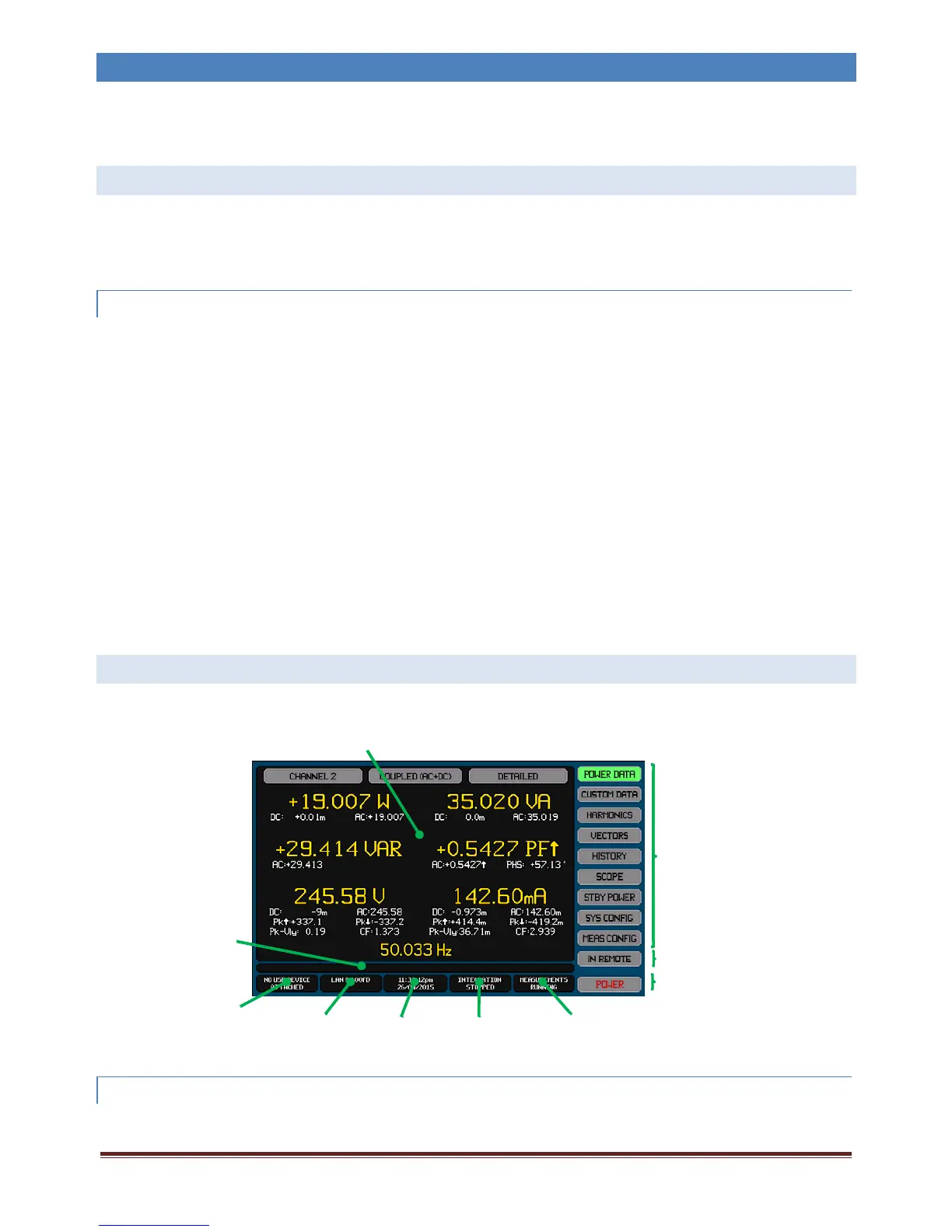
Thereareninemainscreens,ofwhichthePOWERDATAscreenshownbelowisanexample.Allthemainscreenshavethesame
basiclayout.
12.2.1 MAINSCREEN SELECTBUTTONS
Theseninebuttonsallowyoutochoosewhichmainscreenisbeingshown.Theuppersevenselectoneofthemeasurementdata
viewingscreensandtheXT2640willalwayspowerondisplayingthelastoneoftheseselected.Whichmainscreenispresently
selectedisshownbytherespectivebuttonbeinghighlighted.
Data Area
Main
Screen
Select
Buttons
Remote Button
Power Button
USB
Drive
Info Area
Interface
Info Area
Time and
Date
Info Area
Integration
Info Area
Measurement
Info Area
Error
Info
Area



 To Next Page