XT2640OperatingManual 13July2016 Page55of187
12.7.2 COMPARINGHARMONICSAGAINSTLIMITS
TheXT2640hastheabilitytocomparevoltageandcurrentharmonicsagainstlimitssetforeachharmonicindependentlyforvoltage
andcurrent.
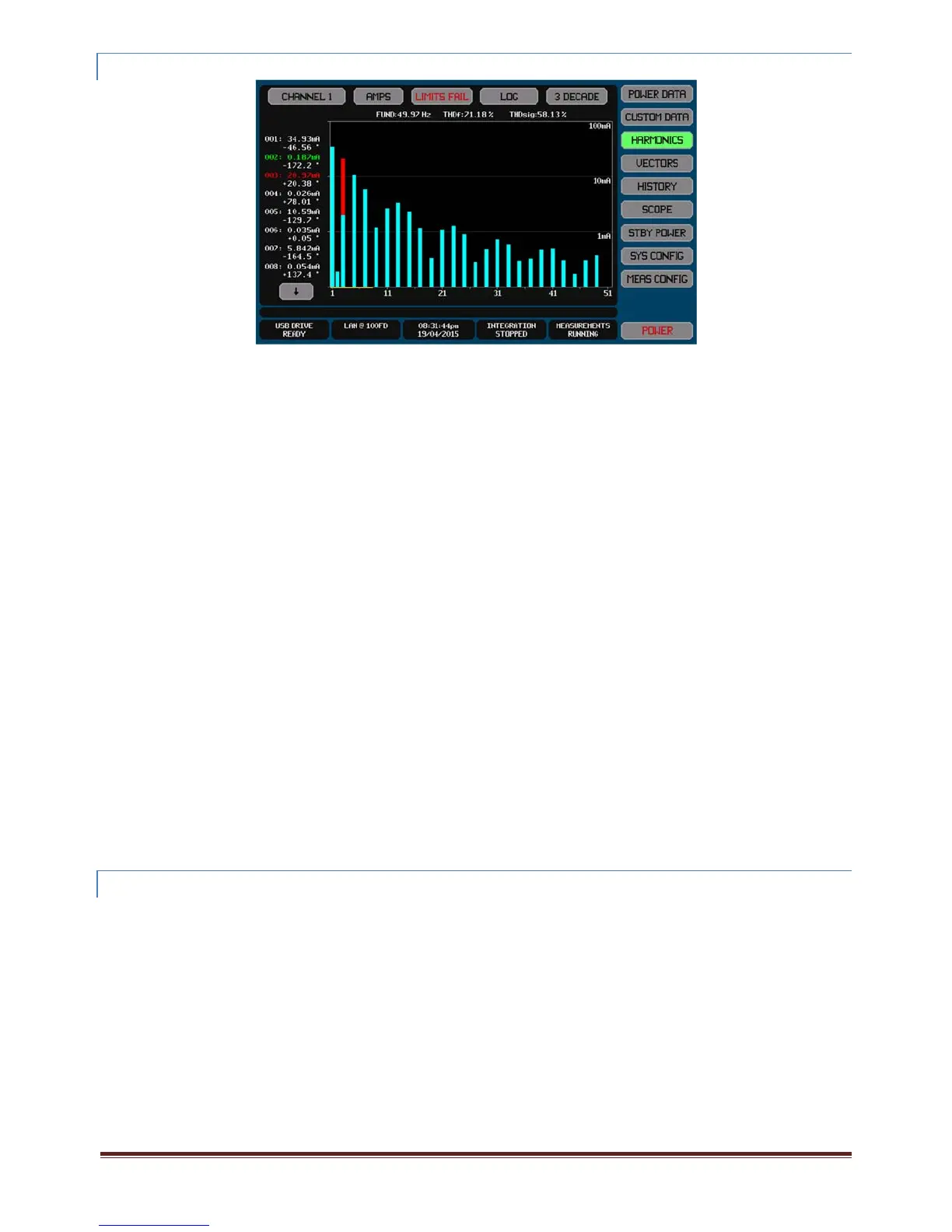
Iflimitsareenabledtobeshownthen‐
Thebarchartincludesaredlineindicatingthelimitforeachcheckedharmonic
Colorstheportionofanyfailingharmonicbarasredabovethelimit(theexampleaboveshowsthis)
Colorsthenumericallistingforeachcomparedharmonicaseithergreen(pass)orred(fail)orwhite(notchecked)
Showstheoverallpass/failstatusintheLIMITbutton(coloredredorgreen)
Intheexampleshownaboveonlythe2
nd
and3
rd
harmonicshavelimitsdefinedandthe3
rd
harmonicisfailing.
Note:
WhenconfiguredforEN61000‐3‐2measurementsthenyoucanselectanyoftheclassificationsofEUTspecifiedinthe
standard.Thelimitsemployedare,ifneeded,calculatedfromtheactualcurrent,powerand/orpowerfactor
measurements.Thisisnotaregulatoryassessment,butmaybeusedforinformativepurposes
WhenconfiguredforEN61000‐3‐12measurementsthenyoucanselectanyofthelimitstablesspecifiedinthestandard.
Thelimitsemployedarecalculatedfromtheactualcurrentmeasurements.Thisisnotaregulatoryassessment,butmaybe
usedforinformativepurposes
12.7.2 .1 COMPARINGAGAINS TUSERLIMITS
Inordertocompareharmonicsagainstuserlimitsyoumustdefinethoselimitsasfollows–
1. Createtheharmoniclimitforeachrequiredharmonic.
a. ThiscanbeachievedbyusingtheinterfacetocommandthelimitsdirectlyintotheXT2640,
b. Or,theycanbeexportedfromaXT2640whichalreadyhastheharmonicslimitsdefinedandthenimportingthatfile
intothisXT2640usingaUSBdrive.
c. Or,theycanbeimportedfromanASCIIfileonaUSBdrivewhichhasbeengeneratedbyyou.Seesection21.6.2for
detailsregardingthis.
d. Notethatthisonlyneedstobeperformedonceifthesamesetoflimitsistobeusedrepeatedly.TheXT2640internally
savesthepresentlydefinedsetsofharmoniclimits.
2. OncelimitshavebeendefinedtheXT2640alwayscomparesthemeasuredharmonicsagainsttheselimits,youmayselect
whetherthebarchartandnumericlistingintheHARMONICSscreenincludestheresultsofthosecomparisonsornotby
pressingtheLIMITbuttonontheHARMONICSscreen.
12.7.3 EXPORTINGORRECORDINGHARMONICS
Themethodsforperformingthisarefullydescribedinsection23.
Harmonicsmeasurementscanbeexportedtoa.CSVformattextualfileonanexternalUSBdriveattachedtothefrontpanelUSBport.
ThisfilecontainsatabularlistingofallmeasuredharmonicsinaspecifiedVPA.
Briefly,thisisperformedby–
1. InsertthedriveintothefrontpanelUSBportandwaitforittobeREADY.
2. PresstheDRIVEINFOareaofthescreen,thescreenshowsthefileexport/importscreen.
3. PresstheHARMONICSbutton.Thescreenchangestoallowingyoutoenterafilename.
4. Enterthedesiredfilename(theextensionisautomaticallyprovided).
5. Ifthefilealreadyexiststhenyouarepromptedtorespondifyouwishtooverwriteitornot.
6. IfconfiguredformorethanasingleVPAthenyouarepromptedtoselecttheVPAforwhichtoexporttheharmonics.
7. Thefileisthenwritten.
AlternativelyyoucanmakearecordofanymeasurementscreenbysavinganimageofittoagraphicfileonanexternalUSBdrive
attachedtothefrontpanelUSBport.



 To Next Page