XT2640OperatingManual 13July2016 Page47of187
Alternatively,youcanmakearecordofameasurementconfigurationbysavinganimageoftheMEASCONFIGscreentoagraphicfile
onanexternalUSBdriveattachedtothefrontpanelUSBport.
Briefly,thisisperformedby–
1. InsertthedriveintothefrontpanelUSBportandwaitforittobeREADY.
2. DisplaytheMEASCONFIGscreenshowingtheVPAwhichyouwishtomakearecordof.
3. PresstheDRIVEINFOareaofthescreen,thescreenshowsthefileexport/importscreen.
4. PresstheSCREENIMAGEbutton.Thescreenchangestoallowingyoutoenterafilename.
5. Enterthedesiredfilename(theextensionisautomaticallyprovided).
6. Ifthefilealreadyexiststhenyouarepromptedtorespondifyouwishtooverwriteitornot.
7. Thefileisthenwritten.
12.5 VIEWINGNUMERICALMEASUREMENTS–THEPOWERDATASCREEN
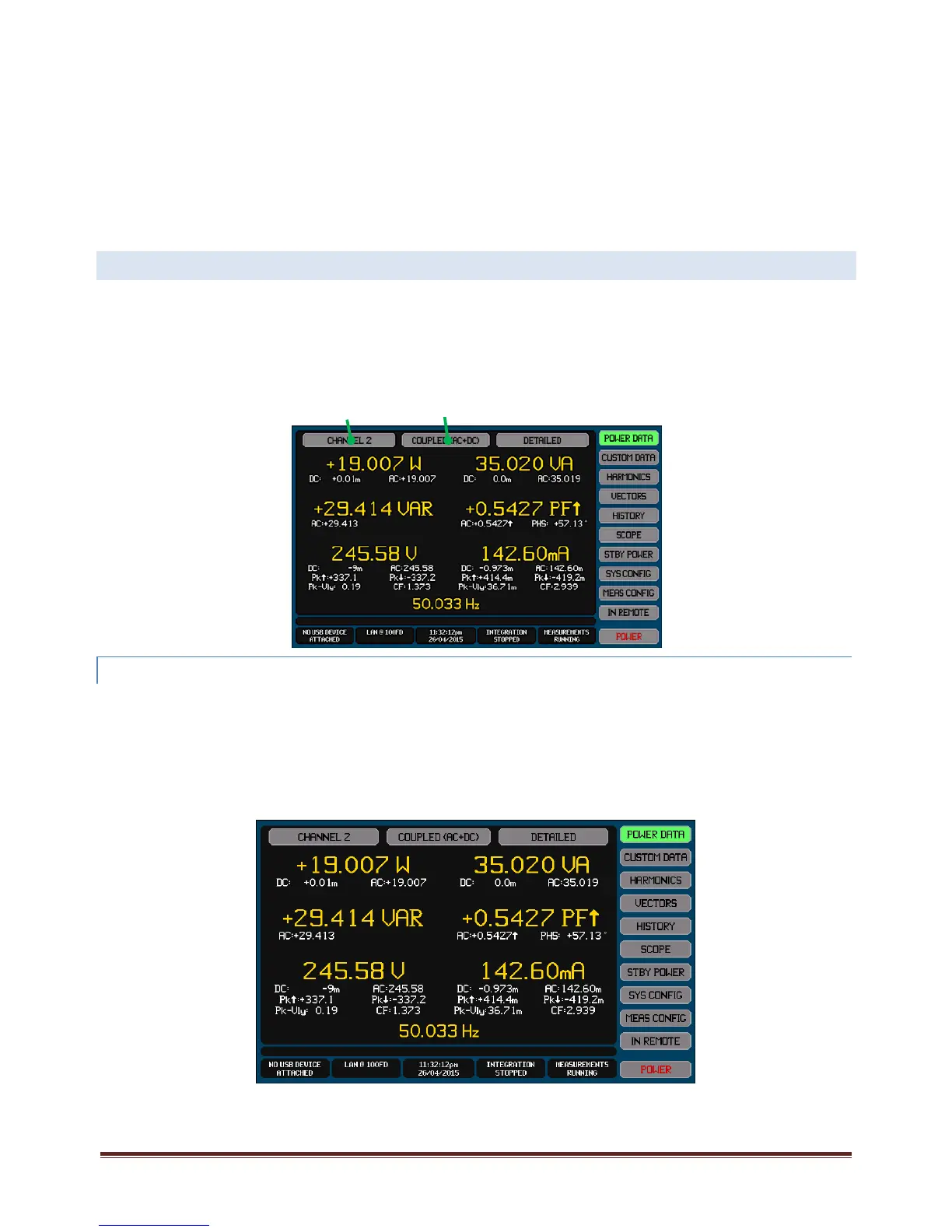
ThePOWERDATAScreencanbeselectedforviewfromanyoftheMainDataScreensbypressingthePOWERDATAbutton.
ThePOWERDATAScreengivesyouaccesstopre‐formattednumericmeasurementresultsforindividualchannelsorVPAs,orto
overallpowerlossandefficiencyresults.
Thereareseveralformatsavailableasdescribedinthefollowingsections.
12.5.1 VIEWINGMEASUREMENT RESULTS FORANINDIVIDUALCHANNEL
TheresultsforanindividualchannelcanbeselectedonthePOWERDATAscreenbypressingtheSourceSelectButtonandselecting
thedesiredchannel.Onlychannelsconfiguredformeasurement,i.e.selectedinaVPA,canbeselected.
Foranindividualchannel,theDataSelectButtonallowstheselectionofavarietyofdata,eachhavingaslightlydifferentlayout.
12.5.1 .1 COUPLED,RECTIFIEDANDFUNDAMEN TALDATA
ThisisviewedbyselectingtheCOUPLED,RECTIFIEDorFUNDAMENTALselectionintheDataSelectButton.IftheCOUPLED
selectionischosenthenthebuttonalsoshowstheconfiguredCOUPLINGsettingforthischannel(i.e.DC,ACorAC+DC).
ThisscreenshowstheVolts,Amps,Watts,VA,VAR,PFandFrequencymeasurementsfortheselectedChannel.
Theprimarymeasurementresultsareshownusingalargefontandcoloredyellow‐gold.
Source
Select
Button
Data
Select
Button



 To Next Page