XT2640OperatingManual 13July2016 Page39of187
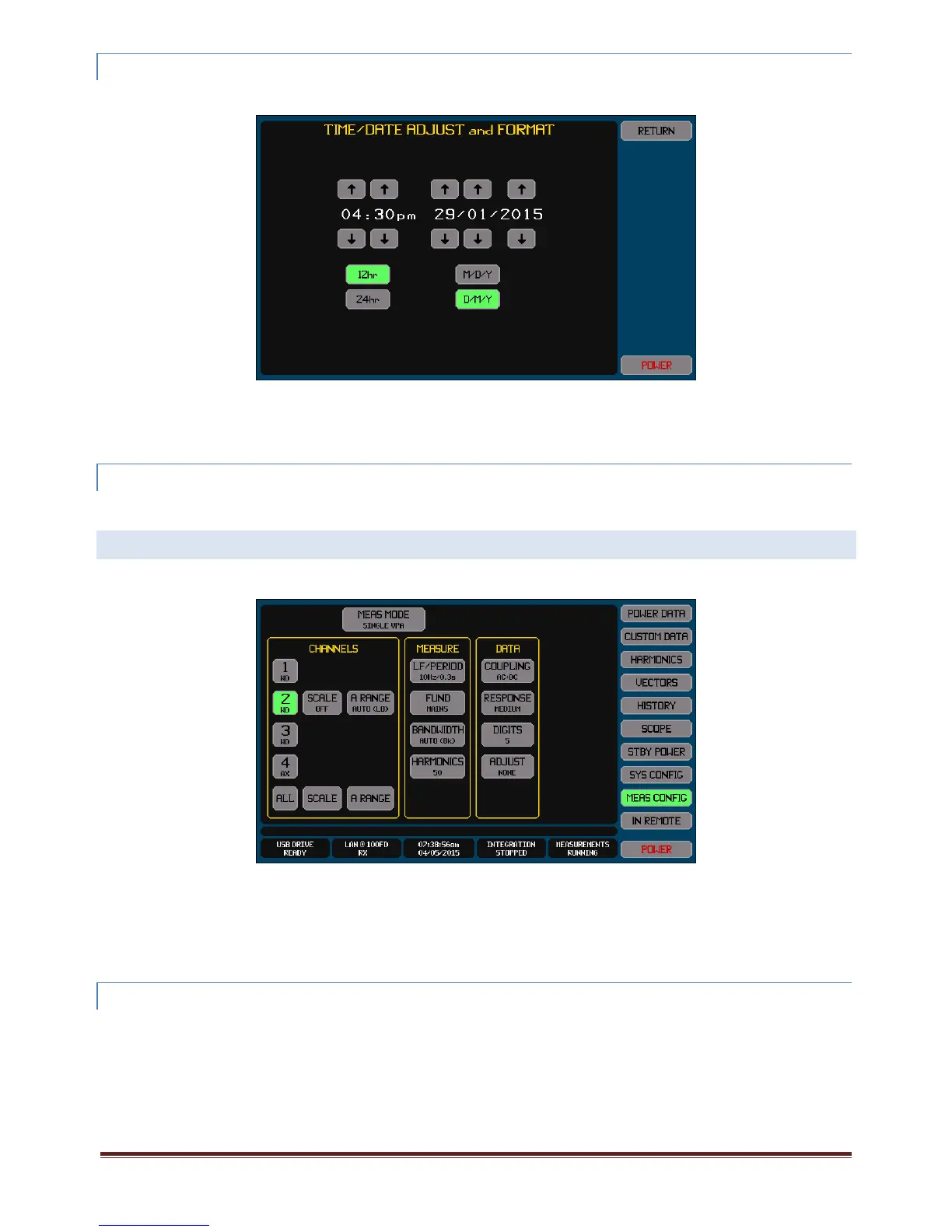
12.3.3 SETTINGTHECLOCKANDTIME/DATEFORMATS
YoumayinitiatetheTimeandDateConfigureScreenbyeitherpressingtheTimeandDateInfoAreawhileonanymainscreen,or
pressingtheSYSCONFIGbuttonandthenpressingtheCLOCKbuttononthatscreen.
Youmayadjustthetimeand/ordatebyusingtherespectiveupanddownarrowbuttons(thesebuttonsauto‐repeatifmaintained
pressed).
Note:
Whenchangingthetime,thesecondsdataisalwayssettozero.
12.3.4 UPGRADINGTHEXT2640OPTIONCONTENT
CertainXT2640optionsarefieldupgradablebythepurchaseofanupgradecodeandentryofthatcodeintotheXT2640.The
upgradeisaccomplishedbypressingtheOPTIONUPGRADEbuttonandenteringthefactorysuppliedcode.
12.4 CONFIGURINGMEASUREMENTS–THEMEASCONFIG SCREEN
AllmeasurementconfigurationoftheXT2640isperformedintheMEASCONFIGScreenaccessedbypressingtheMEASCONFIG
button,anexampleofthisscreenisshownbelow.
Changesmadetotheconfigurationdonotbecomeactiveuntilthisscreenisnavigatedawayfrom,i.e.oneoftheotherMainScreen
SelectButtonsispressed.
Note:
Settingscannotbechangedwhileinremote.
IfyoupresstheMEASCONFIGbuttonwhileshowingtheMEASCONFIGscreenthenanychangeswhichhavebeenmade
willbediscardedandthescreenwillreturntoshowingthepresentlyusedconfiguration.
12.4.1 SELECTINGTHEOVERALLMEASUREMENTMODE
IfyoupresstheMEASMODEbuttonitstartsascreenwhichallowsyoutoselectthemeasurementmodetheXT2640istooperatein.
IfyouselectSINGLEVPAthenonlyasingleVPAmaybeused(VPA1)andmanyotherchoiceselectionsaresimplified.
IfyouselectMULTIVPAthenupto3VPAsmaybeused(VPA1,2and3).Eachofthesewillmaketheirmeasurement
asynchronouslytoeachother(unlesssynchronizedusingtheirLF/PERIODsetting).
IfyouselectSYNCVPAthenupto3VPAsmaybeused(VPA1,2and3).Eachofthesewillalwaysstarttheirmeasurements
synchronouslywithallotherVPAs.Ifmechanicalmeasurementsarealsobeingperformedthenthosewillalsobesimilarly
synchronized.IfthePA9090ispartofamulti‐unitgroupthenthemeasurementswillalsobesynchronizedwithanyother
XT2640swhicharealsoconfiguredwiththeSYNCVPAmodewithinthatmulti‐unitgroup.



 To Next Page