XT2640OperatingManual 13July2016 Page38of187
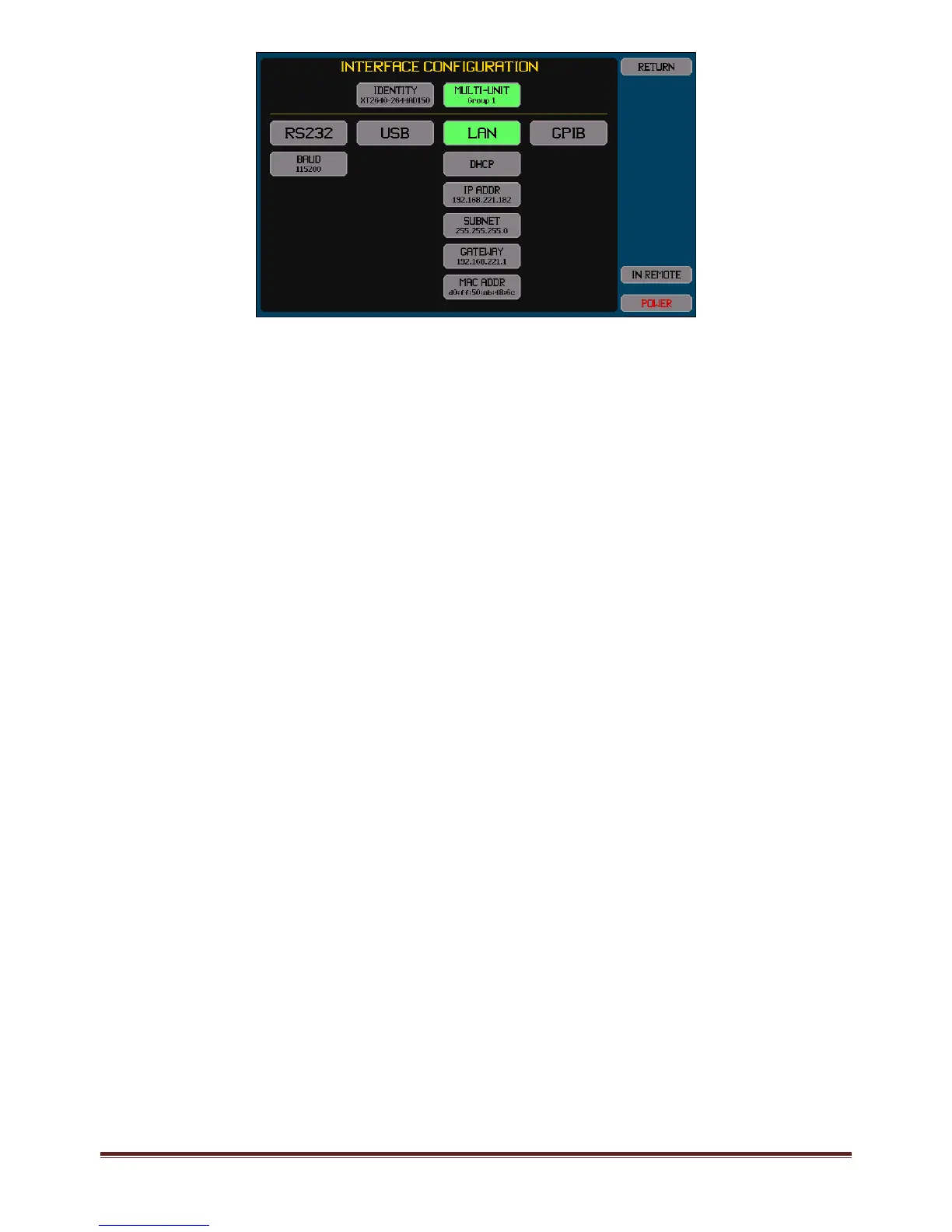
Therearetwoareasshownonthisscreen.Theupperareaallowsyoutosetaname(identity)fortheXT2640ortousethefactory
defaultname,and(ifoptionMUisinstalled)selectwhethertheXT2640participatesinamulti‐unitgroupandwhichgroupnumber
toparticipatein.
Thelowerareaallowsyoutoselectwhichinterfaceistobeusedtointerfacetoacomputerandtheconfigurationtouseforthat
interface.
Thepresentlyselectedinterface(ifany)isshownhighlightedingreen.Pressinganyoftheupperinterfacebuttonstogglesthe
selectionactiveorinactive(onlyoneinterfacecanbeactiveatanytime).
Beloweachinterfacebuttonarethebuttonsallowingthatinterfacetobeconfigured,itisnotnecessarytoenableaninterfacein
ordertoconfigureit.Anychangesmadehaveanimmediateeffect.
Note:
ThesettingsfortheLANinterfacearealwaysusedandtheLANinterfaceisalwaysenabledtooperate.WhethertheLAN
interfaceisselected(ornot)onlyselectswhethertheLANinterfacecanbeusedtocontroltheXT2640fromacomputer.
12.3.2.1 USINGANINTER FACEIDENTITY
TheXT2640canbeconfiguredtohaveanameasanidentityassociatedwiththisspecificinstrumentasfollows–
NONE.ThisselectsthatthisXT2640willnothaveanassociatedidentityandthemDNSprotocolwillnotbeusedviathe
LANinterface.
FACTORY.ThisselectsthatthisXT2640willhaveanameformedfromthemodelnumber,adashcharacterandtheserial
number.TheXT2640willusethemDNSprotocoltoestablishtheuniquenessofthisnameviatheLANinterface.
USERSET.ThisselectsthatthisXT2640willhaveanamewhichisdefinedbyyou.TheXT2640willusethemDNSprotocol
toestablishtheuniquenessofthisnameviatheLANinterface.
12.3.2.2 CONFIGURINGTH ERS232INTERFACE
FortheRS232interfaceyoumustsetthebaudrate.
12.3.2.3 CONFIGURINGTH EUSBINTERFACE
TherearenoconfigurationsettingsfortheUSBinterface.
12.3.2.4 CONFIGURINGTH ELANINTE RFACE
12.3.2.4.1 UsingDHCPtoobtaintheLANConfiguration
InthiscaseyoupresstheAUTO‐IP/DHCP/STATICIPbuttonandselectDHCP.Thereisnootherconfigurationrequiredandifthe
LANinterfaceisenabledtheremainingbuttonsshowtheconfigurationobtained(whileobtainingtheconfigurationthetextinthe
buttonsiscoloredorange).
12.3.2.4.2 UsingManuallysetIPInformation
InthiscaseyoupresstheAUTO‐IP/DHCP/STATICIPbuttonandselectSTATICIP,andthenmanuallyentertheIPADDR,SUBNET
andGATEWAYaddresses.YoushouldconsultyourITdepartmenttoobtainthecorrectsettingsforthese.
IftheconfiguredIPaddressiscoloredred,thenthisindicatesthattheXT2640hasdetectedanotherdeviceonthenetworkwhichis
usingthatIPaddress.
12.3.2.4.3 Peer‐to‐PeerLANConnectiontoaComputer
InthiscaseyoupresstheAUTO‐IP/DHCP/STATICIPbuttonandselectAUTO‐IP.Thereisnootherconfigurationrequiredandifthe
LANinterfaceisenabledtheremainingbuttonsshowtheconfigurationobtained(whileobtaininganIPaddressinthismannerthe
textinthebuttonsiscoloredorange).ThisobtainsanIPaddressusingtheLink‐Localmethod(definedbyRFC3927)andoftencalled
Link‐Local,Zeroconf,IPv4LL,orAPIPA.Theaddressselectedwillbeintherangefrom169.254.1.0to169.254.254.255anditwill
changeeachtimetheinterfaceislinked.ForaWindows
TM
computeritshouldbeconfiguredforDHCPevenifoneisnotpresent(in
practiceitdoesnotaffectoperationifoneispresentasthecomputerwillbeabletoaccesstheXT2640atitslocaladdress).Since
trafficusingthisrangeofIPaddressesshouldnotpassthrougharouter,theXT2640mustbelocaltothecomputer.
12.3.2.5 CONFIGURINGTH EGPIBINTERFAC E
FortheGPIBinterfaceyoumustsettheGPIBaddressoftheXT2640.



 To Next Page