XT2640OperatingManual 13July2016 Page76of187
WhentheENTbuttonispressedtheselectedtimeunitareaautomaticallychangestonextareatotheright,unlessthe
secondsdataisselectedwhentheactionissameaspressingtheoverallRETURNbutton.
15.2 STARTINGANDSTOPPINGINTEGRATION
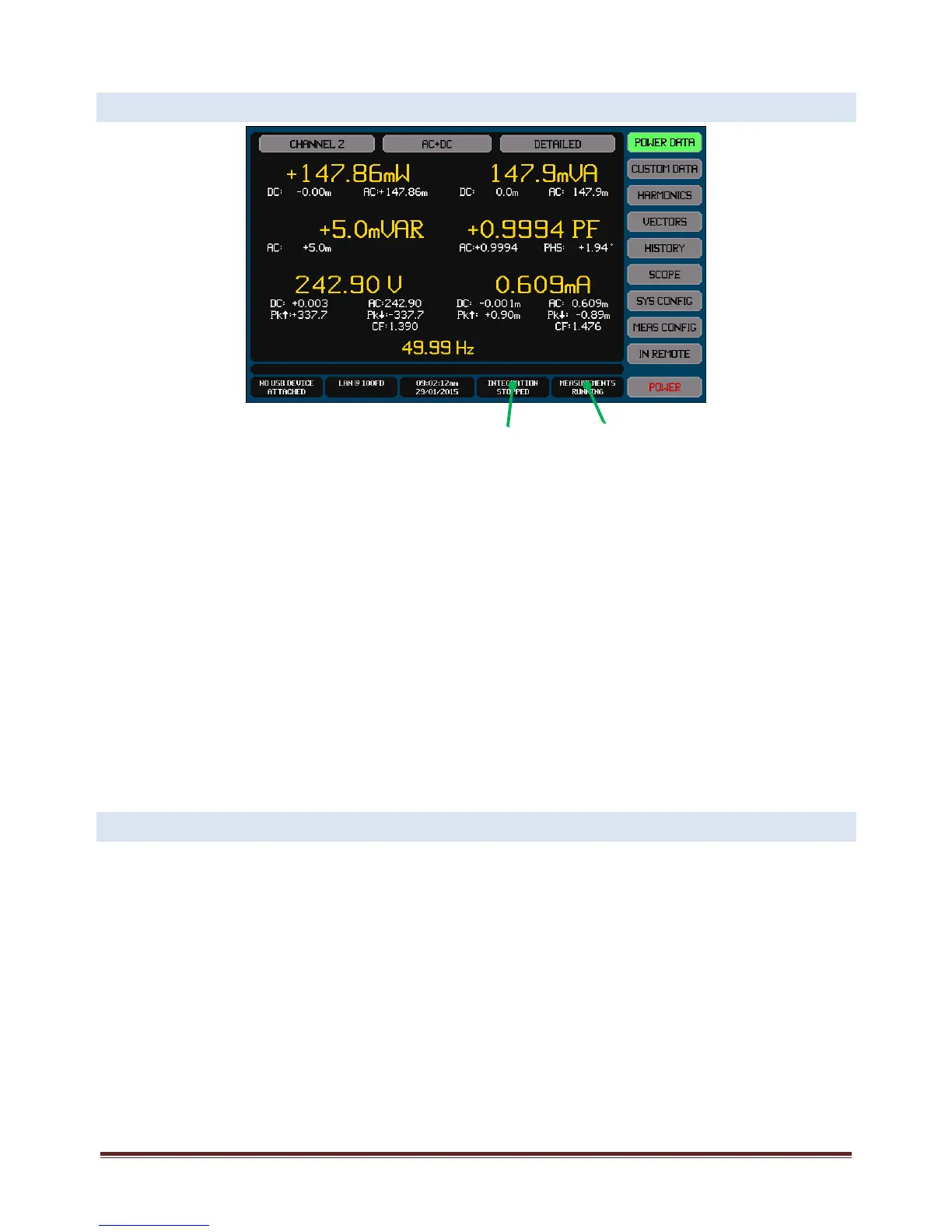
Allmainscreenshaveanintegrationinfoareaasshownontheexamplescreenabove.Thisshowsthepresentstatusofintegration
asfollows–
STOPPED.Indicatesthatnointegrationispresentlybeingperformed.TostartintegrationpresstheIntegrationInfoArea
andpresstheSTARTbuttononthatscreen.
RUNNING.Indicatesthatamanuallycontrolledintegrationisbeingperformed.Integrationwillcontinueuntilmanually
stopped.PresstheIntegrationInfoAreatostopintegration.
PAUSED.Indicatesthatamanuallycontrolledintegrationisbeingperformedbuthasbeenpausedbyyoupressingthe
MeasurementInfoareatoholdit.Integrationwillcontinuewhenthemeasurementholdisreleasedorintegrationis
manuallystopped.PresstheIntegrationInfoAreatostopintegration.
DELAY.Indicatesthatatimedintegrationisbeingperformedandisdelayingpriortocollectingintegrateddata.The
progressbartotherightshowshowmuchofthedelayhasexpired.PresstheIntegrationInfoAreatostopintegration.
RUN.Indicatesthatatimedintegrationisbeingperformedandiscollectingintegrateddata.Theprogressbartotheright
showshowmuchoftheconfiguredruntimehasexpired.PresstheIntegrationInfoAreatostopintegration.
PAUSE.Indicatesthatatimedintegrationisbeingperformed,thedelaytimehasexpired,buttheXT2640isnotcollecting
integrateddatabecauseyouhaveheldmeasurementresults.Theprogressbartotherightshowshowmuchofthe
configuredruntimehasexpired.PresstheIntegrationInfoAreatostopintegration.
Note:
Whenstartingintegration,anypreviousintegrationresultsarealwaysclearedandanewintegrationisstarted.
15.3 EXPORTINGORRECORDINGINTEGRATEDMEASUREMENTS
Themethodsforperformingthisarefullydescribedinsection23.
Allmeasurementscanbeexportedtoa.CSVformattextualfileonanexternalUSBdriveattachedtothefrontpanelUSBport.This
filecontainsallmeasurements(includingharmonics)forallchannelsandallVPAs.
Briefly,thisisperformedby–
InsertthedriveintothefrontpanelUSBportandwaitforittobeREADY.
PresstheDRIVEINFOareaofthescreen,thescreenshowsthefileexport/importscreen.
PresstheMEASUREMENTSbutton.Thescreenchangestoallowingyoutoenterafilename.
Enterthedesiredfilename(theextensionisautomaticallyprovided).
Ifthefilealreadyexiststhenyouarepromptedtorespondifyouwishtooverwriteitornot.
Thefileisthenwritten.
AlternativelyyoucanmakearecordofanymeasurementscreenbysavinganimageofittoagraphicfileonanexternalUSBdrive
attachedtothefrontpanelUSBport.
Briefly,thisisperformedby–
InsertthedriveintothefrontpanelUSBportandwaitforittobeREADY.
Displaythescreentoberecorded.
Integration
Info Area
Measurement
Info Area



 To Next Page