XT2640OperatingManual 13July2016 Page14of187
7 GETTINGSTARTED
1) ApplypowertotheXT2640.
a) AttachathreewirepowercordtothepowerentryconnectorontherearpaneloftheXT2640andattachtheotherend
toasuitablesourceofmains.
2) TurnONtheXT2640(dependingonhowtheXT2640haspreviouslybeenconfiguredthisstepmightnotbeneeded).
a) Pressandcontinuouslyholdanywhereonthefrontpanelscreenforatleast½asecond.Useyourfingertiporastylus;
donotuseapenorpencil.
3) Decidewhatyouneedtomeasure.
a) Seesection8fordetails.Fornow,justlookatthesingleVPAapplicationsandtacklethemorecomplexapplications
later.AVPAisaVirtualPowerAnalyzer;theXT2640hasthreeofthemallowingforuptothreedifferentsetsofpower
measurementsinthesameunit,fornowwe’lljustuseone.
4) WireyourapplicationtotheXT2640(ensuretherearenovoltagespresentwhileperformingthis)
a) Seesection9fordetails.
5) ConfiguretheXT2640.
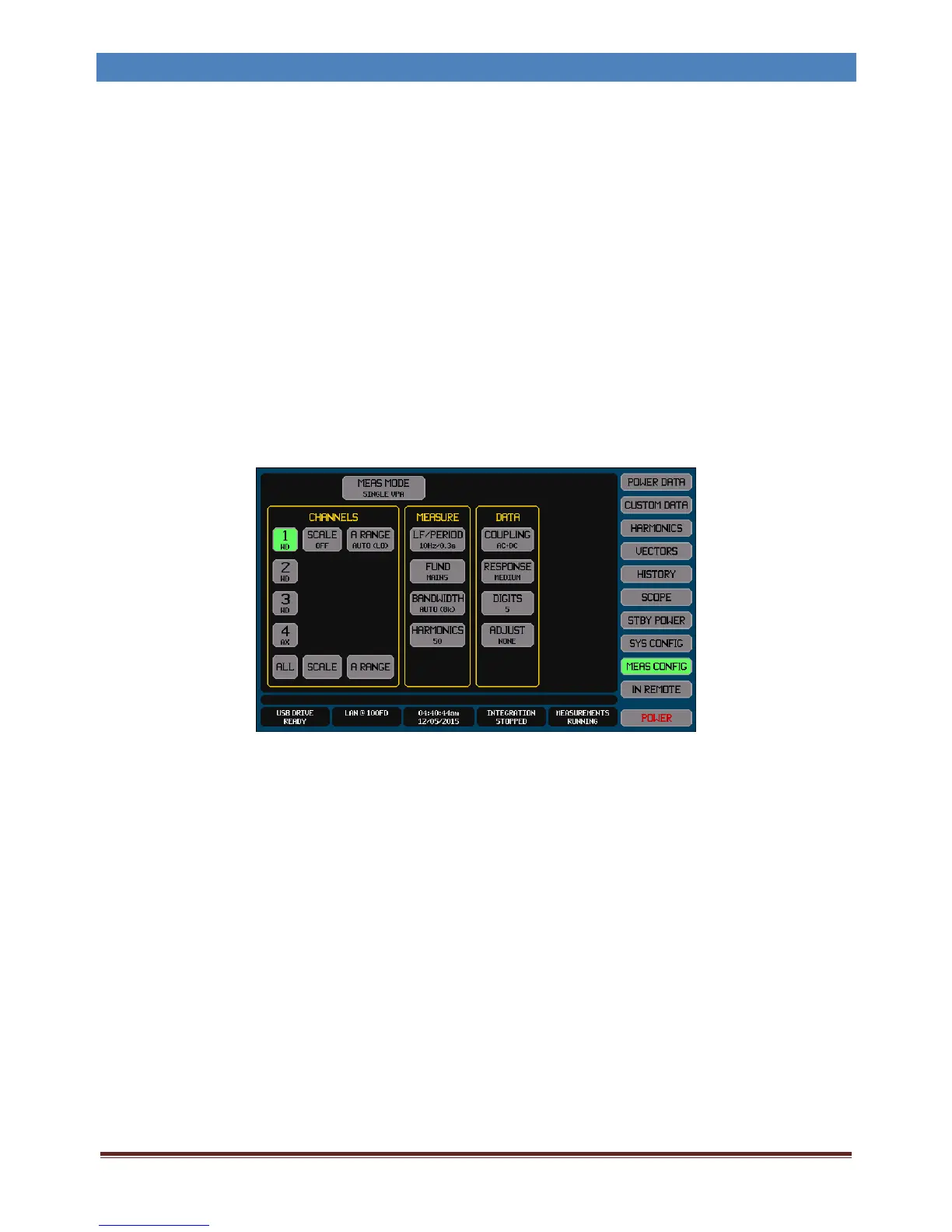
a) PresstheMEASCONFIGbuttonontheXT2640screen.Ifneeded,seesection12.1forfulldetailsregardingusingthe
touchpanelandsection12.4forfulldetailsregardingconfiguration.
Initiallywe’llstartwithsettingswhichareusableforjustaboutanyapplication;youcanalwayscomebackandchange
theselaterifyouwanttooptimizethemforyourspecificapplication.Everythingisvisibleontheonescreenwhichis
shownbypressingonebutton,soit’seasytorememberhowtochangesettingslaterbutwhatyouarenowseeingisall
you’lleverneedtoconfigureformanyapplications.
Thepresentsettingisshownineachbuttoninasmallertextsize,ifyouseeanythingwhichneedschangingthenpress
thatbuttontochangeit.
b) MEASMODE:SettoSINGLEVPA.
c) IntheCHANNELSareaofthisscreen(thisareaconfiguresthechannelsyou’lluse)‐
Selectthechannelsyouareusinganddeselectthoseyouarenot.Presseachnumericchannelbuttonasneededto
toggletheselection.
SCALE:IfyouareusingPTsorCTsthensetupthescalingforeachchannel,orturnoffscalingifnotusingthem.
ARANGE:Notallchannelshavethisbutton.SettoAUTOifavailable.
d) IntheMEASUREareaofthisscreen(thisareaconfigureshowmeasurementsaremade)–
LF/PERIOD:Setto10Hz/0.3s.
FUND:Setasfollows‐
For50/60HzapplicationssetthistoMAINS.
For400HzapplicationssetthistoAVIONICS.
ForotherapplicationssetthistoVOLTAGEwithamaximumfrequencyabovewhatyou’reexpecting
(youcansetthistoaveryhighfrequencyifyou’renotsure).
BANDWIDTH:SettoAUTO‐TRACKtoallowtheXT2640toautomaticallyconfigureitselfforfiltering.
HARMONICS:Setto50unlessyouknowyouneedotherthanthis.
e) IntheDATAareaofthisscreen(thisareaconfigureshowdataisdisplayed)–
COUPLING:SettoAC+DC.IfyouknowthatyouonlywanttheDCvaluesthensettoDCONLY.
RESPONSE:SettoMEDIUM.
DIGITS:Setto5.
ADJUST:SettoNONE.
f) IntheCOMBINEareaofthisscreen(thisareaconfigureshowmulti‐channelmeasurementsarecombined)–



 To Next Page