XT2640OperatingManual 13July2016 Page126of187
DatawhichhasbeenloggedtointernalmemorycanbeexportedtoanexternalUSBdriveatanyfuturetimebyreturningto
thisscreenandpressingtheEXPORTbuttonnexttotheinformationregardingthecontentsoftheinternalmemory.The
exportedfilecanbeineitherASCII(.CSV)orbinary(.BIN)formats.Oncedatahasbeenloggedtointernalmemoryitcannot
beerased,itcanonlybeoverwrittenbyafurtherdataloggingoperationtointernalmemory.
Dataloggingcancreateverylargefiles;youshouldensurethatthedrivehassufficientroomavailablepriortostartingdata
logging.IfthemaximumfilesizeforFAT32(4Gbytes)isreachedorthedrivebecomesfullpriortoyoustoppingdata
loggingthendataloggingisautomaticallystoppedbytheXT2640andadataloggingerrorstatusisset.
Dataloggingtootherthantheinternalmemoryallowsyoutoinsertthedrivebefore,duringorafterperformingthedata
logging.Aninternal32MbyteinternalFIFObufferisusedtoreducethepossibilityofrecordlosscausedbytheabsenceof
oraslowwritespeedoftheUSBDrive.Forshorterdatalogging(<8Mdata)youcanusethisinternalbufferfordata
loggingandthensaveittoadrivelater.
Dataloggingisnotsynchronoustoanymeasurementperiod,butlogsthelatestmeasurementsateachrespectivetime
interval.
Inthisdocumenteachsetofdatarecordedateachdatalogintervaliscalledadatalogrecord,andeachdatawithineach
recordiscalledadata.Whenloggingtointernalmemory,internalbuffer,oranexternalbinaryfileeachdatatakes4bytes.
WhenloggingtoanexternalASCIIfileeachdatahasavariablelength,butistypically12bytes.
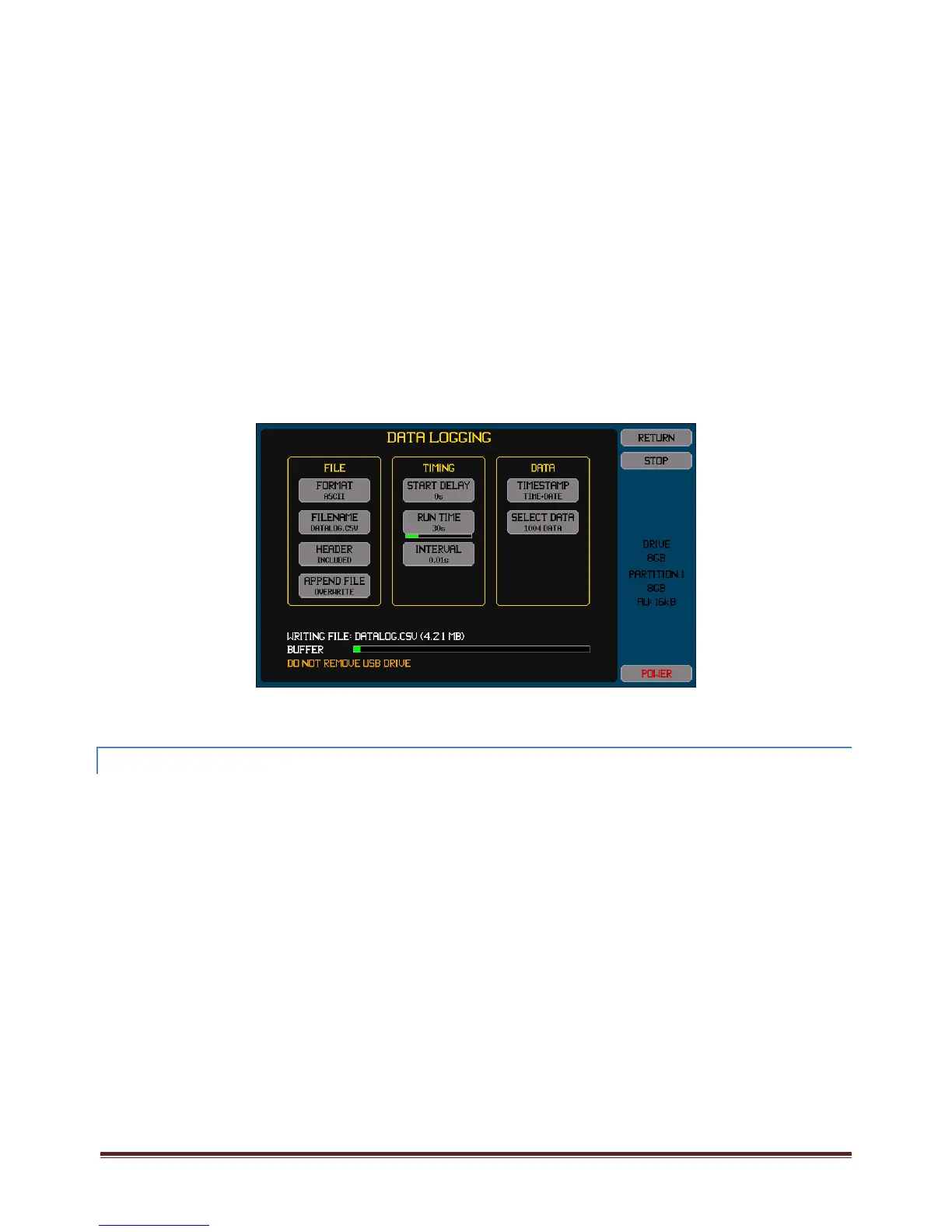
Priortoperformingdataloggingyoumustconfigurethefiledetails,dataloggingtiming,andthefiledatacontents.Initiatingthe
screenwhichallowsyoutodothisisachievedbypressingtheUSBDriveInfoarea.Ifdataloggingisnotbeingperformedandadrive
ispresentlyinsertedthenthiswillstartthefileimport/exportscreen,inthiscasepresstheDATALOGbuttononthatscreentoaccess
thedataloggingscreen.
Thisscreencanalsobeusedtoviewthestatusofdataloggingwhiledataisbeingcaptured.Youcaneitherstayonthisscreenor
returntoitlatertoviewthestatus.Youdonothavetoremainonthisscreenduringdatalogging.
Therearefourareasonthisscreen,thelowerarea(showninthisexample)showingthestatusisonlyshownifeitheradatalogging
activityispresentlytakingplaceorapreviouslyrundataloghasbeencompletedandadrivehasnotbeenbothremovedand
insertedsincethen.
23.7.1 CONFIGURINGTHE DATALOG
ThisisperformedbyusingthebuttonsintheFILEArea.
TheFORMATbuttonallowsyoutoselectifthefileistobewrittentoanexternaldrivewithASCIIorBINARYdataformatsoristobe
savedtoINTERNALmemory.
IfdataisselectedtobewrittentoINTERNALmemorythentherearenootherbuttonsshownintheFILEarea.
TheinternalmemoryintheXT2640istypicallyover10xfasterthanexternalUSBdrives,allowingafasterdata
loggingrateand/ormoredatatobelogged.
Aftercapturingadatalogtointernalmemory,youcanexportthisatalatertimeordatetoanexternaldrivein
eitherASCIIorBINARYformats.Youshouldnotethattheamountoftimetakentoexportthismaybe
considerableasexternalmemoryisconsiderablyslowerthantheinternalmemory.Youshouldalsonotethat
exportingthisintoanexternaldriveusingtheASCIIformatresultsinafilewhichistypically3xlargerthanthe
internalmemorydata,whichmayexceedthemaximumfilesizeortheexternaldrivesize,inthosecasesyouwill
needtoexportitinBINARYformatandconvertthatfileonacomputertotheASCIIformat.
IfdataisselectedtobewritteninASCIIformatthenitiswrittenasonerecordperline,witheachdatawithintherecord
beingcommaseparated.
ThisisoftencalledtheCSVformatandfilesgeneratedinthisformatcanusuallybeopenedwithcommercially
availablespreadsheetprograms(suchasExcel)andwithmanydatabaseprograms.
Youshouldfirstconfirmthattheapplicationisabletoopenthesizeoffilelikelytobegeneratedwhiledata
logging,forexamplesomeversionsofExcelcanonlyopenafilewithlessthan65536records.
IfdataisselectedtobewritteninBINARYformatthenitcanonlybereadusinganapplicationprovidedwiththeXT2640,
whichconvertsthefiletoASCIIformat.



 To Next Page