XT2640OperatingManual 13July2016 Page59of187
Or,pressanywhereonthechart,thisplacesacursoratthehorizontalpositionpressed.Youmaydragthecursorinthis
mannerandifdraggedofftheleftorrightedgesofthechartthenitwillalsoscrollthedisplayedtimespan,oryoumay
simplyrepositionthecursorbypressingsomewhereelseonthechart.
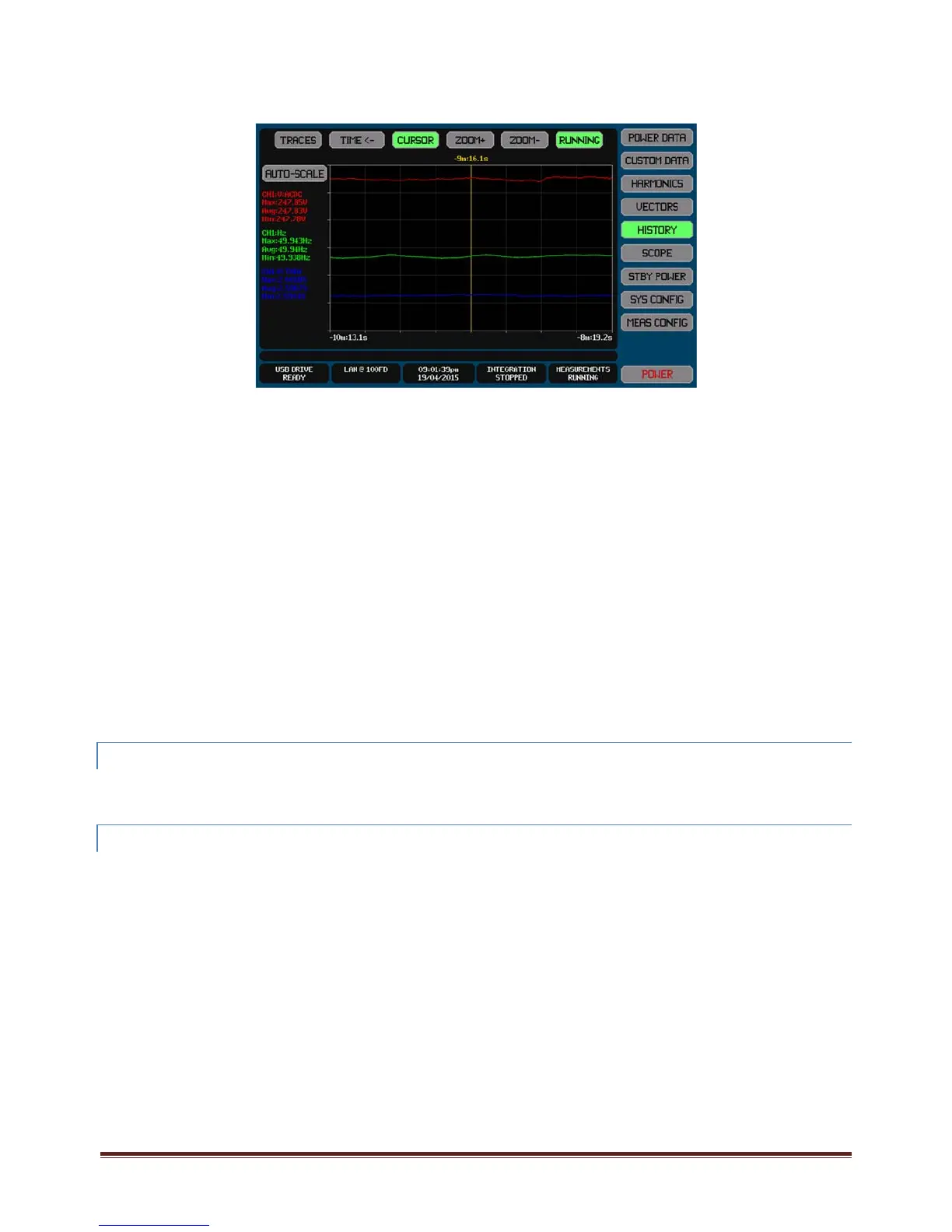
ThescreenbelowshowsanexampleofaHISTORYdatascreenwiththecursorshownandzoomedin.
Whenthecursorisshown–
TheCURSORbuttonishighlightedcoloredgreen
Thetimepositionofthecursorisshownabovethecursorline
Thecursorremainsatthesamepositionintimerelativetothestartofthedatacollection.
Thetextualdataintheleftsideofthescreenchangestoshowthemaximum,averageandminimumdatarecordedforeach
traceinthetimeincrementcorrespondingtothewidthofonepixelatthepresentcursorposition.
YoumayzoomthecharthorizontallybypressingtheZOOM+button(nexttotheCURSORbutton).Whilezoomed–
YoumayzoominfurtherbypressingtheZOOM+again,ormayzoombackbypressingtheZOOM‐button.
Thecursorremainssettothesametimeasitwaspriortozooming,butitmaystillbemovedwithinthetimespan
ofthezoomedchartbypressingatthedesiredlocationwithinthechart.
Thecursormaybemovedbeyondtheleftandrightendsofthetimespanbeingviewedbydraggingitbeyond
thoseedges,inthatcasethecursorremainsattheedgeandthecharttimespanbeingshownischanged.This
enablesyouto‘drag’thetimespanbeingviewedwithouthavingtozoombackout.
EachZOOM+presschangesthehorizontaltimingbyanominalfactorof2:1andamaximumof10zoomlevelsare
allowed(i.e.themaximumzoomis1000:1).
Whenthechartiszoomedbythemaximumfactorthespanofthezoomchangestoreflectthatitisconstrainedto
beaminimumof1/1000
th
oftheoverallhistorytimespanhoweverthecursorpositionremainsthesame.
Anyzoomcanbecancelledandthescreenreturnedtothenon‐zoomedstatewithoutacursoratanytimebypressingthe
CURSORbuttonwhileitishighlighted.
12.9.6 RESCALINGTHECHART TRACES
YoucanpresstheAUTOSCALEbuttontorescalealltracestothemostoptimum1/2/5scales(perdivision)tomaintainalltracesjust
withintheverticalextentsofthechart.ThisactionchangesthescalingforeachenabledtraceenteredintheTRACESconfiguration
butdoesnotaltertheoffsetsettings.
12.9.7 EXPORTINGORRECORDINGHISTORY
Themethodforperformingthisisfullydescribedinsection23.
Historicallysavedmeasurementscanbeexportedtoa.CSVformattextualfileonanexternalUSBdriveattachedtothefrontpanel
USBport.ThisfilecontainsallcapturedmeasurementsasconfiguredforthetracesontheHISTORYscreen(withoutregardtothe
scalingoroffsetconfiguration).Thetabulateddatacovers8192equallyspacedtimeincrementsfromthestartofthehistorycapture
totheendofitandcontainsthemaximum,averageandminimumofallmeasurementsduringeachtimeincrement.
Briefly,thisisperformedby–
7. InsertthedriveintothefrontpanelUSBportandwaitforittobeREADY.
8. PresstheDRIVEINFOareaofthescreen,thescreenshowsthefileexport/importscreen.
9. PresstheHISTORYbutton.Thescreenchangestoallowingyoutoenterafilename.
10. Enterthedesiredfilename(theextensionisautomaticallyprovided).
11. Ifthefilealreadyexiststhenyouarepromptedtorespondifyouwishtooverwriteitornot.
12. Thefileisthenwritten.
Alternatively,youcanmakearecordoftheHISTORYscreenbysavinganimageofittoagraphicfileonanexternalUSBdrive
attachedtothefrontpanelUSBport.
Briefly,thisisperformedby–
1. InsertthedriveintothefrontpanelUSBportandwaitforittobeREADY.



 To Next Page