XT2640OperatingManual 13July2016 Page62of187
anditneedstoknowthefundamentalfrequency.SincetheXT2640alwaysensuresthateverycycleofthesignalsaresampledat
differentphaseswithinthem,acompletehighresolutionimageofasinglecycleisobtainedusingtheactualsamplesoftheactual
signals.
IfnotracesareenabledtobeshownonthechartthenNOTRACESSELECTEDisdisplayedonthechartandthechartisblank.
IftheperiodisshowncoloredorangethentheXT2640isnotlockedcloselyenoughtoallowanaccuraterepresentationofthe
signals.
YoucanpresstheAUTOSCALEbuttontorescalealltracestothemostoptimum1/2/5scales(perdivision)tomaintainalltracesjust
withintheverticalextentsofthechart.ThisactionchangesthescalingforeachenabledtraceenteredintheTRACESconfiguration.
12.10.1.1 CONFIGURINGTRAC ES
Theonlyconfigurationneededistoselectthetracesandtosetthetracecolor,scalingandoffsetforeach.Thisisperformedby
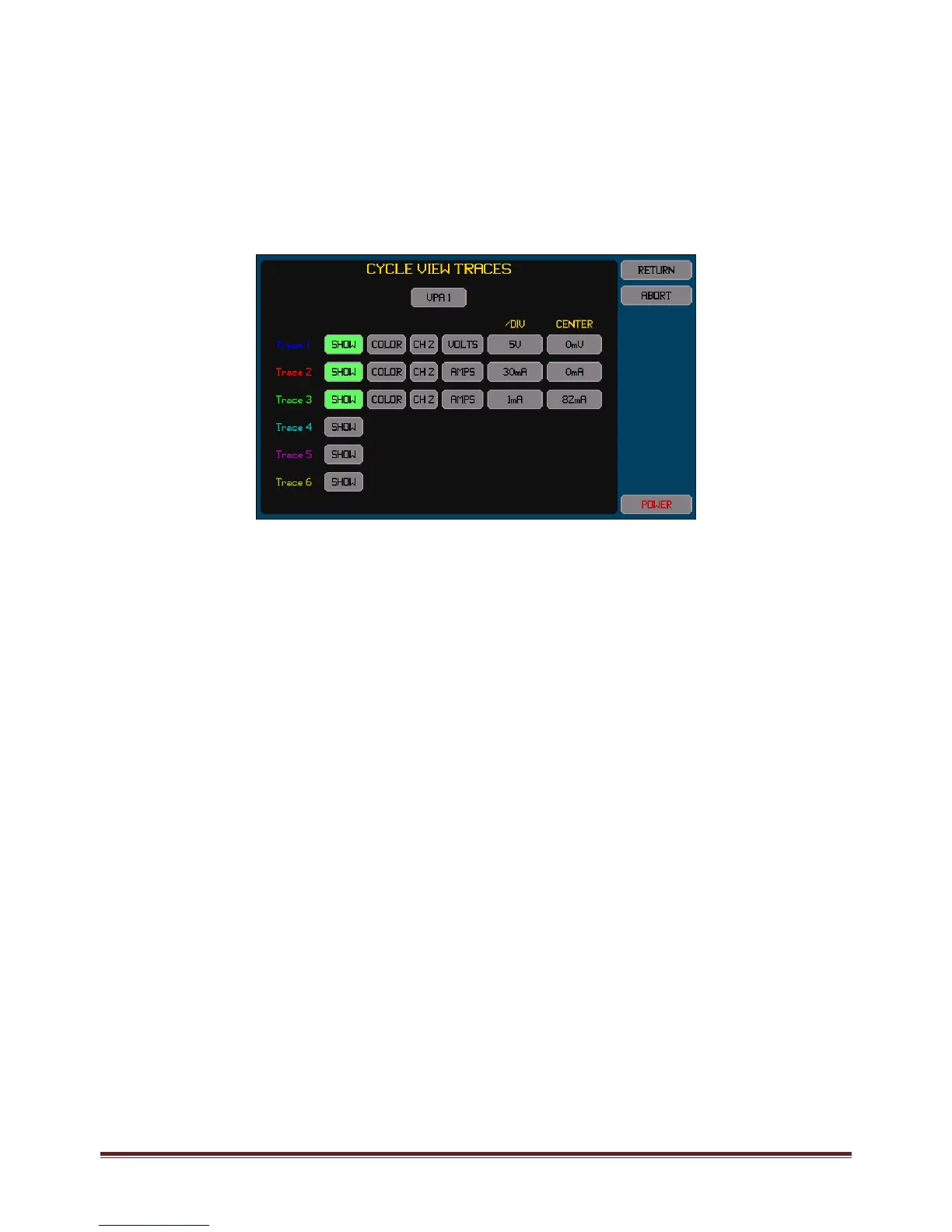
pressingtheTRACESbutton.Anexampleofthescreenwhichallowsconfigurationofthetracesisshownbelow.
AlltracesmustbefromthesameVPA,sotherequiredVPAmustbeselectedpriortoselectinganytraces.
Foreachtrace–
PressingtheSHOWbuttontogglesthetraceon/off.Thebuttonishighlightedcoloredgreenwhenenabled.
ChangethecolorbypressingtheCOLORbuttonuntiltheadjacenttracenumbershowsthedesiredcolor.
TherearetwobuttonstotherightoftheCOLORbuttonwhichallowsyoutoselectthechannelandsignaltotrace.Either
thevoltageorcurrentorwattssignalsortheinter‐phasevoltagesignalsmaybetraced.Thewattssignalistheresultof
multiplyingthevoltageandcurrentsignals.
Thebuttoninthe/DIVcolumnallowsyoutosetthescalingintheunitsoftheselectedsignal.Notethatthisisenteredper
divisionandthereareatotalof6verticaldivisionsinthechart(3aboveand3belowthecenterline).Thiscanalsobesetto
thebest1/2/5valuestoshowalltraceswithintheextentsofthechartwhentheAUTOSCALEbuttonispressedonthe
CYCLEVIEWscreen.
ThebuttonintheOFFSETcolumnallowsyoutosetthesignallevelwhichwillcorrespondtothecenterlineofthechart.
Note:
Tracesaredrawninnumericalorder,trace1first,andthentrace2,andsoon.Sothehighestnumberedenabledtraceis
theuppermosttraceiftracesoverlap.
IfaVPAisconfiguredtoaLF/PERIODsettingofanotherVPAthenselectingeitherVPAwillallowthesignalsineitherVPA
tobeselected.
12.10.1.2 EXPORTINGORRECORDINGCYCLEVIE WDATA
Themethodsforperformingthisarefullydescribedinsection23.
TheCYCLEVIEWdatacanbeexportedtoa.CSVformattextualfileonanexternalUSBdriveattachedtothefrontpanelUSBport.
ThisfilecontainsatabulationofthepointsineachCYCLEVIEWwaveformforallchannelsinaselectedVPA.
Briefly,thisisperformedby–
1.
InsertthedriveintothefrontpanelUSBportandwaitforittobeREADY.
2.
PresstheDRIVEINFOareaofthescreen,thescreenshowsthefileexport/importscreen.
3.
PresstheCYCLEDATAbutton.Thescreenchangestoallowingyoutoenterafilename.
4.
Enterthedesiredfilename(theextensionisautomaticallyprovided).
5.
Ifthefilealreadyexiststhenyouarepromptedtorespondifyouwishtooverwriteitornot.
6.
IfconfiguredformorethanasingleVPAthenyouarepromptedtoselecttheVPAforwhichtoexportthecycleviewdata.
7.
Thefileisthenwritten.
AlternativelyyoucanmakearecordoftheCYCLEVIEWscreenbysavinganimageofittoagraphicfileonanexternalUSBdrive
attachedtothefrontpanelUSBport.
Briefly,thisisperformedby–
1.
InsertthedriveintothefrontpanelUSBportandwaitforittobeREADY.



 To Next Page