XT2640OperatingManual 13July2016 Page64of187
Recommendations:
Forviewingrepetitivesignals.EithertheDC(risingedge)orDC(fallingedge)selectionsshouldbemade.
Forviewingacurrentinrushorstartupevent.TheABS(DC)selectionshouldbemade.
Forviewingfasttransients.TheHFselectionshouldbemade.
PressingtheLEVELbuttonallowsyoutoselectthetriggerdetectionlevelintheunitsofthesignal.
FortheABS(DC)orHFtriggertypesonlypositivevaluescanbeusedandyoushouldnotenteratriggerlevelofzero,asthe
signalwillalwaystrigger.
PressingthePOSITIONbuttonallowsyoutosetwherethetriggerpositionislocatedontheunzoomedchart.
Youmayselect0%,25%,50%or75%.
PressingtheTIMEBASEbuttonallowsyoutoselectthetimebaseinunitsoftimeperdivisionsimilarlytoanoscilloscope.
Timebasesettingsbetween5usand20sperdivisionareavailable.
PressingtheCAPTUREMODEbuttonallowsyoutochoosewhetherthescopecapturewillbeperformednormally(NORMALsetting)
orperformedforinrushcapture(INRUSHsetting).WhenconfiguredfortheINRUSHsettingthefollowingchangesaremade–
WhileacaptureisbeingperformedallDcurrentoptionchannelswhichareunscaledhavetheHIcurrentrangeforced.
Aftercaptureofthescopetracethisisreleasedbacktotheconfiguredcurrentrange.
WhileacaptureisbeingperformedanyBANDWIDTHsettingintheMEASCONFIGscreenisignoredandthecaptured
signalwillnotbebandwidthlimitedbythatsetting.Aftercaptureofthescopetracethisisreleasedbacktotheconfigured
setting.
Afteracaptureisobtainedthecursorisautomaticallyturnedonandpositionedatthemaximumsignaloftrace1.This
enablesdirectreadoutofthemaximuminrushcurrent(forexample).
Recommendation:
TheINRUSHcapturemodeisrecommendedforperforminginrushcurrentmeasurements.Thisenablestheuse
oftheoptimalMEASCONFIGsettingsfornormalpowermeasurementswhilestillallowingaccuratemeasurement
ofinrushcurrents.Althoughthiscanbeusedwithcontinuoustriggering,thisisprimarilyintendedforusewith
singletriggeredcaptures.Theexampleconfigurationshownaboveshowsatypicalconfigurationforinrush
currentcapture,withtrace1configuredasshowingthecurrentsignal.Seealsosection14forfulldetails
regardinginrushmeasurementandcapture.
12.10.2.2 CONFIGURINGTRAC ES
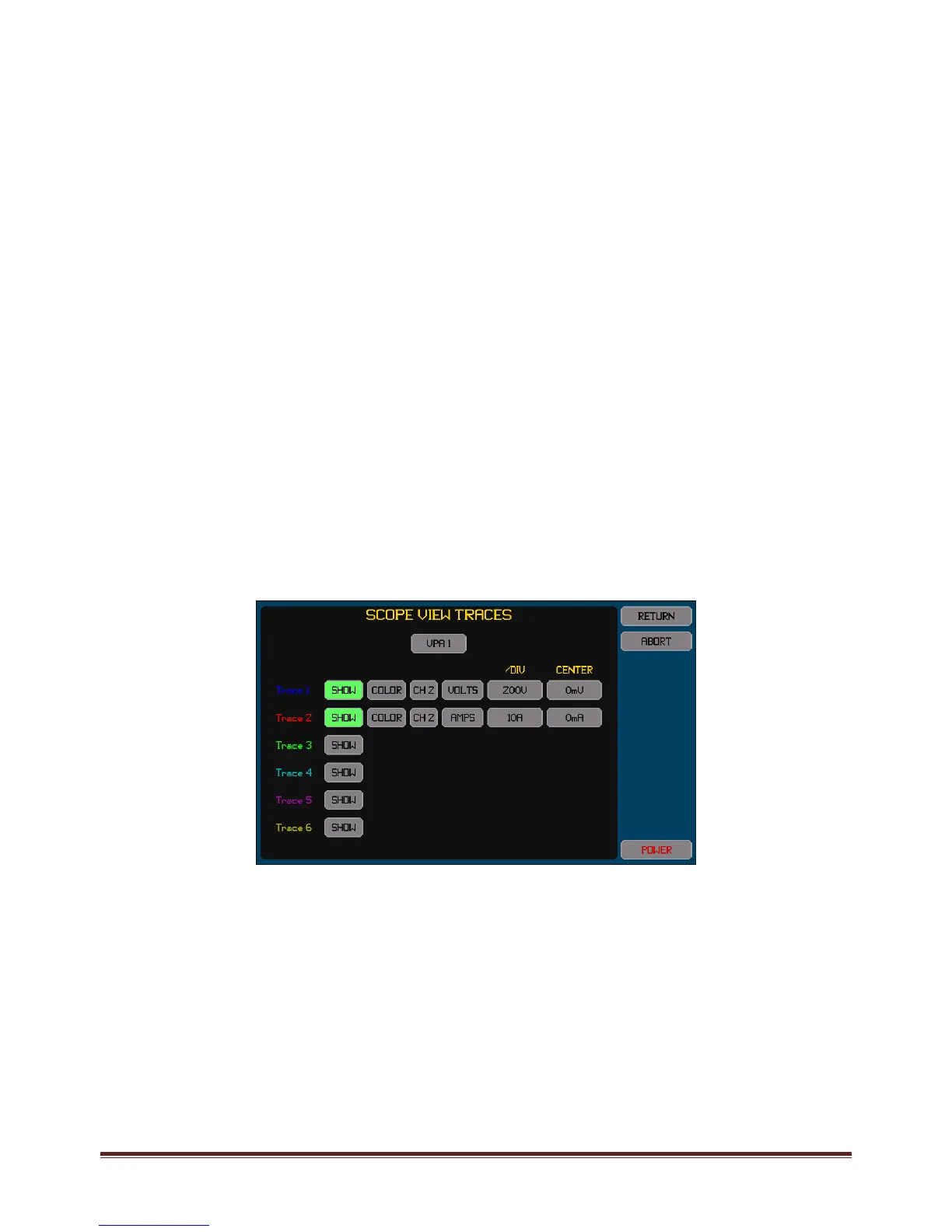
ThisisperformedbypressingtheTRACESbutton.Anexampleofthescreenwhichallowsconfigurationofthetracesisshown
below.Changingtracesdoesnotclearanypreviouslymadescopecapture;itonlyaffectshowitisdisplayed.
AlltracesmustbeinchannelsconfiguredinthesameVPAasthatinwhichthetriggersourcechannelisconfigured.IfaVPAis
configuredtoaLF/PERIODsettingofanotherVPAthenselectingeitherVPAwillallowthesignalsineitherVPAtobeselected.
Foreachtrace–
PressingtheSHOWbuttontogglesthetraceon/off.Thebuttonishighlightedcoloredgreenwhenenabled.
ChangethecolorbypressingtheCOLORbuttonuntiltheadjacenttracenumbershowsthedesiredcolor.
TherearetwobuttonstotherightoftheCOLORbuttonwhichallowsyoutoselectthechannelandsignaltotrace.Either
thevoltageorcurrentorwattssignalsortheinter‐phasevoltagesignalsmaybetraced.Thewattssignalistheresultof
multiplyingthevoltageandcurrentsignals.
Thebuttoninthe/DIVcolumnallowsyoutosetthescalingintheunitsoftheselectedsignal.Notethatthisisenteredper
divisionandthereareatotalof6verticaldivisionsinthechart(3aboveand3belowthecenterline).Thiscanalsobe
automaticallysettothebest1/2/5valuestoshowalltraceswithintheextentsofthechartwhentheAUTOSCALEbuttonis
pressedontheCYCLEVIEWscreen.
ThebuttonintheOFFSETcolumnallowsyoutosetthesignallevelwhichwillcorrespondtothecenterlineofthechart.
Tracesaredrawninnumericalorder,trace1first,andthentrace2,andsoon.Sothehighestnumberedenabledtraceisthe
uppermosttraceiftracesoverlap.



 To Next Page