XT2640OperatingManual 13July2016 Page72of187
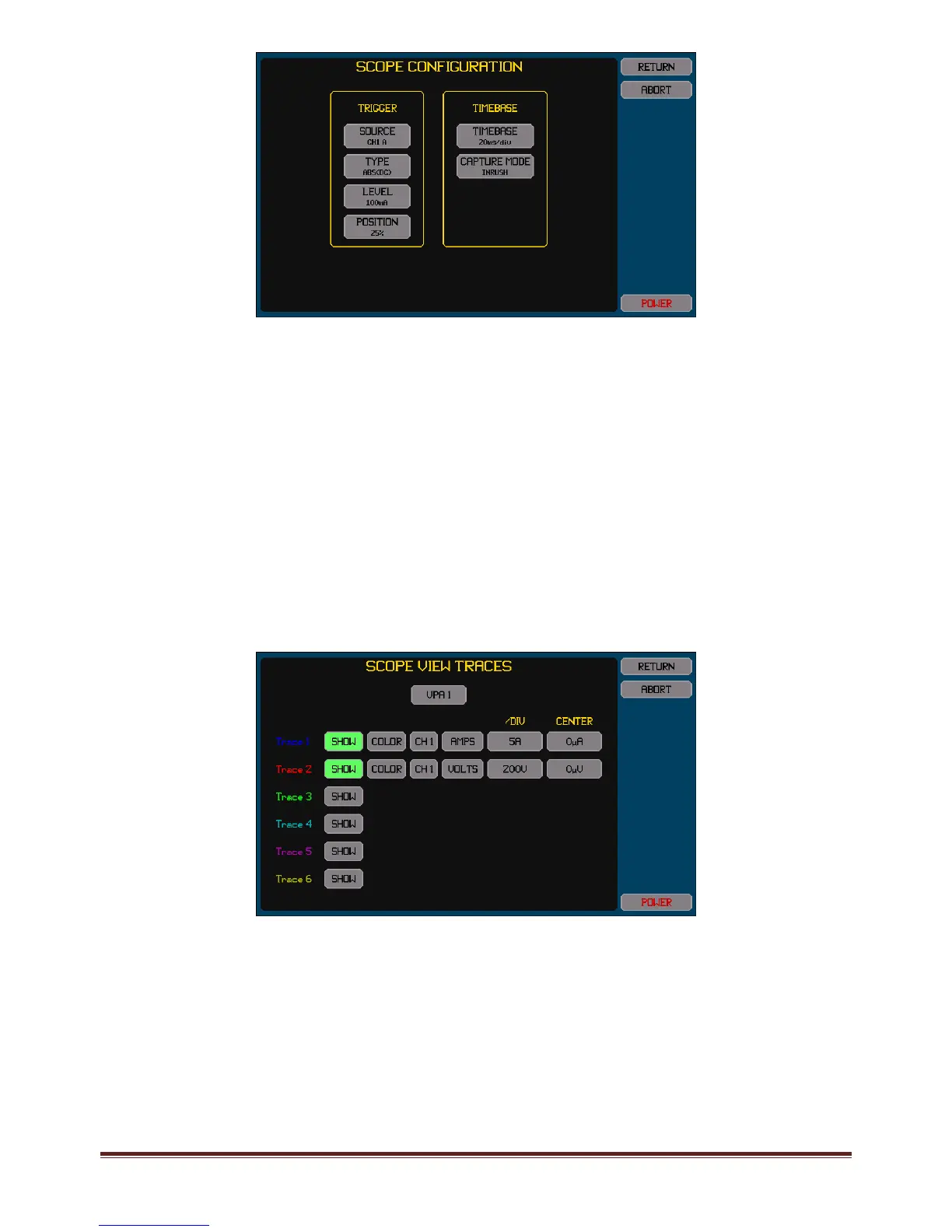
Thisexampleuseschannel1asmonitoringthepowertothedevicebeingtested–anychannelconfiguredfor
measurementscanbeused.
Thisexampleshowsa100mAtriggerlevelbeingused.Thisisatypicaltriggerleveltouseforthispurpose;howeversome
devicesbeingtestedmaydrawmorethanthiswhenturnedoff,inthosecasesthislevelshouldbeincreasedtoabovethe
currentleveldrawnbythedevicewhileturnedoff(orconsiderswitchingthesourceofthepowerratherthanusingthe
devicepowerswitch).
Thisexampleshows20ms/divisionasthetimebaseandthetriggerpositionwillbeatthe25%positiononthescreen–
resultinginthefinalscreenhaving40msshownbeforethetriggereventand120msafterwards.Youcanselectadifferent
timebaseasrequirediftheinrusheventisknowntobeshorterorlonger.The25%triggerpositionisrecommendedfor
thistypeofmeasurement.
TheCAPTUREMODEisselectedasINRUSH.ThissettingtellstheXT2640toautomaticallyignoreanybandwidthlimitation
providedbytheexistingBANDWIDTHsettingandalsotoforcetheuseoftheHIrangeofanyunscaledDcurrentoption
channelswhiletheinrushcaptureisinprogress.Afterthecapturehasbeenmadethenthesesettingswillautomatically
reverttothoseconfigured.
3.
Configurethetraceswhichwillbeshownonthescreen.Thescreenbelowshowsanexampleoftwotracesbeingconfiguredto
becaptured(currentandvoltage).Asshownhere,itisusefultoincludethesupplyvoltageasatrace,asthisallowsyouto
inspectthesupplyvoltagetoseeifitwasbeingsignificantlydisturbedbytheinrushsurgecurrentandsohavinganimpacton
theinrushcurrentmeasurement.
Trace1mustbethesignalwhichwillmeasuretheinrushcurrent;theothertracescanbeanysignalswhicharealsodesiredto
becaptured.
Foreachtrace–
PressingtheSHOWbuttontogglesthetraceon/off.Thebuttonishighlightedcoloredgreenwhenenabled.
ChangethecolorbypressingtheCOLORbuttonuntiltheadjacenttracenumbershowsthedesiredcolor.
TherearetwobuttonstotherightoftheCOLORbuttonwhichallowsyoutoselectthechannelandsignaltotrace.Either
thevoltageorcurrentorwattssignalsmaybetraced.Thewattssignalistheresultofmultiplyingthevoltageandcurrent
signals.AlltracesmustbeinchannelsconfiguredinthesameVPAasthatinwhichthetriggersourcechannelisconfigured.
Thebuttoninthe/DIVcolumnallowsyoutosetthescalingintheunitsoftheselectedsignal.Notethatthisisenteredper
divisionandthereareatotalof6verticaldivisionsinthechart(3aboveand3belowthecenterline).Thiscanalsobeset
afterthecapturehasbeenmadetothebest1/2/5valuestoshowalltraceswithintheextentsofthechartwhenthe
AUTOSCALEbuttonispressedontheSCOPEVIEWscreen.Thisonlyaffectshowthetracewillsubsequentlybedisplayed
andsocanbechangedafterwards.



 To Next Page