The Main Screen Interface
3.2.1. File Menu
A project contains all the data currently active in XtraWare, such as the user
program, parameter settings, and definitions. The File Menu options are
used to create new XtraWare projects, open existing projects, and save
changes to projects. Project files, which are handled like any other file, are
automatically assigned an extension of XDR, for example, project1.XDR.
In addition, the File Menu opti ons are used to download, upload and print
programs and parameters.
Table 1: File Menu Options
Option Icon Description
New
Project
(Ctrl+N)
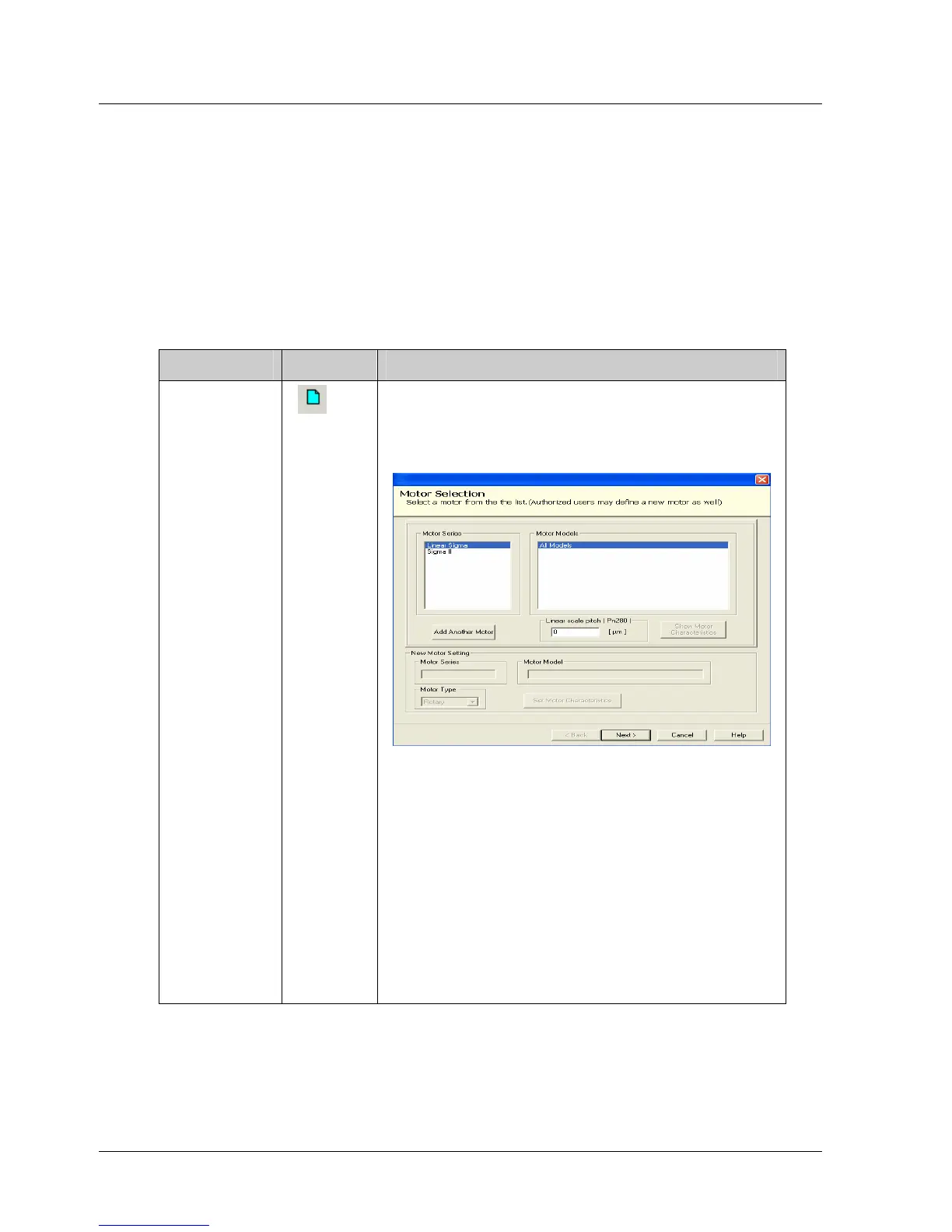
Creates a new XtraWare project. When this
option is selected, the Motor Selection
window in which you select the motor that
will be used for this project, is displayed.
Figure 2: Motor Selection Window
Select the appropriate manufacturer and
then one of the listed modules. If you are
using a model that is not listed, click Add
Another Motor.
Enter the name of the model in the Motor
Model field and select the Motor Type
(either Rotary or Linear).
Click Finish to proceed; the Workspace,
Program, History and Parameters windows
are opened with their default contents.
6 XtraWare User Manual



 To Next Page