The Main Screen Interface
8 XtraWare User Manual
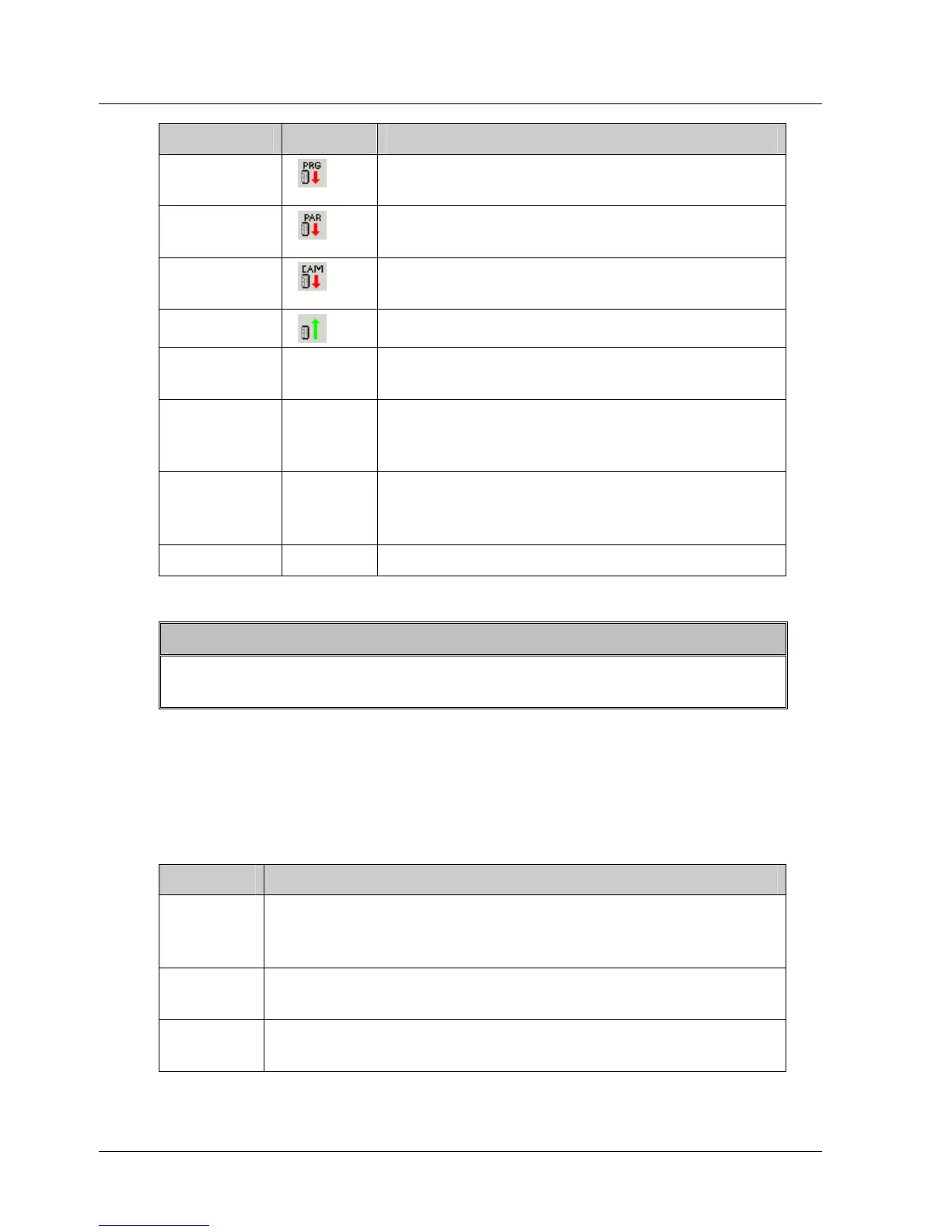
Option Icon Description
Download
Program
Downloads a program to the XtraDrive
driver.
Download
Parameters
Downloads a set of parameters to the
XtraDrive driver.
Download
Cam
1
Downloads cam profiles to the XtraDrive
driver.
Upload
Uploads data from the XtraDrive driver.
Print
Program
Prints the current program.
Print
Parameters
Prints the parameter list, including their
values, on the printer. The parameters are
printed in tabular format.
Print Chart Prints the currently displayed chart and its
corresponding data. See section
4.7.4,
Printing a Chart, for further information.
Exit Exits from XtraWare.
Note:
1) The ECAM-related options are only activated if an ECAM license
has been purchased.
3.2.2. Edit Menu
The Edit Menu options are used to edit the command order of a program in
the Program window.
Table 2: Edit Menu Options
Option Description
Cut
(Ctrl+X)
Deletes selected text or lines from the program and
places the selection on the Windows and XtraWare
clipboards.
Copy
(Ctrl+C)
Places a copy of selected text or lines from the program
on the Windows and XtraWare clipboards.
Paste
(Ctrl+V)
Inserts the contents of the XtraWare clipboard into the
program.



 To Next Page