Operating the XtraDrive Using XtraWare
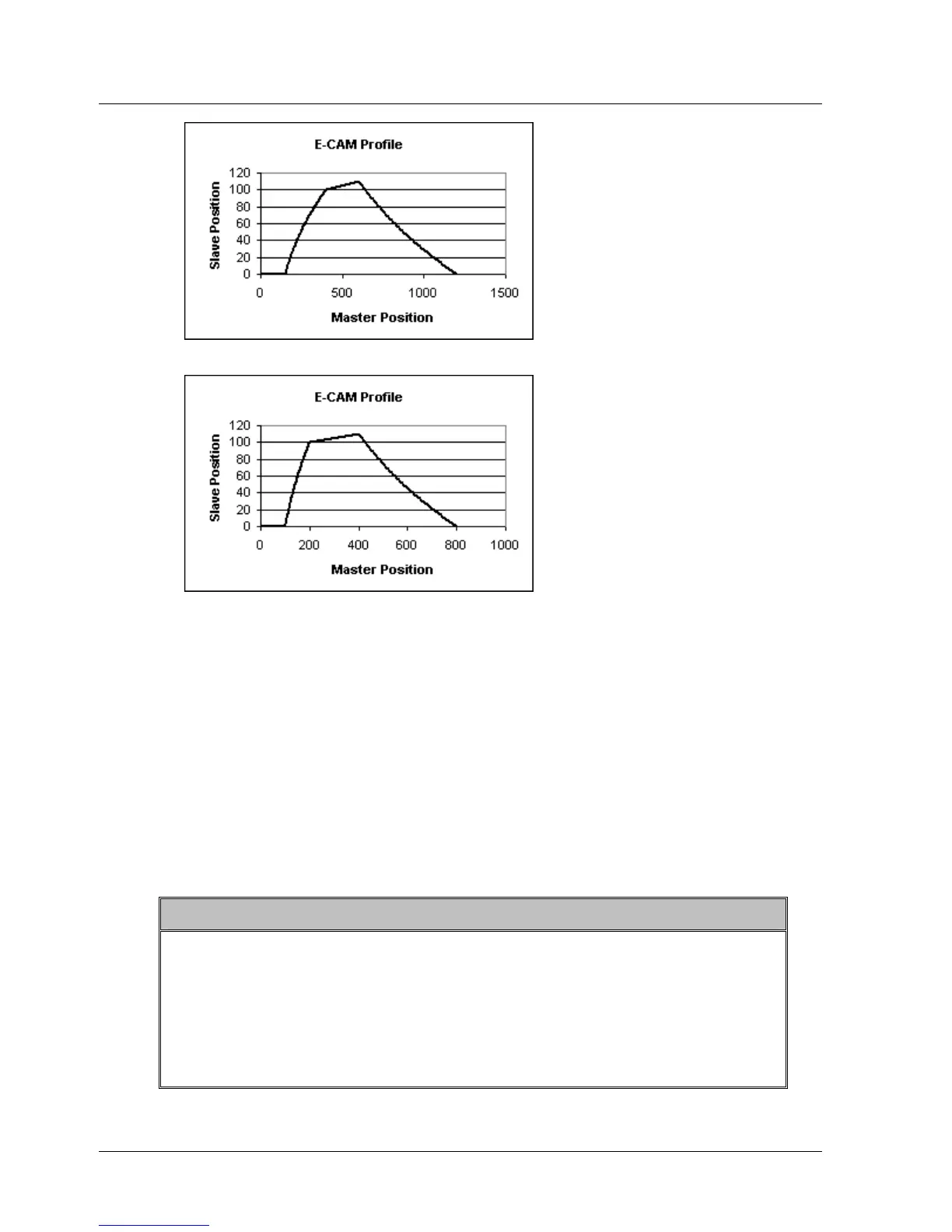
Figure 45: Sample Profile Before Adjustment
Figure 46: Sample Profile After Master Axis Scaling
Similarly, the profile can be stretched or compressed vertically by
multiplying the Slave scale by a fraction C/D. If C/D is larger than one, the
profile will be stretched. If C/D is less than one, the profile will be
contracted.
♦ C, the numerator, is defined by the variable ECAM_Slave_scale_num.
♦ D, the denominator, is defined by the variable ECAM_Slave_scale_den.
The scaling factors cannot by changed while ECAM is engaged.
¾ To apply scaling:
1. Set the variables ECAM_Master_scale_num, ECAM_Master_scale_den,
ECAM_Slave_scale_num and ECAM_Slave_scale_den using the SET_VAR
command.
Note:
When using a virtual axis, it is recommended that scaling only be
used to scale the graph down, that is, A/B and C/D should be set to
values lower than one. If a profile is stretched, a lack of sufficient
data points will result in a profile that is not smooth. When designing
a profile, you should therefore design it for the largest movements
that could possibly be required, so that it will only ever be necessary
to scale the profile down, not up.
64 XtraWare User Manual



 To Next Page