Operating the XtraDrive Using XtraWare
4.9.15.3. Offset
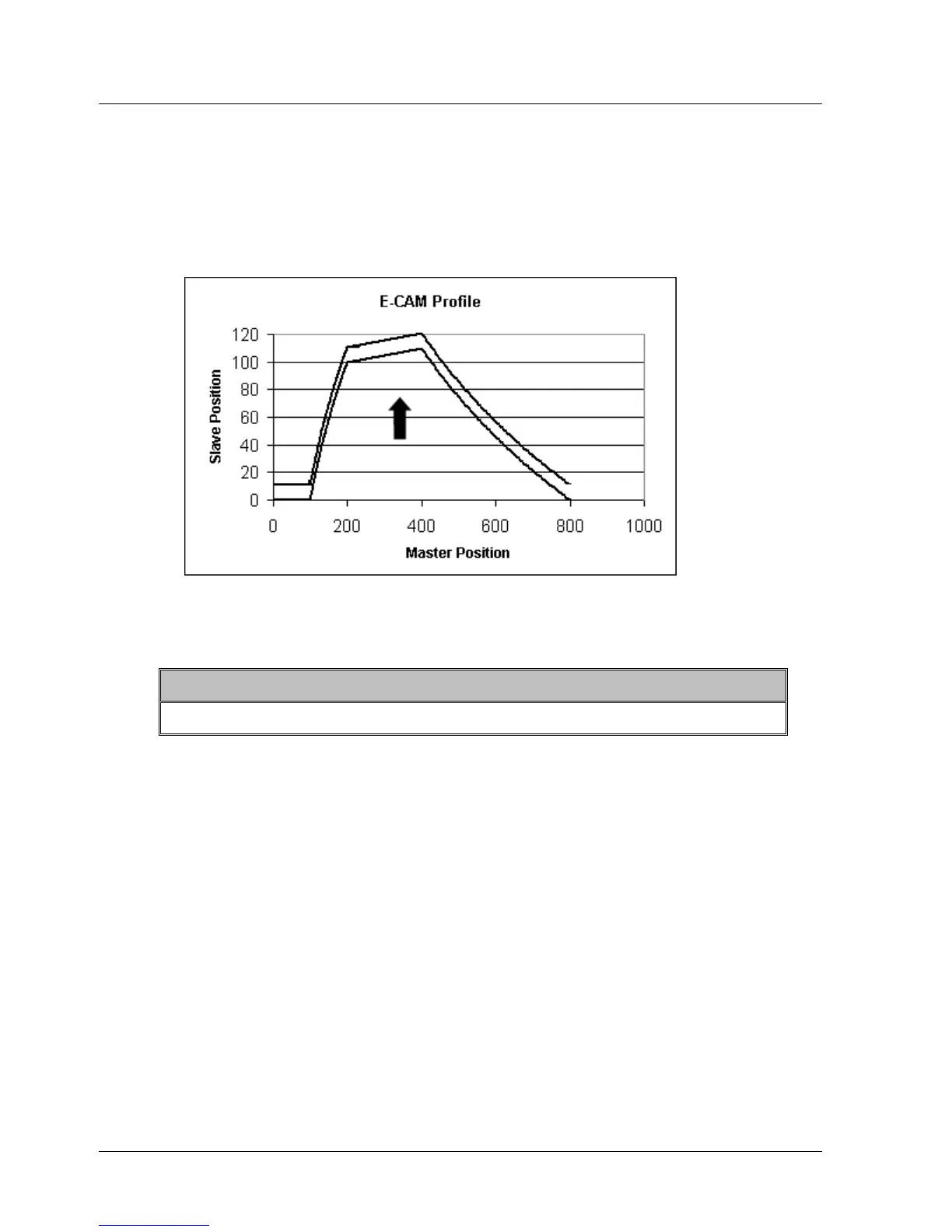
By applying an offset, you can shift a profile vertically. A positive offset
shifts the profile upward, increasing the slave position reached at each
master position. A negative offset shifts the profile downward, reducing the
slave position reached at each master position. The following graphic
illustrates a positive offset.
Figure 48: Illustration of the Application of a Positive Offset
¾ To apply an offset:
1. Set the value of the variable ECAM_Offset using the SET_VAR command.
Note:
The size of the offset is not affected by scaling the slave axis.
Both shifts and offsets can be applied during motion. This will usually result
in a sudden, jolting motion as the target slave position is adjusted instantly
across a discontinuity. When applying a shift before engaging ECAM motion,
ensuring that the profile is shifted to a point at which the slave position is
zero will ensure a smooth initial motion. Applying an offset will always result
in a sudden change to the target slave position.
When the application of a shift or offset does result in a sudden change to
the target slave position, the resulting motion will be constrained by the
maximum torque settings, not by the default profile settings. The maximum
torque settings in each direction are defined by the variables
Forward_Torque_Limit and Reverse_Torque_Limit. (Use the
TORQUE_LIMITS command to temporarily reduce those values.) Reducing
the limits will result in smoother motion at a discontinuity caused by a shift
or offset.
66 XtraWare User Manual



 To Next Page